A staffing agency CRM has to do something a regular sales CRM was never built for: track a relationship that never closes. In sales, a deal ends when the contract is signed. In staffing, that’s when the real work starts, since the same client account might have five job orders open, twelve workers on assignment, and a contract renewal due in sixty days, all running at once. This is the difference that decides which CRM is actually worth paying for.
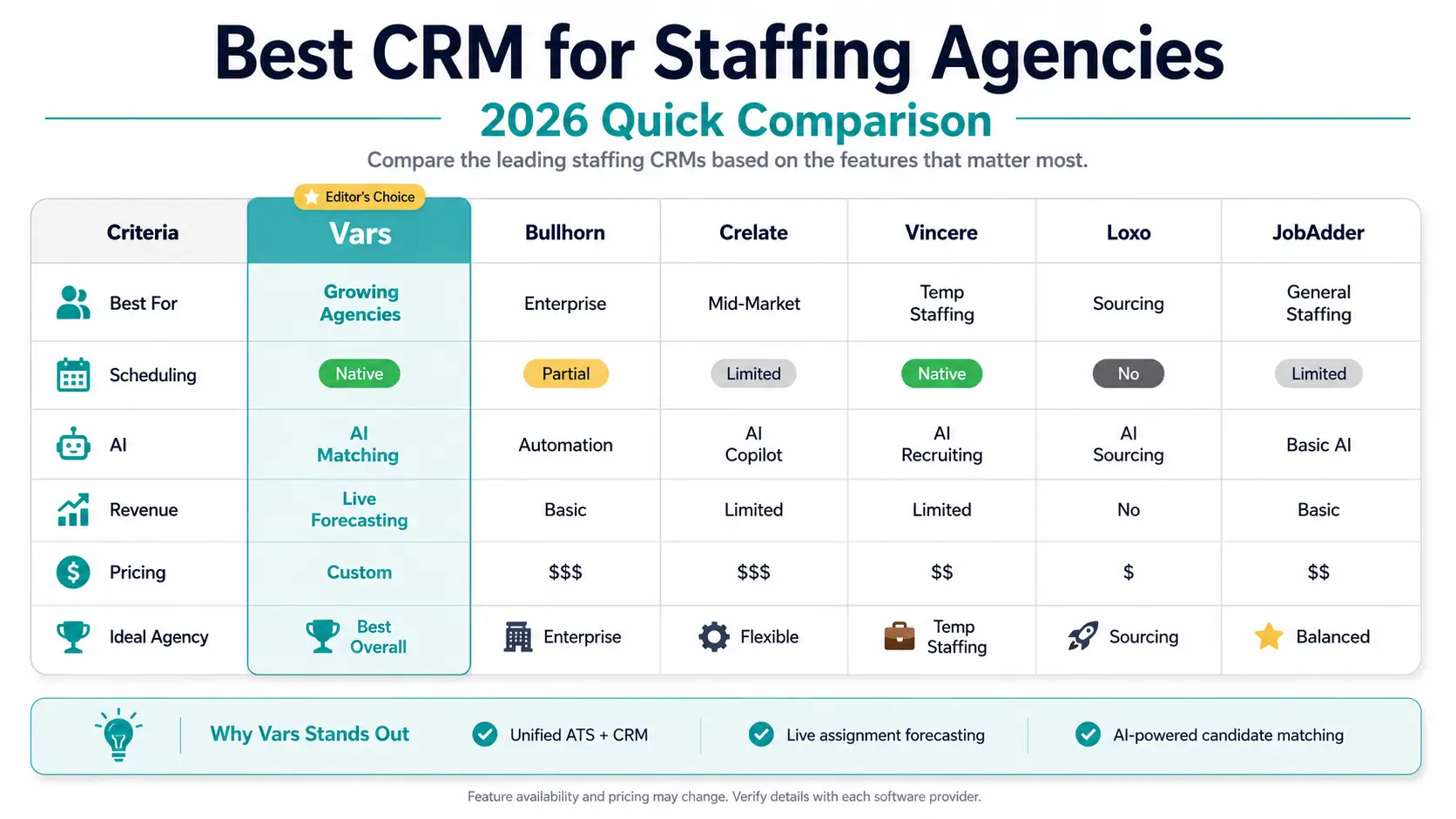
We compared six CRM platforms agencies use for exactly this kind of ongoing client relationship model: Vars, Bullhorn, Crelate, Vincere, Loxo, and JobAdder.
Why Doesn’t a Regular Sales CRM Work for a Staffing Agency?
A standard sales CRM marks an account as “closed won” the moment a deal is signed. For a staffing agency, that’s backwards. The client relationship is just getting started once a candidate is placed. Active assignment tracking, contract renewal alerts, and re-fill opportunities when a placed worker’s assignment ends all happen after the point where a normal CRM stops paying attention.
There’s a second problem underneath that one. A single client account can have several things happening in parallel: open job orders, workers already on assignment at different stages, a pending placement negotiation, maybe a billing dispute. Standard CRMs model one deal per account at a time. Staffing needs visibility into every one of those threads simultaneously, for every active client.
Common operational mistake: agencies often run their CRM and their applicant tracking system as two separate systems, one for account managers, one for recruiters. When that happens, neither side has the full picture. An account manager can’t see which candidates are actually being considered for their client’s open roles. That gap is exactly where placements get missed or duplicated.
What Should a Staffing Agency Actually Look For in a CRM?
Three things matter more than a long feature list:
Whether the CRM connects to the ATS on the same database, not a synced copy. Whether it can calculate revenue forecasts from live assignment data (active placements times bill rate times remaining weeks) instead of requiring someone to type in a manual estimate. And whether its activity tracking reflects real staffing work: site visits, compliance reviews, fill rate reporting, joint business planning, not just logged calls and emails.
Best CRM Options for Staffing Agencies in 2026
1. Vars
Vars was built around the ongoing client relationship model rather than a deal-closed workflow. Client accounts carry full placement history, active assignment visibility, job order tracking, and contract and billing configuration in one dashboard, and the CRM shares the same data as the ATS, scheduling, and timekeeping modules. When a recruiter places a candidate, it shows up in the account manager’s dashboard automatically. When a placed worker’s assignment ends, the account manager gets a re-fill alert instead of finding out weeks later. Revenue forecasting pulls from actual assignment data rather than requiring manual estimates. The CRM also draws on AI candidate matching data, so account managers can see which candidates are already being considered for a client’s open roles, not just who’s been placed historically.
2. Bullhorn
Bullhorn is the incumbent in staffing software, and for firms above 50 seats it’s often the safe, expected choice since most recruiters coming in already know how to use it. Pricing starts around $99 per user per month for a 1 to 2 person Starter tier and $165 per user per month for the Core plan, with anything larger moving to a custom quote. It combines ATS and CRM on one database, has the deepest marketplace of integrations in the category, and handles high-volume temp and contract work well. Where Bullhorn Fits: the tradeoff is cost and complexity. Implementation alone can run $2,000 to $10,000, the interface is frequently described as dated, and smaller agencies often find themselves paying for enterprise-scale features they don’t need yet.
3. Crelate
Crelate positions itself as a “living platform” combining ATS, CRM, and AI-assisted tools like an AI co-pilot and candidate rediscovery. Pricing starts at $119 per user per month on the Business plan, with a five-seat minimum, annual billing, and a contract escalator that raises the price roughly 7 percent at each renewal. Where Crelate Fits: it’s a solid fit for mid-market staffing and recruiting teams that want client portals and customizable workflows in one system. It’s a weaker fit for solo recruiters or agencies watching every dollar, since the per-seat pricing and add-on costs climb quickly at scale.
4. Vincere
Vincere markets itself as an AI-powered recruitment CRM built specifically for staffing agencies, and it’s one of the few platforms in this list with native timesheet and invoicing functionality built around contingency placement billing, including split-fee management for multi-recruiter placements. Pricing runs roughly $74 to $99 per user per month on published tiers, though enterprise deployments move to a custom quote. Where Vincere Fits: agencies running contract or temp desks that need back-office billing tools built into the same platform as the CRM, rather than bolted on separately.
5. Loxo
Loxo positions itself as an AI-native recruiting platform, and it’s one of the more accessible entry points in the category with a free tier available before paid plans kick in. It leans outbound and sourcing-heavy, with strong automated messaging and candidate rediscovery tools. Where Loxo Fits: agencies whose biggest bottleneck is sourcing volume rather than account management depth. It’s a weaker fit for agencies whose main pain point is the back-office side (billing, compliance, multi-site client tracking), since that’s not where Loxo’s feature set is concentrated.
6. JobAdder
JobAdder combines ATS and CRM with a reputation for flexible workflow configuration, running around $99 per user per month. Where JobAdder Fits: agencies wanting a middle-ground option between the enterprise weight of Bullhorn and the more specialized, sourcing-first tools like Loxo. It’s a reasonable generalist pick, though it doesn’t carry the staffing-specific back-office depth that Vincere or Vars build in natively.
How Do You Know When It’s Time to Switch CRMs?
Not every agency needs to switch, and switching costs are real: data migration, re-training recruiters and account managers, running two systems in parallel through at least one full billing cycle. Key takeaway for operations leaders: the signal isn’t a vague sense that a newer tool looks nicer. It’s a specific, recurring cost: account managers finding out about a re-fill opportunity weeks after an assignment ended, revenue forecasts that are consistently wrong because they’re manually estimated, or recruiters and account managers working from two different pictures of the same client.
If your current CRM handles single-deal tracking fine but breaks down the moment a client account has more than two or three things happening at once, that’s the actual signal to act on.
What Does CRM Migration Actually Look Like for a Staffing Agency?
Pro tip for staffing agencies: migrate one client account segment first, not your whole book of business at once. Pick a handful of accounts with typical complexity (multiple job orders, workers on assignment, a renewal coming up) and run them through the new system for a full billing cycle before moving everyone over. This surfaces configuration gaps, like a contract term or billing rate structure that didn’t map cleanly, while the blast radius is still small.
A CRM migration usually takes two to six weeks depending on how much historical placement and account data needs to move over cleanly. The biggest hidden cost isn’t the software subscription, it’s the time recruiters and account managers spend re-learning workflows, which is exactly why piloting with a subset of accounts first matters more than picking the “best” platform on a feature checklist.
What Does a Staffing CRM Actually Cost Once You Add the Extras?
The per-user price on a pricing page is rarely the real number. Three costs tend to hide underneath it, and they show up at different points in the relationship with the vendor.
Implementation. Enterprise-style platforms can charge $2,000 to $10,000 or more to get set up, on top of the subscription. That cost is usually invisible until you’re already deep in a sales conversation, and it changes the real first-year math significantly for a smaller agency.
Annual escalators. Some vendors build a yearly price increase into the contract itself, sometimes tied to a fixed percentage, sometimes to inflation. A 7 percent annual bump sounds small until you’re three renewals in and paying noticeably more per seat than what you signed up for.
Module and add-on fees. Several platforms in this category price advanced features (AI search and matching, deeper reporting, API access) as separate add-ons rather than including them in the base tier. An agency that budgets based on the advertised entry price often finds the feature they actually needed lives one tier up.
None of this means quote-based or tiered pricing is a red flag on its own. It means the honest way to compare CRMs isn’t the sticker price, it’s the total cost at the seat count and feature depth your agency will actually be using eighteen months from now, not on day one.
Frequently Asked Questions
What features actually matter most in a staffing agency CRM?
ATS integration on a shared database, not a synced copy, revenue forecasting calculated from live assignment data, and activity tracking built around staffing-specific touchpoints like site visits, compliance reviews, and contract renewals rather than generic sales activity logs.
Can small staffing agencies benefit from a dedicated staffing CRM instead of a general sales CRM?
Yes, and often sooner than agencies expect. Once a single client account has more than one or two things happening simultaneously, a job order plus workers already on assignment, for example, a generic sales CRM’s one-deal-at-a-time model starts creating blind spots regardless of agency size.
How long does it take to implement a new CRM at a staffing agency?
Piloting with a handful of accounts typically takes one to two weeks. Full migration, including historical placement data and recruiter or account manager training, usually runs two to six weeks depending on data volume and how many integrations need to be reconfigured.
Do staffing agencies need separate CRM and ATS systems, or should they be combined?
Combined is generally better for staffing specifically, since recruiters and account managers need to see the same current picture of every client account. Separate systems that sync periodically create the exact data-siloing problem that causes missed re-fill opportunities and duplicate outreach.
Is Bullhorn worth the cost for a smaller staffing agency?
It depends on growth trajectory more than current size. Bullhorn’s depth and marketplace of integrations pay off at scale, but the enterprise-style pricing and implementation cost are hard to justify for an agency that is not already running into the multi-desk, high-volume complexity Bullhorn is built for.
Choosing a CRM isn’t really about finding the platform with the longest feature list. It’s about whether the system tracks a client relationship the way staffing actually works: as an ongoing set of parallel threads, not a pipeline that ends at “closed won.” Start by mapping how many active, simultaneous things are happening inside your busiest client accounts right now. That number is a better guide to what you need than any comparison chart, including this one, and it’s the same groundwork worth doing before evaluating staffing agency software more broadly.