A labor management system (LMS) is software that coordinates the day-to-day operation of a workforce: scheduling shifts, tracking time, monitoring attendance, and feeding approved hours into payroll. For a staffing agency, that definition gets more complicated fast, because the “workforce” isn’t one group of employees. It’s hundreds of temporary workers spread across dozens of client sites, each with different pay rates, compliance rules, and coverage requirements.
This guide breaks down what a labor management system actually does, why single-employer LMS tools usually fall short for staffing operations, and what to look for if you’re evaluating one in 2026.
What Does a Labor Management System Actually Do?
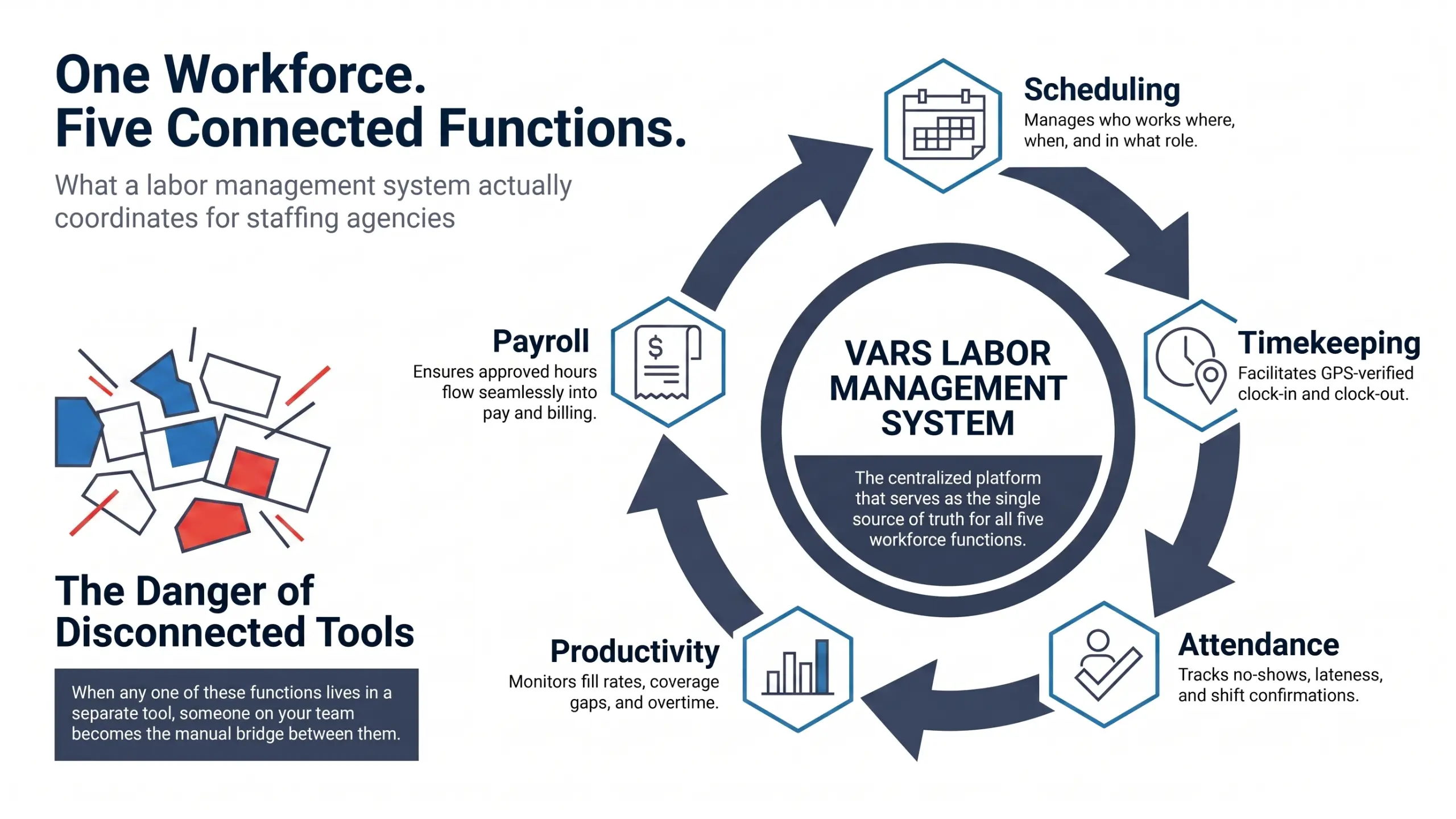
At its core, a labor management system handles five connected functions:
- Scheduling — who works where, when, and in what role
- Timekeeping — clock-in and clock-out data, usually GPS-verified for field or site-based work
- Attendance management — tracking no-shows, lateness, and shift confirmations
- Productivity monitoring — fill rates, coverage gaps, overtime exposure
- Payroll integration — approved hours flowing into pay runs and client invoices without manual re-entry
Key takeaway for operations leaders: an LMS isn’t just a scheduling calendar. It’s the connective tissue between “a shift was booked” and “a worker got paid and a client got billed correctly.” When any one of those five functions lives in a separate tool, someone on your team becomes the manual bridge between them.
Why Do Staffing Agencies Need a Different Kind of LMS?
See how Vars covers this for your agency
Scheduling, credentialing, and payroll in one platform.
Most labor management systems were built for a single employer managing its own staff. That model assumes one set of pay rules, one compliance standard, and one location (or a small number of them).
Staffing agencies don’t operate that way. A mid-size agency might be running:
- 40 client accounts, each with different bill rates and shift rules
- Workers who float between multiple clients in the same week
- Compliance requirements that differ by client, certification and background check tracking required at Client A, faster turnaround required at Client B
- Payroll that has to reconcile against dozens of separate invoicing schedules
Agencies also managing outside contractor pools alongside direct placements often pair this with a vendor management system.
Common operational mistake: agencies try to force a single-employer HRMS or a basic scheduling app to do this, then patch the gaps with spreadsheets. It works until the agency scales past a certain headcount, at which point reconciliation errors and missed coverage gaps start showing up in client relationships.
How Do Staffing Agencies Manage Scheduling and Timekeeping Without an LMS?
In practice, most agencies without a dedicated LMS run scheduling in one system and timekeeping in another, sometimes a third for payroll. That creates a few predictable problems:
| Problem | What It Looks Like Day-to-Day |
|---|---|
| Scheduling-timekeeping gap | Scheduled hours and worked hours live in separate data sets, reconciled manually each pay period |
| Delayed coverage visibility | Account managers find out about a no-show when the client calls, not before |
| Delayed labor cost visibility | Cost overruns show up in weekly or monthly payroll reports, after they’ve already happened |
| No workforce analytics | No clear view of which accounts have chronic fill-rate problems or which workers have high no-show rates |
Pro tip for staffing agencies: if your account managers are finding out about coverage gaps from client phone calls rather than from your own system, that’s usually a sign scheduling and timekeeping aren’t actually connected, even if they’re technically both “in the software.”
What Should You Look For in a Staffing-Specific Labor Management System?
If you’re evaluating LMS options in 2026, a few capabilities matter more than others for staffing operations specifically:
Multi-client scheduling in one view. You should be able to see and schedule across every client account from a single dashboard, not toggle between per-client instances.
GPS-verified attendance without hardware requirements. Field and site-based staffing doesn’t have badge readers at every client location. Mobile clock-in with location verification solves this without asking clients to install hardware.
Real-time labor cost tracking by account. Waiting for a payroll report to find out an account is running over budget means the overrun already happened. Cost accrual needs to be visible as shifts are worked, broken out by client.
Native payroll and billing integration. This is where a lot of agencies lose time. If approved timesheets have to be exported and re-entered into a separate payroll system, that manual step is where errors creep in, wrong rates, missed overtime, billing discrepancies.
Compliance gating at the scheduling step, not after. A worker whose certification lapsed shouldn’t be schedulable for a client that requires it. Catching that after the shift is worked is too late.
This is roughly the operational gap the Vars labor management system was built around: multi-client scheduling, GPS attendance tracking, real-time labor cost visibility by account, and payroll integration that runs off the same approved timesheet data rather than a separate export step. What usually breaks at scale isn’t any one of these features individually, it’s the handoffs between them when they live in different tools.
Is a Labor Management System Enough on Its Own?
Software alone doesn’t fix workforce management problems if the underlying process is broken. A few things worth being honest about:
- If your scheduling process itself is inconsistent (different account managers using different criteria to fill shifts), an LMS will surface that inconsistency faster, not eliminate it automatically.
- Compliance gating in software only works if your compliance data is accurate and current. Garbage in, garbage out still applies.
- Real-time visibility is only useful if someone on your team is actually acting on the alerts, a dashboard showing a coverage gap doesn’t fill the shift by itself.
Key takeaway for operations leaders: an LMS gives you the visibility and the connective infrastructure. Your team still needs a defined process for what happens when a gap, an overtime flag, or a compliance mismatch shows up.
Agencies weighing this against a broader staffing management software platform should map their process gaps first.
What to Fix First When Adopting a Labor Management System
For agencies moving off spreadsheets or disconnected tools, the sequence usually matters:
- Map your current handoffs first — where does scheduling data currently move to timekeeping, and where does timekeeping move to payroll? Identify every manual step.
- Fix compliance data before turning on gating rules — if certification records are outdated, gating will block workers incorrectly.
- Roll out GPS attendance tracking before real-time cost tracking — cost tracking depends on accurate clock-in data, so get that reliable first.
- Layer in analytics last — fill-rate and no-show reporting is only useful once you have a few pay cycles of clean data to look at.
Trying to turn everything on at once is a common reason LMS rollouts stall.
FAQ: Labor Management System for Staffing Agencies
What is a labor management system?
It’s software that manages the operational lifecycle of a workforce, scheduling, timekeeping, attendance, productivity monitoring, and payroll integration. For staffing agencies, it manages all of this across multiple client accounts at once.
How is a labor management system different from an ATS?
An applicant tracking system (ATS) handles recruiting and hiring, sourcing, screening, and placing candidates. An LMS takes over after placement, managing the scheduling and attendance of workers who are already on assignment.
Do small staffing agencies need a labor management system, or is it only for large operations?
Even smaller agencies benefit once they’re juggling more than a handful of client accounts with different rate structures. The complexity that an LMS solves (reconciling scheduling, time, and billing across accounts) shows up earlier than most owners expect.
How long does it take to implement a labor management system?
It depends heavily on how clean your existing compliance and worker data is. Agencies with organized records can be live on scheduling and timekeeping within a few weeks; full payroll and analytics integration typically takes longer.
Does a labor management system replace payroll software?
Not necessarily. It integrates with payroll processing, feeding approved hours directly into pay runs, but the payroll calculation itself may still run through a dedicated payroll module or provider depending on your setup.
What is a warehouse labor management system?
It’s the same core functions (scheduling, timekeeping, productivity tracking, cost tracking) applied to warehouse staffing and distribution environments, often needing bulk scheduling for large worker pools and offline-capable timekeeping for facilities with poor connectivity.
Next Step
If you’re not sure whether your current setup qualifies as a real labor management system or just a collection of connected tools, start by mapping one week of your scheduling-to-payroll process end to end. Note every place data has to be manually re-entered or reconciled. That map will tell you exactly where an LMS would remove the most friction first, or book a walkthrough to see where an LMS would remove friction fastest.