If you run a daycare or childcare operation and you’ve typed “childcare management software” into Google, you’ve probably landed on ten different tools that all promise to do the same thing: attendance, billing, parent messaging, ratios, compliance. Some of them do. Most do it partially. Almost none of them touch the part that actually breaks first at scale, which is staffing the center itself.
This guide breaks down the full category honestly: what childcare management software actually covers, where the category splits into child-facing tools and staff-facing tools, how much it typically costs, what implementation really looks like, and how to figure out which side of that split your center is actually missing. It’s long on purpose; this is the hub for a full cluster of supporting articles, and we’d rather you leave with a complete picture than a marketing summary.
What does childcare management software actually cover?
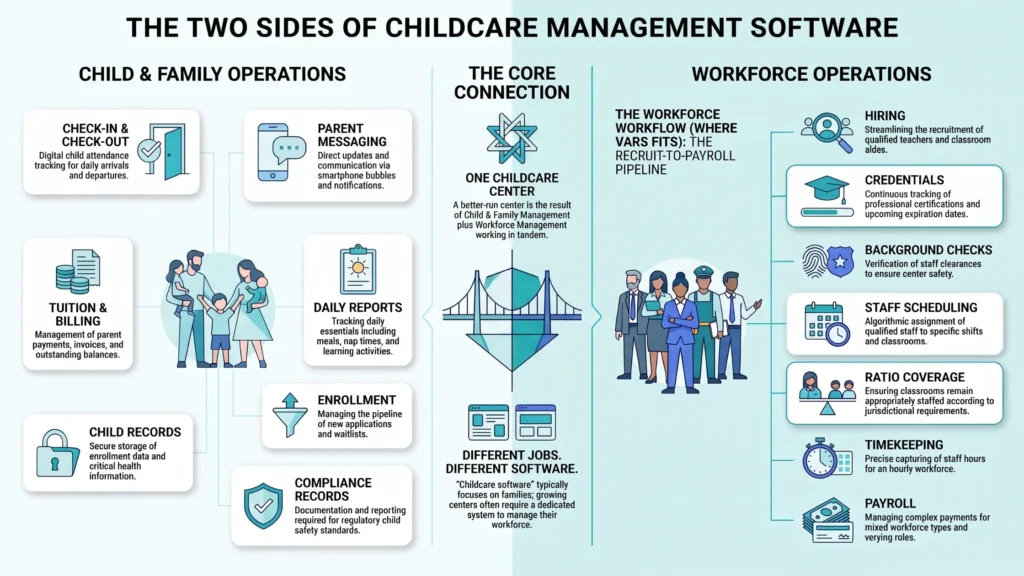
Most software marketed under this label is built for the child and family side of running a center: digital check-in/check-out, tuition billing, parent messaging apps, daily reports (naps, meals, diaper changes), and enrollment/waitlist management. Brightwheel, Procare, and Lillio are the names you’ll see most often in this lane, and we cover each of them in the cluster posts linked below.
What that category almost never covers is the staff side: hiring qualified teachers and aides fast enough to keep ratios legal, scheduling around ratio requirements and last-minute call-outs, tracking credentials and background checks before someone’s cleared to be alone with a room of toddlers, and running payroll across full-time, part-time, and substitute staff without three spreadsheets fighting each other.
Key takeaway: “Childcare software” is really two different product categories wearing one label. Most centers eventually need both: one for the children and parents, one for the workforce.
Why does the market talk about this as one category when it’s really two?
See how Vars covers this for your agency
Scheduling, credentialing, and payroll in one platform.
Search demand shapes vendor marketing more than actual product architecture does. Parents and directors both type “childcare software” or “daycare software” into Google, so vendors, including ones with only child-facing features, optimize their homepages around that exact phrase. The result is a crowded, confusing market where two products with the same label can solve completely different problems.
This isn’t a criticism of any specific vendor. It’s simply how SEO-driven markets tend to consolidate around the highest-volume search term, even when the underlying products diverge. The practical implication for buyers: don’t assume that because two tools are both called “childcare management software,” they’re interchangeable. Read the feature list, not the category label.
Daycare software vs. daycare management software vs. childcare management app: is there a difference?
In practice, these three terms are used almost interchangeably in search, but they carry slightly different connotations worth knowing before you evaluate anything:
| Term | Usually means | Typical buyer |
|---|---|---|
| Daycare software | General category term; often the broadest child/parent-facing toolset | Single-site owner-operator |
| Daycare management software | Same category, framed around operations and admin (billing, enrollment, reporting) | Directors managing licensing and compliance |
| Childcare management app | Mobile-first framing of the same category, emphasizing parent communication | Parents and on-the-floor staff |
We break each of these down in more depth in the cluster posts linked throughout this guide; start with What Is Daycare Software? if you want the plain-language definition first, or Daycare Center Software vs. Childcare Management Software if you’re trying to reconcile conflicting vendor terminology mid-evaluation.
What does implementation of childcare management software actually look like?
Most centers underestimate how much change management is involved in a software switch, not because the software is complicated, but because it touches every staff member’s daily routine at once. A realistic implementation timeline runs through several distinct phases:
- Data migration (1-3 weeks): moving enrollment records, billing history, and compliance documentation from your old system or paper files
- Staff training (1-2 weeks, often overlapping): front-desk staff need to be comfortable with check-in/check-out before go-live day
- Parent rollout (ongoing): getting families to actually download and use the parent app takes longer than most directors expect, often 4-6 weeks to reach full adoption
- Parallel run (optional but recommended): running the old and new system side by side for a billing cycle catches errors before they become parent-facing problems
Common operational mistake: Going live with a new childcare management platform mid-month, in the middle of a billing cycle. Most experienced implementers recommend starting on the first of a new billing period specifically to avoid reconciliation headaches.
What does childcare management software typically cost?
Pricing varies significantly by vendor, center size, and feature tier, but three common pricing models show up across the market: flat monthly fees (predictable, but can overcharge smaller centers), per-child pricing (scales with enrollment, which is fair but means costs grow with success), and per-location licensing for multi-site operators. Free tiers exist for very small or home-based operations but typically cap child count and drop compliance-reporting features that larger centers rely on.
A pattern worth watching for during vendor conversations: staffing and scheduling features, when they exist at all, are frequently gated behind a higher pricing tier or sold as a separate add-on module, which is itself a signal that the vendor treats staffing as secondary to their core child-facing product.
How do you choose the right daycare management software?
Whether you call it a daycare management system, daycare management software, or childcare software, the evaluation process is the same. Before comparing vendors, separate your requirements into the two buckets from above. A center evaluating tools should ask, at minimum:
- Does this tool handle licensing-required recordkeeping (ratios, immunization records, incident reports)?
- Does it integrate with or replace how we currently run payroll for staff?
- Can parents self-serve (check-in, billing, messaging) without staff manually relaying information?
- Is there a mobile app, and does it work for both parents and floor staff, or just one side?
- What happens to our data if we switch providers later?
Pro tip for staffing agencies: If your center (or the agency staffing it) is spending more hours per week on finding and scheduling qualified staff than on parent communication, you’re evaluating the wrong half of the category. Start with the workforce side.
What mistakes do centers most commonly make when buying childcare software?
In real implementations, we see the same handful of mistakes repeat across centers of very different sizes. The first is buying based on a feature checklist rather than an actual workflow test. A platform can check every box on paper and still fail the moment your specific billing cycle or staffing pattern runs through it. The second is treating staffing as an afterthought, assuming the vendor’s basic shift calendar will scale, only to discover months later that it can’t handle ratio requirements or credential tracking. The third is underestimating the parent-adoption curve: a beautifully designed app is only useful once parents actually download and use it, and that rollout takes real project management, not just a launch email.
Where does a workforce platform like Vars fit into daycare operations?
Vars is not daycare management software, and we won’t pretend otherwise; we don’t do child check-in, tuition billing, or parent messaging. What Vars does is the layer underneath that: the staffing and workforce operations that keep a childcare center legally staffed and running.
In real implementations, the biggest operational bottleneck for growing childcare operations usually isn’t the parent-facing app; it’s getting qualified staff hired, credentialed, scheduled around ratio requirements, and paid correctly across multiple locations. One operations lead at a multi-site childcare network told us their biggest weekly time sink wasn’t attendance tracking at all; it was manually re-checking who was certified to cover an infant room on short notice, cross-referencing three different spreadsheets to confirm a substitute’s background check hadn’t expired.
That’s the layer Vars sits in: applicant tracking for hiring teachers and aides faster, scheduling that respects ratio and credential requirements, background-check and credential tracking, and payroll that handles a mixed full-time/part-time/substitute workforce without manual reconciliation. If your center or agency runs on a spreadsheet for any of that, it’s worth a look at how a dedicated staffing and scheduling platform handles it instead.
What’s next in this guide?
This hub links out to the full cluster below. If you’re just getting oriented, start with the definitions; if you’re actively evaluating tools, jump to the buyer’s guide and features checklist.
- What Is Daycare Software? Features, Benefits & How It Works
- What Is Daycare Management Software? A Complete Breakdown
- Childcare Management App: What It Is and Why Daycares Use One
- How to Choose the Right Daycare Management Software (2026 Checklist)
- Daycare Center Software vs. Childcare Management Software: What’s the Difference
- Daycare Software Features Every Center Should Look For
- Daycare Software Programs Explained: Types, Pricing & Picks for 2026
- Software for Daycare Centers: A Buyer’s Guide
- Daycare Software Systems 101: Cloud, On-Premise & Mobile Explained
- Childcare Software for Daycares: Do You Actually Need One?
How do you know if your center is ready to invest in a full platform?
Readiness has less to do with center size than with how much time your current process is costing you. A useful gut-check: track, for one representative week, how many hours across your team go toward billing follow-ups, compliance paperwork, parent phone calls that a daily report would replace, and manual staff scheduling. If that number is under two or three hours a week, a full platform may be premature. If it’s climbing into double digits, the case for investing writes itself.
Readiness also shows up in growth signals: adding a second room, a second location, or crossing roughly 15-20 staff members are all points where manual coordination that worked fine at a smaller scale starts to visibly strain. Centers that wait until the strain becomes a parent-facing or licensing problem tend to have a harder, more rushed implementation than centers that act on the earlier warning signs.
What does a realistic 12-month cost of ownership look like?
The subscription price is only part of the real cost. A fuller picture includes onboarding and setup fees (sometimes waived, sometimes not), staff training time valued at actual wages, the productivity dip during the first month of parent adoption, and any add-on modules you’ll likely need once you’re using the core product day-to-day: multi-location reporting, advanced compliance exports, or a staffing module, for instance.
Centers that budget only the advertised monthly price are frequently surprised by the real first-year total once these factors are included. Asking a vendor directly for a full first-year cost estimate, not just the base subscription, is a reasonable and increasingly common request during the sales process.
How should a staffing agency supplying childcare workers think about this differently?
If you’re a nanny or childcare staffing agency rather than a center itself, the calculus shifts. Your clients, the daycare centers and families you place workers with, are the ones evaluating and buying daycare management software; your business’s software needs sit entirely on the workforce side: sourcing, vetting, credentialing, scheduling placements, and paying your workers correctly. You’re generally not a buyer for daycare management software at all, but you are exactly the audience for a platform like Vars.
This is worth stating plainly because search demand around “childcare management software” pulls in both audiences: center operators and staffing agencies, even though their actual purchasing needs diverge almost completely once you get past the shared keyword.
What role does staff turnover play in the software-buying decision?
Childcare has one of the higher staff turnover rates of any service industry — industry research puts annual turnover at 26-40%, well above most other service sectors (source) — and this shapes software needs on both sides of the category more than buyers often anticipate. On the parent-facing side, high turnover means new staff need to get comfortable with the daycare software quickly, which argues for prioritizing ease of use over depth of features during evaluation. On the workforce side, high turnover is precisely the problem a dedicated staffing platform is built to absorb: faster hiring cycles, quicker credential verification for new hires, and scheduling tools flexible enough to absorb frequent staff changes without the whole schedule collapsing.
Centers with especially high turnover often the case in markets with a tight labor supply for qualified childcare workers tend to see the workforce side of this guide as considerably more urgent than the parent-facing side, since a functioning classroom depends on having enough qualified, credentialed staff present before parent communication quality becomes the next priority.
How does this guide’s advice change for a franchise or multi-brand operator?
Franchise operators face an additional wrinkle: software decisions are sometimes made at the corporate or franchisor level rather than by individual location owners, which can limit flexibility on the child-facing side even when a specific location’s needs diverge from the standard platform. Staffing, by contrast, is more commonly left to individual location or regional management, which makes the workforce side of this guide often the more actionable starting point for a franchise location owner evaluating what’s actually within their control to improve.
How does this guide apply if you’re evaluating software for a brand-new center that hasn’t opened yet?
Pre-opening centers face a slightly different sequencing problem than established ones: you’re setting up enrollment and billing systems before you have real operational data to test against, and you’re often hiring your founding staff at the same time. In this situation, it’s worth deliberately choosing the staffing side of your evaluation first, since a strong founding team affects everything downstream, including how smoothly the parent-facing software rollout goes once children are actually enrolled. Centers that lock in daycare management software before their hiring and staffing process is solid often find themselves reconfiguring both systems simultaneously during an already chaotic opening period.
If this describes your situation, Vars can support the hiring and onboarding side well before your first day of enrollment, so that piece is stable by the time daycare software adoption becomes the priority.
What’s a reasonable way to sequence software decisions if budget only allows one purchase this year?
Most centers can’t buy everything at once, and sequencing matters. If forced to choose, resolve whichever gap carries compliance or safety risk first, typically the staffing side, since an under-ratio classroom is a licensing problem in a way that a slower parent app rollout usually isn’t. A center that stabilizes staffing first often finds the parent-facing software decision easier and less urgent the following year, since a well-staffed, well-run classroom naturally generates fewer parent complaints in the first place, regardless of which app is or isn’t in place yet.
Frequently Asked Questions
Should a brand-new, not-yet-opened center prioritize staffing or daycare software first?
u003cpu003eGenerally, staffing a strong founding team affects how smoothly the parent-facing software rollout goes once children are actually enrolled.u003c/pu003e
How does staff turnover affect which software category to prioritize?
u003cpu003eHigh turnover generally argues for prioritizing the workforce/staffing side first, since fast hiring and credentialing directly address the root problem, while parent-facing software doesn’t.u003c/pu003e
Do franchise operators have less flexibility in software decisions?
u003cpu003eOften on the parent-facing side, where corporate may standardize the platform, but staffing decisions are more commonly left to individual location management.u003c/pu003e
Is childcare management software the same as daycare management software?
u003cpu003eLargely yes; the terms are used interchangeably in most search and marketing contexts. Both usually refer to child/parent-facing tools for attendance, billing, and communication rather than staffing tools.u003c/pu003e
Does daycare software include staff scheduling?
u003cpu003eRarely, and when it does, it’s usually basic shift assignment rather than ratio-aware scheduling, credential tracking, or payroll. Most centers need a separate workforce tool for that layer.u003c/pu003e
What’s the biggest gap in most childcare management software?
u003cpu003eThe staffing and workforce side: hiring, credential tracking, ratio-compliant scheduling, and payroll across mixed employment types. Almost every major child-facing tool leaves this to spreadsheets or a separate system.u003c/pu003e
Do small, single-site daycares need both categories of software?
u003cpu003eNot always at first. A single small center can often manage staffing manually. The need for a dedicated workforce tool usually shows up once a center adds locations, substitutes, or grows past a handful of staff.u003c/pu003e
How long does it take to implement childcare management software?
u003cpu003eData migration and staff training typically take 2-4 weeks combined, but full parent adoption of a new app often takes 4-6 weeks longer. Budget 6-10 weeks for a smooth, fully adopted rollout.u003c/pu003e
Are staffing features ever included in childcare management software pricing?
u003cpu003eOccasionally as a basic add-on at a higher tier, but rarely with the depth (ratio logic, credential alerts, payroll) that growing centers eventually need.u003c/pu003e
Conclusion
If you’re early in evaluating options, start with the definitions in this cluster. If you already know your center’s real bottleneck is staffing rather than parent communication, the fastest next step is a straightforward one: map how many hours per week your team spends on hiring, scheduling, or payroll for childcare staff, then book a demo to see whether that time can come back.