Comparing daycare software platforms comes down to five questions: what does it handle well, what does it leave to you, how does it fit your current workflow, what does it cost at your actual size, and what happens to your data if you switch later. Here’s how to work through each one without getting lost in feature lists.
Why do feature lists fail as a comparison method?
Every vendor’s marketing page lists roughly the same features: check-in, billing, messaging, compliance reporting. A checklist comparison at that level of detail will show near-identical results across most serious vendors, because everyone knows what belongs on the list. What a feature checklist can’t tell you is the depth: whether “compliance reporting” means a generic PDF export or a report formatted specifically for your state’s licensing requirements, or whether “billing” means basic invoicing or genuinely handles subsidy programs and split payments cleanly.
What should you test first during a daycare software demo?
See how Vars covers this for your agency
Scheduling, credentialing, and payroll in one platform.
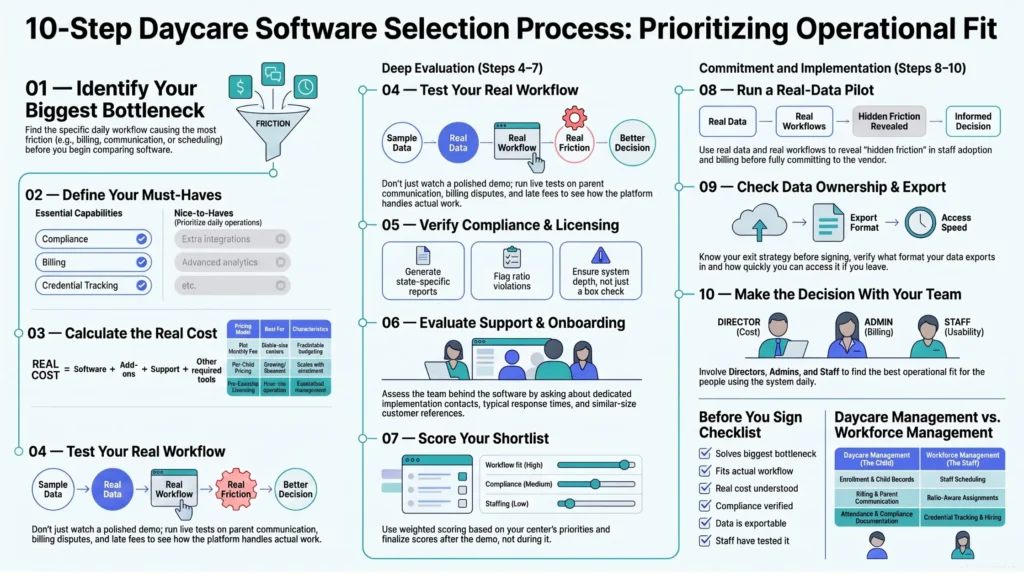
Don’t start with the feature list; start with your center’s actual daily bottleneck. If it’s parent communication, test the messaging and daily-report flow live. If it’s billing disputes, test how the platform handles partial payments, subsidies, and late fees. A demo built around your real workflow reveals more in 15 minutes than a full feature comparison chart.
How do you compare pricing across daycare software programs?
| Pricing model | Works best for | Watch out for |
|---|---|---|
| Flat monthly fee | Predictable-size centers | Overpaying if under capacity |
| Per-child pricing | Growing or seasonal enrollment | Costs scale with success |
| Per-location licensing | Multi-site operators | Add-on fees for cross-site reporting |
Common operational mistake: Comparing sticker price alone without checking whether staff scheduling, payroll, or credential tracking are separate add-ons or missing entirely. Ask this explicitly before signing.
What questions should you ask about compliance and licensing features?
- Can it generate the exact reports your state licensing agency requires?
- Does it track credential and certification expiration dates automatically?
- Can it store incident reports and immunization records in a licensing-audit-ready format?
- Does it flag ratio violations before they happen, or only report them after?
How should you weigh vendor support and onboarding quality?
Support quality is one of the hardest things to evaluate from a demo, because sales teams are naturally more responsive than support teams handling live tickets. Ask specifically about onboarding: is there a dedicated implementation contact, or a general support queue? What’s the typical response time for a billing error during a live pay period? Request references from centers of a similar size to yours, not just the vendor’s flagship customers, since a platform that works well for a 300-child network may behave very differently for a 40-child single site.
What should a scoring framework for your shortlist look like?
Rather than an unweighted checklist, assign relative importance to each category based on your center’s actual pain points. A center struggling with billing errors should weight billing accuracy and subsidy handling heavily; a center preparing for a licensing renewal should weight compliance reporting depth. Score each shortlisted vendor 1-5 in each weighted category after the demo, not during it. First impressions during a polished sales demo are notoriously unreliable predictors of real-world performance.
How do you evaluate the staffing side, separately from the child-facing side?
Most daycare software comparisons stop at parent-facing features and never test the staffing module seriously. Pro tip for staffing agencies and multi-site operators: ask the vendor directly whether their scheduling tool understands ratio requirements by room and age group, and whether it integrates with payroll. Most will admit it doesn’t, because that’s not what the product is built for.
That gap is exactly where a dedicated platform like Vars comes in: scheduling built around ratio and credential requirements, plus payroll and hiring for the workforce running the center. It’s worth evaluating separately from your daycare software choice rather than treating it as a checkbox on the same list.
What should the final decision process look like?
Once you’ve narrowed to two or three finalists, run a short pilot if the vendor allows it; even a two-week trial with real (not sample) data surfaces friction that a demo won’t. Involve the staff who’ll use the system daily in this final stage, not just leadership, since adoption problems after signing are far more expensive to fix than choosing carefully up front.
How should you evaluate vendor financial stability and longevity?
Migrating years of enrollment, billing, and compliance data to a new platform is disruptive enough that you want reasonable confidence the vendor will still exist in three to five years. Ask how long the company has operated, whether they’re independently profitable or venture-funded (and if funded, at what stage), and what happens to your data and access if the company were acquired or shut down. This isn’t a comfortable question to ask a sales rep, but it’s a fair and increasingly common one in SaaS purchasing generally, and a serious vendor should have a ready answer.
What should you ask about data ownership and export before signing?
Get explicit written confirmation of what data you can export, in what format, and how quickly, if you ever need to switch vendors. Some platforms make this straightforward with a self-service export tool; others require a support ticket and can take weeks. This single term, more than almost any feature comparison, determines how much leverage you retain after signing a vendor confident in their product usually has no issue committing to easy data portability in writing.
How should you structure vendor reference calls to get honest answers?
Vendor-supplied references are, understandably, generally satisfied customers; that’s who agrees to take the call. Get more honest signal by asking specific, pointed questions rather than open-ended ones: “What’s the one thing you’d change about this platform if you could?” or “Describe a time support didn’t resolve an issue as quickly as you needed.” Most reference customers will answer honestly once asked directly, even if they wouldn’t volunteer criticism unprompted.
What should you do if your shortlisted vendors all seem similar?
When a shortlist converges on largely similar feature sets and pricing, the deciding factor often becomes something outside the feature comparison entirely: implementation support quality, contract flexibility, or simply which team was most responsive and transparent throughout your evaluation process. That responsiveness during the sales process is itself a reasonably good predictor of what post-sale support will feel like, since it reflects how the company treats prospects who haven’t yet signed a contract.
How should you handle disagreement among decision-makers during the evaluation?
It’s common for a director, owner, and lead teachers to weigh priorities differently; a director may prioritize compliance reporting depth, while floor staff cares more about how quickly daily reports can be logged during a busy morning. Rather than letting this disagreement stall the decision, structure the evaluation so each stakeholder group scores the shortlist against the criteria that matter most to their role, then weight those scores according to how much each group’s daily experience should influence the final call. This produces a more defensible decision than a single decision-maker choosing in isolation, and it also builds early buy-in that helps adoption after the switch.
What’s a reasonable timeline to budget for the entire selection process, start to finish?
For a single-site center, budget roughly four to six weeks from initial research to a signed contract, assuming no major internal approval delays. Multi-site or franchise operators should expect six to ten weeks given the additional stakeholders and often more rigorous procurement requirements. Rushing this timeline to hit an arbitrary deadline for a new school year or a licensing renewal tends to produce a worse decision than a modestly delayed but more thoroughly evaluated one; software problems discovered after signing are considerably more disruptive than a few extra weeks of careful comparison up front.
How should you weigh a platform built specifically for your center type versus a generalist platform?
Some daycare software platforms specialize by segment home-based providers, church-affiliated centers, franchise networks, while others serve the broad market generically. A specialized platform often anticipates needs specific to your segment more accurately (like specific state subsidy program integrations common among a particular customer base), while a generalist platform may offer more overall polish and broader integration support. Neither is universally better; weigh this specifically against how well your center’s needs match the mainstream use case versus a more specific niche.
Frequently Asked Questions
How long should the entire vendor selection process realistically take?
Four to six weeks for a single-site center, six to ten weeks for multi-site or franchise operators. Rushing this timeline tends to produce worse decisions than a modestly longer, more thorough process.
What if my team disagrees on which platform to choose?
Have each stakeholder group score the shortlist against what matters most to their role, then weight the scores; this produces a more defensible decision and builds early adoption buy-in.
How do I get honest feedback from a vendor’s reference customers?
Ask specific, pointed questions like what they’d change about the platform, rather than open-ended questions that invite generic positive answers.
What should I do if my shortlisted vendors seem nearly identical?
Let responsiveness and transparency during your evaluation process be the tiebreaker; it’s a reasonably reliable predictor of post-sale support quality.
What’s the most important factor when choosing daycare management software?
Fit with your center’s actual daily bottleneck: test the workflow that causes you the most friction today, not the longest feature list.
Should staffing features be a deciding factor in daycare software selection?
They can be a factor, but most daycare software doesn’t handle staffing seriously. Plan to evaluate a dedicated workforce tool separately rather than expecting one platform to do both well.
How long does it typically take to switch daycare software platforms?
Migration timelines vary, but data export/import, staff retraining, and a parallel-run period are common regardless of provider budget several weeks, not days.
Is it worth paying more for a daycare software platform with better compliance reporting?
For centers managing licensing audits regularly, yes, the time saved on manual compliance documentation often justifies the cost difference.
Should I run a pilot before fully switching daycare software platforms?
Yes, when a vendor allows it, even a short pilot with real data reveals workflow friction that a sales demo won’t show.
Who should be involved in the final decision, beyond the director?
Include the front-desk and floor staff who’ll use the system daily; their feedback often catches adoption issues before they become expensive post-signing problems.
Conclusion
Once you’ve narrowed your daycare software shortlist, run the staffing side of your evaluation in parallel rather than after. See how Vars handles scheduling, credentials, and payroll, so you’re comparing complete pictures, not just the child-facing app.