Catering staffing software helps agencies supply servers, bartenders, cooks, dishwashers and banquet captains to events, fill shifts when someone cancels, and track hours for pay and billing. Catering and banquet work has a distinct rhythm: bookings come in by event, crews are sized to a guest count, and a single cancellation two hours before service can affect the whole event. This guide covers the workflow for front-of-house and back-of-house crews and where software helps. The restaurant staffing page shows how this applies to your segment.
Agencies that also staff larger events can look at event staffing software built for role-based crews.
How is catering and banquet staffing different from other hospitality staffing?
Compared with ongoing hotel or restaurant assignments, catering work is event-driven.
In practice, schedulers tend to feel the pressure in the two hours before service, when one cancellation forces a replacement and a briefing at the same time.
- Each event is a mini project. Date, venue, guest count, menu style and service format drive the crew size.
- Many roles, one event. Banquet captain, servers, bartenders, line cooks, prep cooks, dishwashers, setup and breakdown crew.
- Short, irregular shifts. Many events run four to eight hours, plus setup and cleanup.
- Seasonal swings. Wedding season, holidays and conference seasons create peaks.
- Multiple venues. The same crew may work different sites in a week.
- Client expectations. Presentation matters, so experience and appearance count.
What usually breaks at scale: A scheduler who holds the week in a notebook and a group chat can manage ten events. At thirty, the same method produces double bookings and missed callouts.
What does a catering event look like from booking to close-out?
See how Vars covers this for your agency
Scheduling, credentialing, and payroll in one platform.
Seeing the whole sequence helps you find where staffing time is lost. A typical event moves through six stages:
- Booking: the client confirms date, venue, guest count and service style, and you record the roles and numbers you will supply.
- Crew build: you match workers by role, experience and availability, and hold a standby for the roles that cannot go short.
- Confirmation and briefing: every worker confirms and receives address, parking, uniform and call time, plus any notes the event lead wants passed on.
- Setup and service: the crew arrives for setup, the lead briefs them and service runs to the plan.
- Breakdown: cleanup runs after the guests leave, often longer than clients expect.
- Close-out: the lead approves hours, you pay the crew and invoice the client from the same record.
Most agencies lose time in stages 3 and 6: confirmations chased by phone and hours collected by message. Those two stages are where a clear process pays back first.
How do you build a crew for a catering event?
Work backwards from the event.
- Capture the event details: date, start and end times, venue, guest count, service style and special requirements.
- Define roles and numbers. Use your own staffing ratios from past events and the client’s requirements.
- Add setup and breakdown windows, which often start before and end after the guest-facing hours.
- Match workers by role, experience and availability.
- Confirm each worker and lock the shift on the roster.
- Send details: address, parking, uniform, call time and the lead’s contact information.
Pro tip for staffing agencies: Keep a short list of “event-ready” workers for each role, including those who can cover more than one position. They make last-minute changes much easier.
How do you build reusable templates for different event types?
Once you have run a few events of the same kind, stop building each one from scratch. Make a template for each common type, such as a corporate lunch, a wedding, a plated gala and a cocktail reception. Each template lists the roles, a starting ratio of workers to guests from your own past events, setup and breakdown windows and the standard briefing note. For each new booking, copy the template and adjust for guest count, venue layout and service style. Review each template after events, while the lessons are fresh, and update the ratios. Templates save time and reduce the chance of forgetting a role.
What should front-of-house and back-of-house scheduling cover?
The two sides work differently, and a good system supports both.
| Front of house | Back of house | |
|---|---|---|
| Roles | Servers, bartenders, captains | Cooks, prep, dishwashers |
| Key requirements | Appearance, service experience, alcohol service permits where required | Food safety knowledge, kitchen experience |
| Timing | Guest-facing hours plus setup | Early start for prep, late finish for cleanup |
| Common callouts | Bartenders and servers on peak nights | Dishwashers and prep cooks |
Alcohol service and food handling requirements differ by state and locality. Track the relevant permits and cards on each worker’s record and confirm requirements with the client or counsel. You can see how this works in practice on the scheduling software page.
How do you brief the crew so service starts smoothly?
A short briefing before service prevents most problems that guests notice. The event lead should cover the timeline for the event, each person’s station and role, the menu and any dietary or allergen information passed on by the client, how service will flow, who to ask for help and what to do if a guest raises a concern. Keep it to five or ten minutes and ask each person to confirm their station. If workers start at different times, brief them as they arrive. Send the key points in the confirmation message too, so the briefing is a reminder and not the first time anyone hears it.
What should uniforms and appearance standards look like?
Presentation is part of what the client buys. Write a one-page standard covering uniform items, grooming, shoes, name badges and what is supplied by the agency or the worker. Include the dress code in the confirmation message, with a photo if useful. Decide what happens if someone arrives incorrectly dressed, such as a spare item from the lead or a quick fix, so it does not become an argument on the day. If a client has their own requirements, add them to the shift. Check any rules about who pays for uniforms with your payroll provider or counsel, because they differ by location.
How do you fill a last-minute callout before service?
Callouts are the real test of a catering agency. A repeatable response looks like this:
- Know the gap immediately. The cancellation should show on the roster as soon as the worker reports it.
- Identify qualified, available workers by role and location.
- Notify them together, not one by one by phone, with the shift details.
- Use a first-confirmed rule so only one person takes the shift.
- Update the roster and tell the event lead.
- Record the callout, so repeated cancellations are visible.
Common operational mistake: Calling workers one at a time while the clock runs. By the fifth call, the event lead is already asking where the replacement is.
How should you handle tips, service charges and gratuities?
Catering often includes a service charge, a tip pool or direct gratuities, and the rules on how they are treated differ by location and by how they are charged. Before the event, agree with the client how gratuities or service charges are handled and who receives them. Record the arrangement against the event, and make sure workers know how they will be paid any share. Payroll and tax treatment is a matter for your payroll provider or counsel, so confirm it before you promise anything to workers. Clear records and clear communication prevent most arguments after the event.
How do you track event shifts, hours and billing?
Catering work often has several types of hours in one event: setup, service, breakdown and sometimes travel. Decide in advance how each is paid and billed. For more on this, see our guide to bar and nightclub staffing software.
- Record check-in and check-out at the venue.
- Have the event lead approve hours at the end of the event, noting any extension or early release.
- Apply the correct pay and bill rates by role.
- Invoice from approved hours, with a line for each role and any agreed extras.
Meal and rest break rules and overtime thresholds vary by state. For more on that topic, see the post on meal and rest break compliance for staffing agencies, and confirm requirements with counsel. For more on this, see our guide to hospitality compliance tracking.
How does Vars work as catering staffing software?
Vars is software that agencies use to run their operations, and it is not a catering or staffing agency. For catering and banquet work, Vars connects scheduling, onboarding, check-in, payroll and billing. Shifts are built by role for each event, workers confirm through the mobile app, and approved hours flow into pay and invoices without retyping. When a worker cancels, coordinators can see who is available and notify them quickly, and AI Candidate Matching helps shortlist qualified workers for the open role. See the hospitality staffing software and event staffing software pages for more.
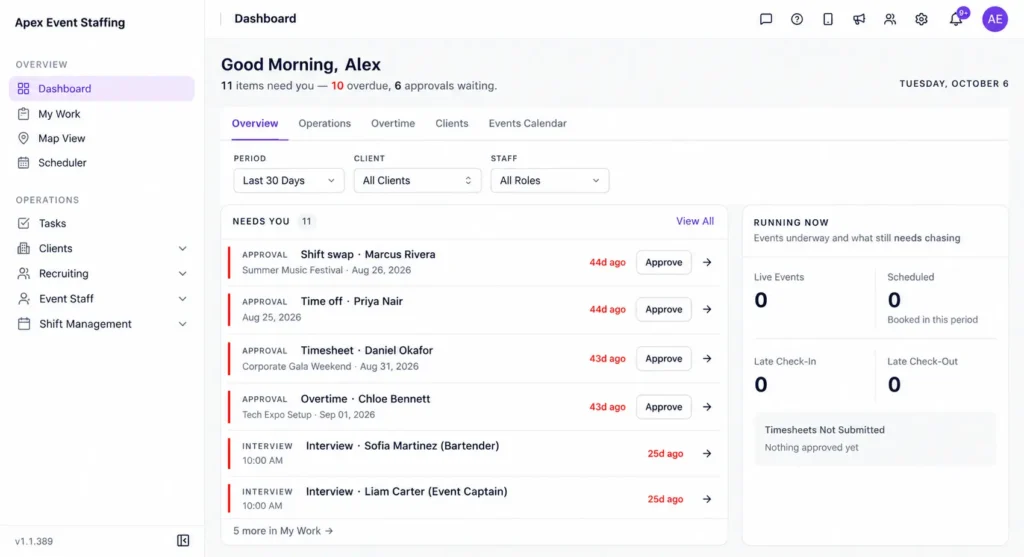
Software cannot guarantee that someone will take a shift at the last minute. It shortens the time it takes to find out who can. For more on this, see our guide to handling last-minute callouts in hospitality.
What should you fix first, and what can wait?
- One roster for every event, visible to everyone who schedules.
- Role-based worker profiles, including permits and certifications.
- A callout process with a standby list and a first-confirmed rule.
- Approved hours feeding pay and billing.
- Later: worker reliability tracking and booking priority.
What scheduling mistakes do catering and banquet agencies make most often?
- Staffing to guest count only. Menu style, venue layout and service format change how many people you need.
- Forgetting setup and breakdown time, so the schedule covers guest hours but not the work around them.
- No role flexibility. Without workers who can cover more than one position, a single cancellation leaves a gap.
- Sending details too late. Address, parking and uniform instructions should reach workers well before call time.
- Not logging callouts. Without a record, repeated cancellations stay invisible.
What usually breaks at scale: The agency that books each event from scratch. A reusable template for each event type, based on your own past crews, saves hours and reduces missed roles.
FAQ
What is the best way to fill a last-minute catering callout?
Notify qualified, available workers at the same time, use a first-confirmed rule and keep a standby list for each role.
How do catering agencies track alcohol permits and food handler cards?
Store them on the worker’s profile with expiration dates and block scheduling for roles that require them when they lapse. Requirements vary by location.
Can one system handle both front-of-house and back-of-house staff?
Yes, if it supports different roles, rates and requirements within the same event.
How long before an event should crews be confirmed?
As early as possible, with reminders as the date approaches and a standby plan for cancellations.
How do we handle dietary and allergen information for service staff?
Ask the client for the information before the event, pass it to the event lead and include it in the briefing so servers know what to say and whom to ask. Do not rely on memory on the night.
How should we set up templates for different catering events?
Create one for each common type with roles, starting ratios from your own past events and the standard briefing note. Copy it for each new booking and adjust for guest count and venue.
What should we agree with a client about gratuities and service charges?
Agree who receives them, how they are distributed and how they appear on the invoice, and have your payroll provider or counsel confirm the treatment before you tell workers.
Conclusion: your next step
Catering staffing software helps agencies keep up with event-driven demand: one roster, role-based profiles, a clear callout process and hours that flow to pay and billing. That is what keeps one cancellation from becoming a missed service.
Your next step: review the last month of callouts and list how long each took to fill and how the replacement was found. The slowest ones show where your process needs a standby list or a faster notification method. To see event shifts and callouts handled in one system, book a demo.