Multi-event staff scheduling means building one roster that covers several events or venues at the same time without placing a worker in two places, forgetting travel time or running people into overtime across jobs. The reliable method is a single master roster, role definitions that match across events and automatic conflict checks before you publish. If you run overlapping events for several clients, read about event staffing software for agencies to see how the pieces connect.
This guide covers the conflicts that appear when events overlap, how to prevent them step by step and where software helps and where process matters more.
What role conflicts appear in multi-event staff scheduling?
| Conflict | Example | How to prevent it |
|---|---|---|
| Double booking | A usher is assigned to two venues with overlapping call times | One master roster with automatic overlap checks |
| No travel buffer | A worker finishes in one venue at 5 pm and starts across town at 5:15 pm | Set a minimum gap between assignments |
| Role mismatch | A worker without a required credential is placed in a licensed role | Match roles to qualifications before assigning |
| Hidden overtime | Two short shifts on two events push a worker over a weekly threshold | Track total hours across events, not per event |
| Shared supervisor | One lead is named for two venues at once | Treat supervisors as scheduled roles with their own conflict check |
What usually breaks at scale: each event gets its own spreadsheet and its own coordinator. Both coordinators believe the same worker is theirs. The conflict appears on the day, when the worker is at one venue and the other is short.
Operations leads running overlapping events usually find conflicts the same way: one name appears on two coordinators lists and nobody notices until the day.
How do you avoid role conflicts across venues, step by step?
See how Vars covers this for your agency
Scheduling, credentialing, and payroll in one platform.
- Keep one master roster. Every event reads from the same list of workers and the same availability, so a booking at one venue is visible to every coordinator.
- Define roles the same way across events. If one client calls a role “door host” and another “usher”, map them to one role so qualifications and rates follow the worker.
- Set minimum gaps between assignments. Decide how much travel and rest time you need between venues and treat anything shorter as a conflict.
- Check conflicts before publishing. Resolve overlaps while changes are cheap, not at call time.
- Rank events when demand exceeds supply. Agree in advance which event gets the best crew when two compete, based on client contracts and event risk.
- Share a standby pool. Keep pre-confirmed workers who can move to whichever event has a gap, and see event staff scheduling for how rosters and standby fit together.
Pro tip for staffing agencies: create a one-page view of all events for the week, with workers down the side and days across the top. Conflicts show up as double entries in a row, and you can spot them in seconds.
What does a one-week grid of events look like?
The quickest way to see conflicts is to lay all events on one grid. The example below uses placeholder names:
| Worker | Mon | Tue | Wed | Thu | Fri |
|---|---|---|---|---|---|
| Worker A | Conference, doors | Conference, doors | Off | Gala, bar | Gala, bar |
| Worker B | Festival, gates | Festival, gates | Conference, runner | Conference, runner (overlap risk) | Off |
| Worker C | Off | Gala, setup | Gala, setup | Festival, gates | Festival, gates |
Color any cell where one worker appears twice in a day, and flag anyone whose hours for the week cross a threshold you set. In this example, Worker B on Thursday needs a decision before the roster is published. A grid takes ten minutes to build and finds problems that separate event spreadsheets hide.
How do you control overtime across overlapping events?
Overtime is a multi-event problem because the thresholds apply to the worker, not to the event. A worker who does a six-hour shift for one client and a five-hour shift for another on the same day may cross a daily threshold that neither event shows on its own. Rules differ by state and classification, so confirm yours with your payroll provider or counsel and set alerts accordingly.
Look at total hours per worker for the day and the week when you assign, not afterward. For costs that follow, see bill rates and markups and how overtime reaches the invoice in event payroll, timesheets and invoicing.
How much travel and rest time should you allow between assignments?
There is no single answer, so measure it. For your most common venue pairs, check the real door-to-door travel time at the time of day the shifts end and start. Add time for parking, security and finding the right entrance, and add a rest allowance if shifts are long. Write the result as a minimum gap and make your scheduling tool or your checklist enforce it. Rules on rest periods and consecutive hours differ by location and worker classification, so confirm them with your payroll provider or counsel. The cost of a gap that is too tight is a late arrival at the second event, which your client sees immediately.
How do you handle last-minute changes across several events?
When a client changes an agenda or a worker drops out, the change can ripple. Moving a worker to cover a gap at one event opens a gap at another. Handle it in four steps: confirm the new gap by role and zone, check who is free and qualified across all events, move the worker only if the donor event stays covered, and notify only the affected workers.
Common operational mistake: fixing a gap by moving someone without checking what they were covering. You solve one problem and create another that surfaces later.
How do you check attendance across venues?
One check-in view across events lets a coordinator see who has arrived at each venue against the roster. Our guide to check-in for event crews explains what to track. For multi-day detail, read conference staffing schedules.
What should a master roster hold for each worker?
A master roster is only as useful as the data behind it. For each worker, keep roles they can fill, credentials and expiry dates, availability by day, home area or travel range, and total hours booked this week. With those fields, a coordinator can answer “who is free, qualified and close enough” without calling anyone.
Keep it current. Ask workers to update availability on a set day each week and remove anyone who has not confirmed in a defined period. A roster full of outdated entries creates the same conflicts as no roster, because coordinators stop trusting it and go back to private lists.
How do you decide which event gets the best crew?
When demand exceeds your best people, agree the rule before the week starts, not in the middle of a crisis. Typical factors are the commitments in the contract, the risk and visibility of the event, the roles that cannot go wrong, repeat-client importance and how recently each client received your top crew. Write the order down and share it with coordinators, so they apply the same logic. When you must move a strong worker from one event to another, record the reason and tell the account manager, who may want to speak to the client first.
How do you run a short daily cross-event meeting?
A ten-minute meeting each morning keeps coordinators aligned. Walk through each event in turn: who is confirmed, who is missing, what changed overnight and what help is needed from other events. Look at the one-week grid together, confirm which standby workers are assigned where and record decisions in the roster. Coordinators leave knowing which gaps are theirs to close. The meeting should end when every open gap has an owner and a time.
How do you hand off between coordinators?
In a multi-event week, ownership gets blurry. Name one coordinator per event and one owner for the master roster. Only the roster owner changes who is assigned to what, and event coordinators request changes through them. At shift handover, leave a short note per event: open gaps, pending confirmations and anything the client asked for. It sounds formal, but it prevents the classic problem of two coordinators fixing the same gap in different ways.
Where does software help, and where does process matter more?
Software helps with the parts that scale badly by hand: one master roster, overlap checks, hours across events and one view of attendance. It does not decide your priority rules, your travel buffers or which client gets the best crew. Set those rules first and then configure the tool to enforce them.
How does Vars fit into multi-event scheduling?
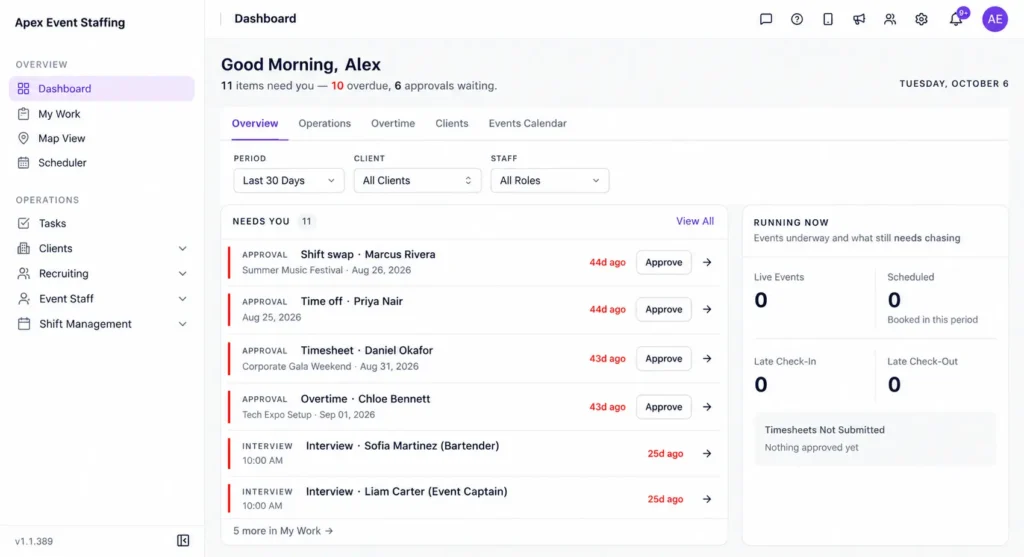
Vars is software that agencies use to run their operations. It is not an event staffing agency. In Vars, rosters for several events live in one system, so a coordinator can see conflicts before they reach the floor. The scheduler can assign shifts based on availability and qualifications, workers can release and claim shifts with approval, and the mobile app lets workers confirm and check in. For open roles, AI Candidate Matching shortlists available, qualified workers. See the scheduling software page for details, and confirm which features your plan includes.
What should you fix first when scheduling multiple events?
Fix the single master roster and the overlap check first. Those remove the most embarrassing conflicts. Then add travel buffers and cross-event hours. Reporting and forecasting can wait.
Key takeaway for operations leaders: conflicts across events are information problems. Put every booking in one place, and most of them disappear before the day.
FAQ
How do I schedule staff across multiple venues on the same day?
Use one master roster, set a minimum travel gap between assignments and check conflicts before you publish. Confirm each assignment with the worker.
What is the best way to avoid double-booking event staff?
Assign from a single shared roster that flags overlapping shifts, so every coordinator sees the same bookings.
How do I decide which event gets the best crew?
Agree priority rules in advance, based on client contracts, event size and risk. Apply the same rules every time.
Can a spreadsheet handle multi-event scheduling?
For a few small events, yes. It strains when several coordinators edit it, changes arrive often or overtime depends on hours across events.
How do I cover a gap without creating a new one?
Check who is free and qualified across all events, move someone only if the donor event stays covered and notify only the affected workers.
How do I build a master roster for multiple events?
Start with a list of workers, their roles, credentials and availability, then assign shifts for every event from that single list. Check conflicts and hours across events before you publish.
How much standby capacity do I need across several events?
Use your own history by role. Count the gaps at recent events of the same type and size the pool to cover the typical gap, then share it across events instead of holding a separate pool for each.
Who should own the master roster?
One named person, usually a senior coordinator or operations lead. Event coordinators request changes through the owner, so every change is visible and checked for conflicts.
Conclusion: your next step
Multi-event staff scheduling works when every booking lives in one place, roles mean the same thing across events and conflicts are checked before you publish. The result is fewer surprises on the day and less rework after it.
Your next step: take your busiest week from the last quarter and lay out every event on one grid with workers down the side. Count the overlaps you only found on the day. To see multi-event rosters in Vars, book a demo.
Related reading: Festival and Seasonal Event Staffing and Event Staffing Software.