Event staff scheduling software lets you build a roster by zone, role and shift, send it to the crew, confirm who is coming and change it when the event changes. For an agency, the useful versions also connect the schedule to check-in, timesheets, pay and client billing. If you run crews for several clients, read about event staffing software for agencies to see how those pieces fit together.
This guide explains how agencies schedule event crews step by step, which features matter, what it costs and where software cannot help. For a side-by-side look at vendors, see our event staffing software comparison.
What is event staff scheduling software, and who is it for?
It is a tool for planning who works where and when at an event, and for keeping that plan accurate as things change. Two groups use it in different ways:
- Event organizers and venues schedule their own staff. They need clear rosters, availability and reminders.
- Staffing agencies supply crews to many clients. They also need worker onboarding, approved timesheets and billing per client.
The tools overlap, but the needs are not the same. An organizer can run well on a simple scheduler. An agency that stops at the schedule still does the hard part by hand afterward.
How do agencies schedule event crews step by step?
See how Vars covers this for your agency
Scheduling, credentialing, and payroll in one platform.
- Start from the run of show. Get the session grid, move-in and move-out times and floor plan. Do not build from a headcount given on a call.
- List every zone and when it is live. Registration, doors, breakout rooms, exhibit floor, back of house and loading dock each have different peaks.
- Split zones into roles. A registration desk needs greeters, badge support and a lead. Defining roles early prevents a full crew with nobody who can fix a problem.
- Cut the day into shift blocks that follow demand. Early, mid and late crews usually cover more with fewer idle hours than one fixed shift.
- Assign workers by availability and qualification, then check for conflicts such as overlapping shifts before publishing.
- Publish with details and ask for confirmation. Every worker needs call time, location, supervisor and dress code. For a worked example, see how to build a conference staffing schedule.
Pro tip for staffing agencies: ask the client for the session grid and exhibitor move-in schedule on the day you receive the purchase order. Move-in and move-out days are where schedules are most often built wrong.
In practice, the first draft of an event roster is rarely the problem. The trouble starts with the third change request, when several people are editing the same plan.
Here is why shift blocks matter. A registration desk is busiest in the hour before the opening session and quiet by mid-afternoon. Scheduling the same crew from 6 am to 2 pm leaves people idle in the second half and thin in the first hour. An early block of greeters, a smaller mid block and a lead who stays until close usually costs less and covers the peak better. The same logic applies to doors, which spike around session start times.
How do you set up the roster so changes stay small?
Most scheduling pain comes from rosters built as one big list. Build them so that one change touches as little as possible:
- Keep a zone and role library. Define each zone and the roles in it once, and reuse them for every event.
- Build from templates. A conference, a festival and a banquet each have a typical shape. Start from the nearest template and adjust.
- Use named leads per zone. A change is easier to route when each zone has an owner.
- Keep shift blocks short enough to move. A worker who covers a whole day is harder to reassign than one who covers a block.
- Hold a standby list by role. When a gap opens, you fill it from a list, not from scratch.
The test of a good structure is simple: when the client moves one session, how many people do you need to message?
Which features matter most in an event staff scheduler?
| Feature | Why it matters at events | Question to ask a vendor |
|---|---|---|
| Roster by zone and role | Demand differs by area and hour | Can I build a multi-day roster by zone? |
| Conflict checking | Prevents double-booked workers | Is a conflict flagged before I publish? |
| Shift confirmation | Shows who is at risk of no-showing | Can I see who has not confirmed? |
| Shift release and claim | Replaces text-message swaps | Can swaps need manager approval? |
| Mobile app | Crews work from phones | Can workers see and confirm shifts on mobile? |
| Check-in and time capture | Feeds pay and billing | Do recorded hours flow into timesheets? |
Common operational mistake: buying for the schedule view. The roster screen is the easy part. Check what happens to the hours afterward.
Is a rota the same as a schedule?
Yes, in practice. “Rota” and “roster” are common in the UK and Australia, while “schedule” is more common in the US. They all mean the plan of who works which shifts. When you evaluate tools, look for the capability, not the label, since a product that says “rostering” may do exactly what another calls “scheduling.”
Is there free event staff scheduling software, and what does it cost?
Some vendors offer free trials, and a few offer free tiers for very small teams. Paid schedulers publish prices from a few dollars per user per month. For example, Humanity lists plans from $2 per user, with a $60 minimum on its first two plans, as checked in October 2026. Agency platforms vary by features and crew size.
When you compare, ask whether the price covers every worker or only managers, and what is extra, such as onboarding, payroll connections and weekend support. Write each vendor’s total for the same crew size and compare the totals.
What does a good change process look like?
Changes are the normal state of an event, so give them a process. Whoever edits the roster follows the same steps:
- Record the request: who asked, when and what changed.
- Check the conflicts: overlaps, qualifications, overtime thresholds and travel time.
- Update only the affected shifts.
- Notify only the workers those shifts touch, and require a confirmation.
- Tell the supervisor and the client contact if coverage in a zone has changed.
- Keep the log, because it supports your invoice if the client later disputes hours.
If your team cannot follow these steps without a long message thread, that is the problem to fix before you shop for software.
How do you handle availability, qualifications and fatigue?
A roster that looks full can still fail on the day. Check three things before you publish:
- Availability. Capture it in one place and refresh it before each event, not once a year.
- Qualifications. Tag roles that need them, such as a license, a certificate or experience with a specific equipment type, and schedule only workers who hold them. Confirm requirements with the client.
- Fatigue and travel. Avoid back-to-back long shifts with short rests, and allow travel time between venues. Rules on rest and overtime differ by location, so confirm them with your payroll provider or counsel.
What does an event-day scheduling checklist look like?
Use the same list every time, so nothing depends on one person’s memory:
- One week out: roster published, shift details sent and confirmation requests out.
- The day before: unconfirmed workers chased, standby list confirmed and reminders sent with call time and entrance.
- Event morning: arrivals checked against the roster, gaps filled from standby and the client contact told only if coverage is at risk.
- During the event: changes logged with the requester’s name and affected workers notified.
- After the event: hours confirmed and the roster closed, with notes on what to change next time.
How should you test a scheduler in a demo?
Give the vendor a short scenario and ask them to run it live: build a two-day roster with three zones, move one session, add a late workshop, replace a no-show and release a worker early. Watch how many steps each takes, who gets notified and whether the change history is recorded. Then ask to see how the approved hours reach pay and the invoice. A tool that handles these steps cleanly will handle the routine work easily.
Where does scheduling software help, and where does process matter more?
Software helps with volume: building multi-role rosters, catching conflicts, sending details and confirmations, and keeping one version of the roster for everyone. It does not fix an unclear brief, a thin labor market or a weak supervisor.
What usually breaks at scale: one spreadsheet tab per day and a group chat. The roster is right at 5 pm, the client changes the agenda at 7 pm and by morning half the crew works from a stale version.
How does Vars fit into event staff scheduling?
Vars is software that agencies use to run operations. It is not an event staffing agency. In a multi-day event, a coordinator builds the roster in one place and sees conflicts before they reach the floor. The scheduler can assign shifts based on availability and qualifications, and workers can release a shift that a qualified colleague claims, with approval.
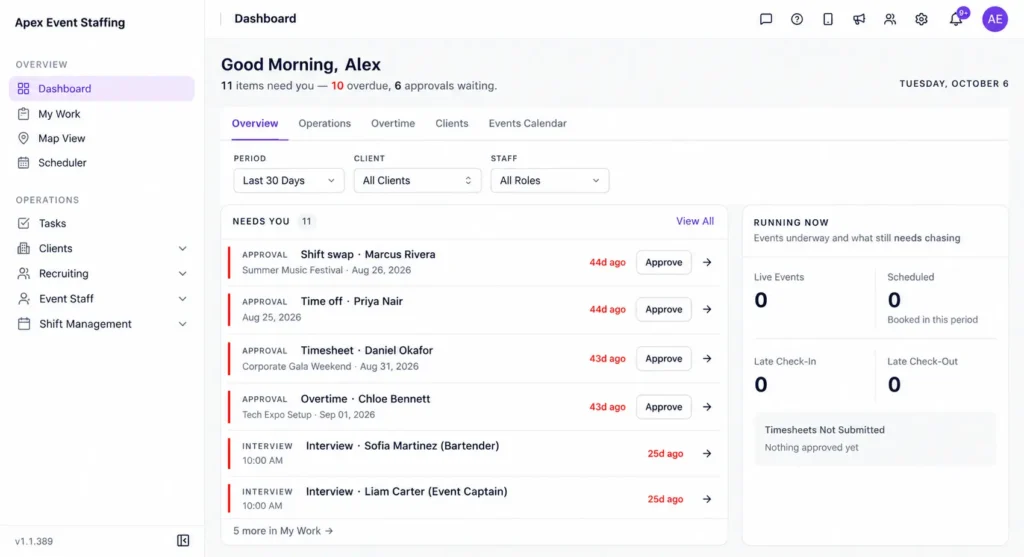
When a role is still open, AI Candidate Matching helps shortlist available, qualified workers. Workers see shifts in the mobile app and check in there, so the same record feeds timesheets, payroll and billing. See the scheduling software page for details, and confirm which features your plan includes.
For the next steps in the workflow, read check-in for event crews and event payroll, timesheets and invoicing.
What should you fix first when you improve event scheduling?
Fix confirmations first. If you do not know who has confirmed the night before, you will find out at call time. Next, fix change control, so one agenda change reaches only the affected workers. Leave forecasting and reporting for later.
Key takeaway for operations leaders: a good schedule is not the finish line. It is the first record in a chain that ends with pay and an invoice, so choose a tool that carries the chain.
FAQ
What is the best way to schedule staff for a multi-day event?
Build from the run of show, split each day by zone, role and shift block, and ask workers to confirm each day separately. Day two rarely matches day one.
Can I use a general scheduling app for event staffing?
Yes, for your own staff at a few events. Agencies serving several clients usually outgrow it once they need onboarding, approved timesheets and client billing.
How do I avoid double-booking event staff?
Assign from one shared roster that flags overlapping shifts and require confirmation for each shift.
Do workers need an app to use event staff scheduling software?
Not always, but a mobile app makes confirmations, swaps and check-in much easier for crews who work from their phones.
How far ahead should I publish the schedule?
Publish worker-facing details at least a few days before the event, then send reminders the evening before and the morning of.
How do I build a roster template for recurring events?
Define each zone, role and shift block once, save it as a template and adjust headcount for each event. Review the template after each event while the lessons are fresh.
What should I do when a worker is double-booked?
Resolve it before you publish by checking conflicts across events. If it appears later, replace the worker from your standby list, update the roster and tell the client contact only if coverage is affected.
Can scheduling software handle worker qualifications?
Many tools support tags or skills so you can schedule only qualified workers. Ask each vendor to show it with your own role list, and confirm the requirements with your client.
Conclusion: your next step
Event staff scheduling software works best when the schedule connects to confirmation, check-in and pay. Pick tools for the whole chain, not only the roster.
Your next step: take your last event and time how long a full roster took and how long a single mid-event change took. The second number shows whether your process holds up. To see multi-role, multi-day rosters in Vars, book a demo.
Related reading: Event Staffing Software and Festival and Seasonal Event Staffing.