Event staffing payroll is the work that starts when the lights go out: collecting every crew member’s hours, confirming them with the client, paying the crew and invoicing the client for the same hours. The fastest-running agencies close this loop within days. The slowest spend a day or more after each event matching sign-in sheets, texts and supervisor notes against a roster. The difference is rarely effort. It is whether hours were captured once, in one place, during the event. For more on this, see our guide to event crew budgeting and cost management.
Agencies that run events can see how scheduling, check-in, payroll and billing connect in event staffing software for agencies.
Why is event payroll harder than regular temp staffing payroll?
Events create a particular set of problems that standing assignments do not.
- Many people, short shifts. A single event can involve dozens of workers across several roles, each with a different start time.
- Different rates by role. Bartenders, ushers, brand ambassadors and AV runners may be paid and billed at different rates.
- Variable hours. Load-in runs early, teardown runs late, and clients extend or release crews on the day.
- Multiple supervisors. Hours may be confirmed by an on-site lead, the client’s coordinator or both.
- Fast turnaround expectations. Crews expect prompt pay, and clients expect a prompt, accurate invoice.
What usually breaks at scale: An agency that runs one event a week can reconcile by hand. At several events a day, the reconciliation takes longer than the events.
What does a clean post-event process look like?
See how Vars covers this for your agency
Scheduling, credentialing, and payroll in one platform.
A reliable cycle has six steps:
- Hours captured at the event. Check-in and check-out are recorded when they happen, not recalled the next day.
- Supervisor review. The on-site lead confirms the hours and flags exceptions such as late arrivals, early releases and no-shows.
- Client approval. The client confirms the total hours or the invoice basis.
- Pay calculation. Hours are paid at each person’s rate, with overtime or premium rules applied as set.
- Payment. Crew members are paid on your regular schedule.
- Invoice. The client is billed from the same approved hours at the bill rates.
The control that matters most is that pay and invoice come from the same approved record.
What does a close-out timeline look like?
A written timeline keeps the close-out from drifting. The days below are an example, so replace them with your own commitments to workers and clients:
- Event day: hours are recorded at check-in and check-out. The on-site lead logs every exception before the crew leaves.
- Day 1: the lead confirms hours and the coordinator sends the client a short summary of total hours by role and any changes made on the day.
- Day 2: the client confirms or queries the hours. Queries are answered from the records, not from memory.
- Day 3: hours are approved and released to payroll. Any unresolved query is held separately so it does not delay everyone else.
- Day 4 or 5: the invoice goes out from the same approved hours, with the approval attached.
If your clients take longer, build their approval time into your timeline and your payment terms. The aim is that every step has an owner and a date.
How do you capture event crew hours accurately?
Accuracy depends on when and how hours are recorded.
- Use check-in at the venue, whether through an app or a supervisor’s confirmation, so start times are not guessed.
- Record breaks according to your policy and any applicable rules, which vary by state.
- Log changes on the day, such as a client releasing staff early, with who requested it.
- Keep a short exception list: no-shows, replacements, late arrivals and extensions.
Common operational mistake: Collecting hours from a group text after the event. Memories differ, and every disagreement costs time and goodwill.
Where does margin leak between the event and the invoice?
| Where it leaks | What happens |
|---|---|
| Hours retyped from sign-in sheets | Typos cause under- or over-billing |
| Extension not billed | Crew paid for extra time that the client never sees on the invoice |
| Wrong role rate | A crew member is paid at one rate and billed at another |
| Setup and teardown missed | Early and late hours are paid but not invoiced |
| Slow invoicing | Disputes arise when the event is no longer fresh in anyone’s mind |
| Client disputes without records | Credits are given because you cannot show the original approval |
Pro tip for staffing agencies: Send the client a short summary right after the event: total hours by role and any changes made on the day. Disputes are easier to settle when the details are fresh.
How should you handle pay timing for event crews?
Event workers often work one-off shifts and care about fast, accurate pay. A few practices help:
- Publish a pay schedule and keep to it.
- Tell workers when hours are approved, so they know the process is moving.
- Handle corrections quickly, with a clear way to report a problem.
- Keep records of rates and approvals per event.
Payroll rules, including how and when workers must be paid, vary by state and by classification. Confirm your obligations with a payroll provider or counsel.
How do you handle a dispute about hours?
Disputes are easier when the evidence is attached to the timesheet. When a client questions a number, work through it in order:
- Find the check-in and check-out records for the people involved.
- Check the log for changes made on the day, and who requested them.
- Compare scheduled hours with recorded hours and look for the specific difference.
- Reply with the records, not a summary, and propose the correction if one is due.
- Record the outcome and the cause, such as unclear start time, so the next brief fixes it.
Avoid arguing from memory. A client who sees the records usually accepts the number. A client who hears a recollection often does not. Our guide to pay and bill software for staffing agencies covers how approvals and records reduce credits.
How should you handle workers who work several events in a week?
Crew who work several events can cross overtime thresholds without any single event looking long. Track total hours per worker across events, not only per event. Before you publish rosters, check which workers are close to a threshold and decide whether to rebalance the schedule. Overtime rules differ by state and classification, so confirm yours with a payroll provider. It is much cheaper to see this on Tuesday than to discover it when payroll runs. For the budget impact, see our guide to event staffing cost management.
What should you measure after each close-out?
Four simple numbers show whether the process is improving. They are your own measures, so compare them with your earlier events:
- Days from event end to approved hours
- Days from event end to invoice sent
- Share of hours changed after the lead’s confirmation
- Hours paid but not billed
If the third number is high, the problem is upstream, in how hours are recorded on the day. If the fourth is above zero, find the cause the same week.
How does Vars handle event timesheets, payroll and invoicing?
Vars is software that agencies use to run their operations, and it is not an event staffing agency or a payroll service. For events, Vars keeps scheduling, timekeeping, payroll and billing connected: hours captured at check-in become approved timesheets, which feed crew pay and the client invoice, so there is no day of reconciliation after the event. See the staffing billing software, staffing payroll services and event staffing software pages for the details. For more on this, see our guide to timesheet and billing disputes.
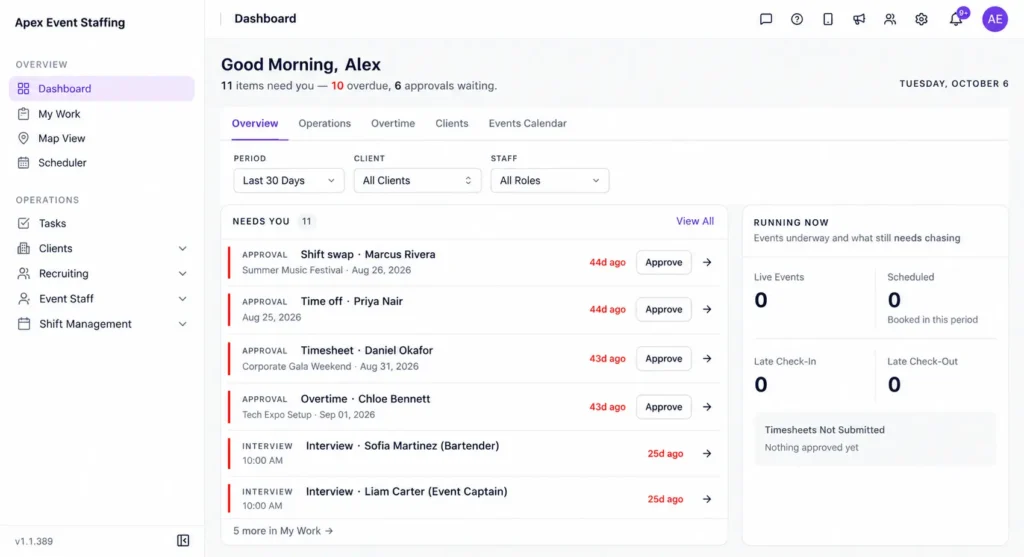
Software will not settle a client’s disagreement about how long a crew was needed. It does give you a record of check-ins, approvals and changes to point to. For more on this, see our guide to building a conference staffing schedule.
What should you fix first, and what can wait?
- One place for hours. Move from sign-in sheets and messages to a single record.
- Role-based rates stored once for pay and bill.
- A same-week approval habit with the on-site lead and the client.
- Invoicing from approved hours, not from a separate spreadsheet.
- Later: margin reports by event, client and role.
What should the client invoice include so it is approved without a call?
An event invoice that is easy to check gets paid faster. Include:
- Event name, date and venue, matching the client’s purchase order or booking reference
- Hours by role, with the number of workers and the rate for each
- Setup and teardown lines, shown separately from guest-facing hours
- Changes made on the day, such as an extension or early release, with who approved them
- Any agreed extras, such as travel or equipment, with the supporting detail
- A one-line summary of total hours and total amount
Key takeaway for operations leaders: A client who can match the invoice to what they saw at the event rarely disputes it. A client who has to ask what a line means usually waits.
Pro tip for staffing agencies: Keep a one-page close-out checklist for every event: hours approved, exceptions resolved, pay released, invoice sent. When a coordinator is away, anyone can pick it up, and nothing waits on one person’s memory. Review the checklist after your busiest weekend and remove any step that did not earn its place.
FAQ
How soon after an event should an agency invoice the client?
As soon as hours are approved. Faster invoicing reduces disputes and improves cash flow.
Who should approve event crew hours?
Usually an on-site lead with the client’s confirmation. Agree on who has the authority before the event.
How do we handle crew who work several events in a week?
Keep one worker record that totals hours across events, so overtime and pay are calculated correctly.
Can we automate event timesheets?
Check-in and approval steps can be digital, which reduces retyping. Someone still has to review the exceptions.
What should we do when a client approves hours late?
Build the approval window into your timeline and your payment terms, and send a short reminder with the hours summary attached. Late approval is easier to manage when the client knows the date you need it.
How do we handle workers who need to be paid before the client pays?
That depends on your payment terms, your cash position and local rules on pay timing. Agree the terms with clients in writing and confirm pay-timing rules with your payroll provider.
What records should we keep for each event?
Keep the roster, check-in and check-out records, change log with approvers, approved timesheets and the invoice with its approval. Together they answer most disputes.
How do we invoice for setup and teardown?
Show them as separate lines from guest-facing hours, with the number of workers and the rate. Agree the treatment with the client before the event so the invoice has no surprises.
Conclusion: your next step
Event staffing payroll becomes manageable when hours are captured once at the event and used for both crew pay and the client invoice. That removes the reconciliation that stretches a day into a week.
Your next step: time your last event’s close-out, from the end of the event to the sent invoice, and list every manual step. Those steps are your improvement list. To see timesheets, payroll and invoicing connected for events, book a demo.