Pay and bill software for staffing connects what you pay a worker with what you bill the client, using the same approved hours. A good setup turns an approved timesheet into a paycheck and an invoice without anyone retyping the hours, and it shows your margin per assignment as it happens. If your timesheets, payroll and invoices live in three places, your margin is leaking in the gaps between them. You can see how this works in practice on the staffing payroll services page.
What does pay and bill software actually do?
In a staffing agency, every assignment has two sets of numbers: what the worker is paid and what the client is charged. Pay and bill software keeps both tied to the same hours.
The core functions are:
- Timesheet capture and approval, from clients, supervisors or an app
- Pay calculation, including overtime, differentials and assignment-specific rates
- Invoice generation, applying the client’s bill rate to the same approved hours
- Margin visibility, showing the spread between pay and bill by worker, assignment and client
- Records, a trail that explains how each invoice line was built
The value is in the connection. A standalone invoicing tool can produce a clean invoice, but if it gets hours from a spreadsheet, you still carry the risk of mismatch. For more on this, see our guide to event payroll, timesheets and invoicing.
How does one assignment move from timesheet to pay and invoice?
See how Vars covers this for your agency
Scheduling, credentialing, and payroll in one platform.
The easiest way to judge any pay and bill setup is to follow a single assignment all the way through. The figures below are illustrative. Replace them with your own rates.
- Hours are recorded. A worker completes a 10-hour shift, and the system records start, end and breaks.
- Hours are approved. A supervisor or client approves the timesheet, and the approval stays attached to it.
- Pay is calculated. Say the pay rate is $20 per hour with overtime after 8 hours at 1.5 times. That gives 8 regular hours and 2 overtime hours, or $160 plus $60, which is $220 base pay before payroll costs.
- The invoice is calculated. Say the client’s bill rate is $30 per hour, with overtime billed at 1.5 times. That gives $240 plus $90, which is $330.
- Margin is visible. Before payroll costs, the spread is $110. After your own payroll costs, which you should confirm with your payroll provider, you can see what is left on this assignment.
If the overtime pay rule is set but the overtime bill rule is missing, the worker is paid $220 while the client is invoiced $300, and the agency quietly loses $30. Nothing looks wrong on either document. This is why the rates need to live together on the assignment, and why a margin view per assignment catches problems that invoices alone do not.
How is pay and bill software different from payroll, invoicing and accounting tools?
The categories overlap, and vendors use the terms loosely. The table shows the usual division of work. Check each product’s own description, because some tools cover more than one job:
| Tool type | Main job | What to confirm it covers |
|---|---|---|
| Payroll service | Calculates and pays workers, files related reports | Whether it can take approved hours from your timesheets without retyping |
| Invoicing tool | Produces and sends client invoices | Whether bill rates and hours come from the same record as pay |
| Accounting system | Records the financial results, receivables and payments | How it receives invoices and payments from your pay and bill process |
| Pay and bill software | Connects approved hours to both pay and invoices | Which payroll and accounting systems it connects to, and what it does not replace |
Many agencies run one of each and move data between them by hand. Pay and bill software is meant to remove that handoff. Ask each vendor to draw the line between what their product does and what your payroll provider and accounting system still do.
Where does margin leak between the timesheet and the invoice?
Most leakage is small, repeated and invisible until month-end. These are the places to check:
| Where it leaks | What happens |
|---|---|
| Hours re-entered by hand | A typo in one system means pay and bill no longer match |
| Wrong bill rate applied | An old rate is used after a client’s contract changes |
| Overtime billed as regular time | Pay goes up, the invoice does not |
| Missed or late timesheets | The worker is paid, the client is not billed for that week |
| Disputed hours with no record | You credit the client because you cannot prove the original |
| Slow invoicing | Cash arrives later, and some lines age unbilled |
What usually breaks at scale: Agencies with a few clients can catch these errors by eye. Past a certain volume, nobody has time to compare every line, and small errors become a regular, quiet cost.
How do timesheet disputes affect your billing?
When a client disputes hours, the question is whether you can show how the number was reached: who approved it, when, and at what rate. If the answer lives in email threads, the dispute usually ends in a credit.
Keep approval records tied to the timesheet itself. Our guide on timesheet and billing disputes goes deeper into why agencies lose margin there.
Common operational mistake: Letting clients approve hours by email while the payroll team keeps a separate spreadsheet. When the two disagree, nobody knows which one is right.
What features matter when comparing staffing invoicing software?
A feature list can look the same across tools. These are the points that separate them in daily use:
- Timesheet to invoice with no re-entry. Ask the vendor to show approved hours becoming an invoice.
- Multiple rates per assignment. Regular, overtime, holiday and differential rates, for pay and for bill, set once.
- Client-specific invoice rules. Some clients want invoices by cost center, department or purchase order.
- Correction handling. If a timesheet changes after approval, can the system adjust the invoice and the paycheck consistently?
- Margin reporting. Can you see margin by client and by assignment without a separate spreadsheet?
- Accounting handoff. How do invoices and payments reach your accounting system?
- Audit trail. Who changed what, and when?
Pro tip for staffing agencies: Give every vendor the same messy test. Use one assignment with overtime, one corrected timesheet and one client with a purchase order requirement. Compare how each tool handles it.
How should you test the special cases?
Standard timesheets work in most tools. The differences appear in the exceptions, so test these with every vendor on your shortlist:
- Overtime and differentials. Does one set of rules drive both pay and bill, with different multipliers on each side?
- Holiday and shift premiums. Can you set them per client or per assignment?
- Expenses and per diem. Can they be paid to the worker and passed through to the client on the invoice?
- Multiple cost centers or purchase orders. Can one client receive invoices split by department, location or PO number?
- Corrections after approval. If a timesheet changes after the invoice went out, can you issue a credit and a matching pay adjustment?
- Short-notice rate changes. Can you change a rate for future hours without rewriting past ones?
Bring your messiest real example to the demo. A tool that handles it cleanly will handle the rest.
How is pay and bill software priced?
Pricing models differ, and the cheapest headline number is often not the cheapest total. Common models include a fee per user, a fee per worker or per assignment, a percentage of invoiced revenue and a flat platform fee. Many vendors also charge for setup, payroll connections, extra modules or support tiers.
Ask each vendor to price the same scenario: your number of active workers, clients and invoices per month. Then ask what is not included. A fee per worker may be fine for a small pool and costly for a large temporary one, while a percentage of revenue grows as you do. Write down each total, and add the time your team spends on manual work the tool will not remove. The comparison is then fair.
What should you ask about accounting and financing?
Your invoices have to reach the people who record and collect the money. Ask each vendor three things. First, which accounting systems it connects to, and what data moves across. Second, how payments and credits come back so receivables stay accurate. Third, if you use invoice financing or a similar arrangement, what invoice data you can export for it. Finance should join the demo for this part. A tool that produces correct invoices but creates a manual step for the accounting team has only moved the problem.
What should you fix first, and what can wait?
You do not have to replace everything at once. A sensible order:
- One approval point. Decide where hours get approved and treat anything outside it as unapproved.
- Rates stored once. Pay and bill rates should live on the assignment, not in someone’s notes.
- Invoice from approved hours. Stop building invoices from separate spreadsheets.
- Margin report. Review margin per client monthly to catch rate or overtime problems.
- Later: client-specific invoice formats, automated reminders and deeper reporting.
Software helps most at steps two and three. It does not help at step one if clients and supervisors approve hours late or inconsistently.
Where does Vars fit in a pay and bill workflow?
Vars is software that staffing agencies use to run operations. In a pay and bill workflow, it keeps timesheets, payroll and billing in connected records, so approved hours become both pay and invoices without retyping. The agency gets timesheet to invoice automation and a view of what is approved, pending or billed. See the staffing billing software page for the product details.
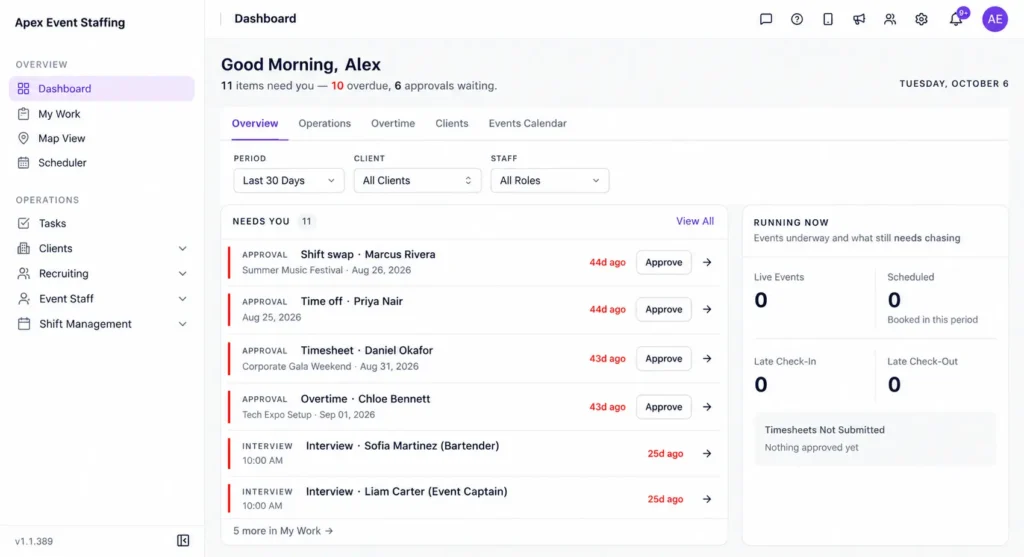
Vars does not replace your judgment on rates or your relationship with clients who dispute hours. It reduces the retyping and the lag, and it gives you a record to point to.
What reports should pay and bill software give you?
Reports turn records into decisions. Ask each vendor to show these, using your own sample data if possible:
- Margin by client and by assignment, so you see which work pays and which does not
- Unbilled hours, meaning approved hours that have not reached an invoice
- Credits and corrections, with the cause recorded, so patterns are visible
- Overtime by worker across clients, since thresholds follow the worker
- Approvals outstanding, by client and by approver, to chase late hours before cut-off
- A change log, showing who edited approved hours and when
If a vendor offers custom reports, ask how long they take to build and who builds them. A report you can get on day one beats a better one you wait six weeks for.
How do you tell whether your pay and bill process is working?
You do not need a complex dashboard. A handful of numbers, reviewed monthly, show whether margin is leaking:
| Measure | What it tells you |
|---|---|
| Days from period end to invoice sent | How much cash is waiting on your own process |
| Timesheets missing at cut-off | How well approvals are working |
| Number of invoice credits and adjustments | How often invoices go out wrong |
| Hours paid but not billed | Where work is happening without revenue attached |
| Margin by client against the expected spread | Which clients have rate or overtime problems |
Track the same measures each month and look at the direction, not a single number. If credits rise after you add a new client, the rate setup for that client is the first place to look.
What does a six-week move to new pay and bill software look like?
A staged plan reduces risk. Adjust it to your pay calendar:
- Week 1: clean the rates. List every client rate and worker rate, fix errors and assign an owner for each.
- Week 2: set up and import. Configure the clients, assignments and rates in the new system and check a sample against your contracts.
- Weeks 3 and 4: run in parallel. Process one full pay cycle in both systems and compare hours, pay, invoices and margin line by line.
- Week 5: switch one group. Move a single client or team over, and keep the old process for the rest.
- Week 6: review and roll out. Fix what the first group surfaced, train coordinators and clients who approve hours, and move the remaining groups.
Start right after a pay cycle closes and avoid your busiest season. The parallel run costs extra effort, but it is much cheaper than discovering a rate error after a month of live invoices.
How do records and audit trails protect the agency?
Every pay and bill record may be questioned later by a client, a worker, an auditor or your own finance team. A good audit trail answers by showing who approved the hours, when, at what rate and what changed afterward. Check that approved timesheets cannot be edited silently, that each edit records the person and the reason and that you can export the history for an invoice or a worker on request. Decide how long you keep records, and confirm retention requirements with your counsel or payroll provider, since they differ by location and document type.
How do you get workers, coordinators and clients to use the new process?
The tool only helps if people follow the process. Plan the human side as carefully as the setup:
- Coordinators need training on how hours are approved, how corrections are made and who owns each step.
- Clients who approve hours need a short explanation of what changes for them, when approvals are due and what happens after the cut-off.
- Workers need to know how they record time, when they are paid and whom to contact about an error.
- Finance needs a written description of how invoices and payments reach the accounting system.
Send the cut-off calendar to everyone in the same message and repeat it on every approval request. Most adoption problems come from people not knowing the deadline, not from the software.
What mistakes do agencies make when they change their pay and bill setup?
- Switching tools mid-quarter without a parallel run. Run one cycle in both systems and compare totals before you retire the old process.
- Importing rates that were already wrong. Clean up the rate list first. A new system will repeat old errors faster.
- Training only the finance team. Coordinators and clients who approve hours also need to know the new steps.
- Skipping the audit trail. Decide who can edit approved hours and make sure each change is recorded.
Key takeaway for operations leaders: Treat the change as a process project with a software component, not the other way around.
FAQ
What is the difference between pay and bill software and invoicing software?
Invoicing software produces invoices. Pay and bill software ties those invoices to the same hours used for payroll, so pay and bill stay aligned.
Do small staffing agencies need pay and bill software?
If you handle a handful of workers and clients, a spreadsheet can work. The need grows as clients, rates and overtime rules multiply.
How do we handle overtime in pay and bill?
Store overtime rules for both pay and bill, and confirm the tool applies them from the approved hours instead of a manual calculation.
How long does it take to move to a new pay and bill system?
It depends on how many clients, rates and workers you load, and on how clean your current data is. Ask the vendor to scope your setup.
How is pay and bill software priced?
Models include per user, per worker or assignment, a percentage of invoiced revenue and flat fees, often with setup or add-on charges. Ask for a written quote for your own volumes and compare totals.
Can it handle clients with different invoice rules?
Many tools can, but test it. Bring a client that needs invoices split by cost center or purchase order and ask the vendor to produce one live.
What should we clean up before we migrate?
Fix your rate list, remove inactive assignments and decide who approves hours for each client. A new system will repeat old errors faster if you import them.
Does pay and bill software replace our accounting system?
Usually not. It connects approved hours to pay and invoices, then hands results to your accounting system. Confirm the exact handoff with each vendor.
Conclusion: your next step
Pay and bill software for staffing is about closing the gaps between timesheet, paycheck and invoice. Start by finding where your hours are retyped, because that is where margin disappears.
Your next step: take one recent invoice and trace each line back to an approved timesheet and a paycheck. Note every place the number was entered more than once. To see timesheet to invoice automation in action, book a demo.