Event crew budgets usually leak in five places: staffing above real demand, overtime and break rules, no-shows replaced at a premium, hours that are retyped or disputed, and hours that never get billed. Event staffing cost management works best when the schedule, check-in, timesheets, pay and invoice are connected, so costs are visible while the event is running, not after. To see how those pieces connect for agencies, read about event staffing software for agencies.
Where do event crew budgets actually leak?
| Leak | How it happens | What to track |
|---|---|---|
| Overstaffing | Headcount set from a call, not the run of show | Scheduled hours against demand by zone |
| Overtime and breaks | Long shifts and uncovered breaks | Hours per worker per day |
| Premium backfill | No-shows replaced at the last minute | Number and cost of replacements |
| Retyped or disputed hours | Sign-in sheets and texts matched by hand | Share of hours changed after approval |
| Unbilled hours | Extra time never reaches the invoice | Paid hours against billed hours |
What usually breaks at scale: one person holding the budget in a spreadsheet while three coordinators change the roster. By the time the budget is updated, the event is over.
In real implementations, the biggest leak is usually small and repeated: a few extra hours per event that nobody approved and nobody billed.
How do you build a crew budget before the event?
See how Vars covers this for your agency
Scheduling, credentialing, and payroll in one platform.
- Start from demand. List each zone, the hours it is live and the roles it needs, based on the run of show.
- Convert demand into labor hours. Multiply roles by shift length and add paid setup and breakdown time.
- Apply pay rates and overtime assumptions. Include any shift differentials and travel allowances you pay.
- Add payroll costs. Employer taxes and other costs depend on your setup and location, so confirm them with your payroll provider.
- Set bill rates and the margin you need. Our guide to bill rates and markups explains how agencies set them.
- Hold a contingency. Size it from your past events rather than a fixed percentage, and agree with the client how extra hours are approved.
Pro tip for staffing agencies: keep the budget by zone and day, not as one total. A total hides which zone is running over.
What does a worked crew budget look like?
The figures below are illustrative, not benchmarks. Replace them with your own pay rates, payroll costs and bill rates. Take one zone, registration, at a one-day conference: 6 workers for 8 paid hours each.
| Line | Calculation | Example |
|---|---|---|
| Labor hours | 6 workers x 8 hours | 48 hours |
| Base pay | 48 hours x $20 per hour | $960 |
| Payroll costs | Assumed 15% on top of pay; confirm yours with your payroll provider | $144 |
| Total labor cost | Base pay plus payroll costs | $1,104 |
| Bill rate | 48 hours x $32 per hour | $1,536 |
| Gross margin | Bill minus labor cost, divided by bill | $432, or about 28% |
Now change one assumption. If two workers run one hour over without approval, labor cost rises by about $46 and billed hours stay at 48, so margin falls to roughly 25%. If those two hours are approved and billed, margin holds. The difference is not the extra hour, it is whether anyone approved and invoiced it.
Run this calculation per zone and per day for your next event, using your real numbers. It takes ten minutes and shows which zone carries the margin and which one quietly loses it.
How does event staffing software budgeting help with cost control?
Software cannot set your rates, but it can keep the numbers connected. When the roster, check-in records and timesheets live in one system, you can compare scheduled hours with actual hours, spot overtime early and see which approved hours are ready to bill.
- Roster: shows planned hours by zone and worker, so you can see the budget impact of adding a shift.
- Check-in: records actual arrival and departure, which is the evidence behind pay and billing.
- Timesheets: turn recorded time into approved hours.
- Pay and billing: use the same approved hours, so margin per assignment is not a guess.
Which cost reports you see depends on your setup and plan, so ask a vendor to show the specific report you need, such as scheduled hours against actual hours for one event.
What does a simple budget-versus-actual review look like?
After each event, lay out four numbers per zone: budgeted hours, scheduled hours, actual hours checked in and billed hours. Then read them left to right. If scheduled is above budgeted, the roster drifted from the plan. If actual is above scheduled, someone worked extra time, so ask who approved it. If billed is below actual, hours were worked but not invoiced.
Do this for your next three events and keep the results in one place. Patterns appear quickly: one zone always runs over, one client always adds hours on the last day, or one type of shift always needs a premium replacement. Each pattern is a pricing or scheduling decision you can make before the next quote, instead of a surprise you absorb after it.
How do you track labor cost while the event is running?
Check three numbers each day: hours checked in so far, hours still scheduled and workers approaching an overtime threshold. If you only look after the event, you can report the overspend but not prevent it.
Our guide to check-in for event crews covers how attendance data supports this, and conference staffing schedules shows how to plan breaks so a zone is never left empty or over-covered.
How do you stop overtime and break rules from eating margin?
Rules for overtime, meal breaks and rest breaks differ by state and by worker classification. Confirm them with your payroll provider or counsel and build the answers into the schedule. Practical habits help regardless of the rules:
- Stagger breaks so relief covers each zone.
- Use split shifts that follow demand instead of one long block.
- Flag workers approaching a threshold before the shift ends.
- Review the longest days after each event and adjust the next roster.
Common operational mistake: giving every worker the same break time. At a conference that empties the registration desk when lunch sessions end, and the replacement cost lands in your margin.
How do you cost a quote so the margin holds?
Margin is easiest to protect at the quote. Cost the job from the bottom up before you send a number: labor hours by zone including setup and breakdown, pay rates with any overtime or differentials, payroll costs from your provider, supervision, travel, backfill risk and your target margin. Then ask what happens if the event runs an hour over or a zone needs more crew. Quote with clear terms for extra hours, so a change in scope changes the price. If a client pushes for a lower figure, change the scope or the service level, such as fewer supervisors or a smaller standby, instead of cutting the margin quietly.
How do you close out an event without losing billable hours?
Close-out is where leaks become permanent. Match approved hours to the invoice, keep client approvals with each timesheet and resolve disputes with records rather than memory. Read event payroll, timesheets and invoicing for the process, and timesheet and billing disputes for how agencies avoid losing margin there.
Compare paid hours with billed hours for every event. A gap is either an error or a billing opportunity, and either way you want to know the same day.
How should you agree extra hours with the client?
Extra hours are the most common source of unbilled time, and they are usually a communication problem, not a pricing problem. Agree the rules before the event, in writing:
- Who can approve extra hours on site, by name, and how that approval is recorded.
- How a change is requested, such as a message to the coordinator that is logged against the event.
- What rate applies to hours added at short notice, after midnight or on a public holiday.
- When the client confirms hours, for example at the end of each day instead of after the event.
Daily confirmation does more for margin than any report. A client who signs off on Friday’s hours on Friday does not dispute them three weeks later. Keep the approval attached to the timesheet so the invoice can point to it. Our guide to event payroll, timesheets and invoicing covers the close-out steps in order.
How do cost controls differ by type of event?
The same habits apply everywhere, but the biggest leak changes with the event:
- Conferences and trade shows: overlapping breaks and agenda changes. See the conference staffing schedule guide for covering zones across several days.
- Festivals and seasonal events: onboarding volume and no-shows across hundreds of crew. See festival staffing for the process.
- Catering and banquets: last-minute callouts and short shifts. Premium backfill is the cost to watch.
- Multi-venue weeks: double-booking and travel time between sites, which show up as overtime.
Start with the leak that matches your busiest event type, fix it for one cycle and then move to the next.
What should your regular cost review cover?
A short monthly review beats a large annual one. Bring four things to it: the budget-versus-actual numbers for your last few events, the list of hours changed after approval, the number and cost of last-minute replacements, and the gap between paid and billed hours. For each item, decide one action. Examples are changing how you set contingency, adding a standby pool for one role or asking a client to confirm hours daily. Write the action next to the owner and the date, and review it the next month. Cost control is mostly the habit of looking at the same numbers at the same time.
What is a practical cost checklist for each stage of an event?
A short checklist at each stage keeps small leaks from piling up. Adapt it to your own process:
Before the event
- Budget by zone and day, with paid setup and breakdown included
- Written rules for extra hours, who approves them and at what rate
- Break plan that staggers relief so no zone is left empty
- A standby pool sized from your past no-show history
- Bill rates and any short-notice or holiday rates agreed with the client
During the event
- Daily check of hours checked in against hours scheduled
- A flag for workers approaching an overtime threshold
- Extra hours logged with the approver’s name as they happen
- A running list of replacements and what each cost
- Client confirmation of the day’s hours before the crew leaves
After the event
- Timesheets approved and matched to check-in records
- Paid hours compared with billed hours, with every gap explained
- Budget versus actual by zone, filed with the event record
- One decision for the next event, such as a changed contingency or a new break plan
The checklist is deliberately plain. Its value comes from using it on every event, so that your numbers are comparable and the patterns become visible.
How does Vars fit into event cost management?
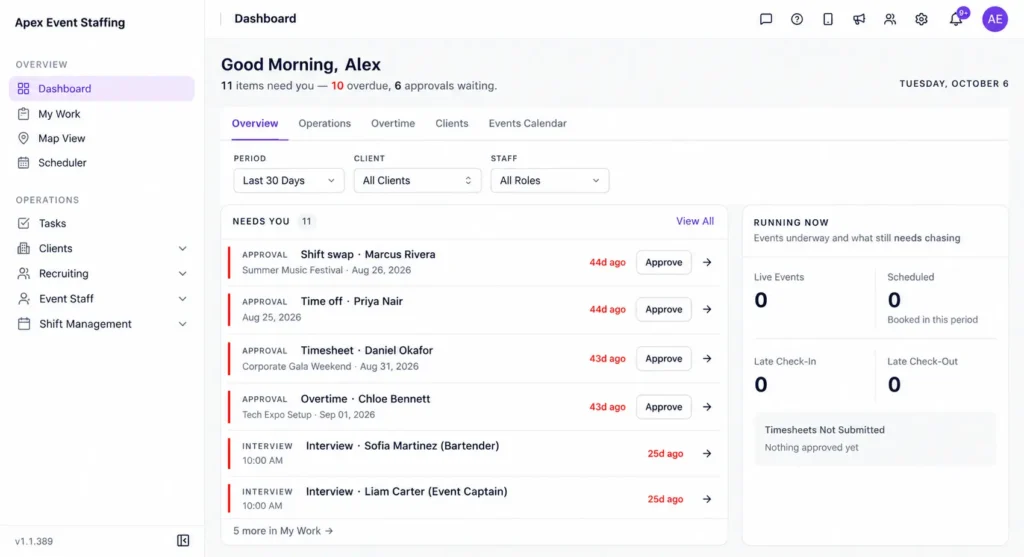
Vars is software that agencies use to run their operations. It is not an event staffing agency. In Vars, rosters, check-in through the mobile app, timesheets, payroll and billing connect, so the hours that feed pay also feed the invoice. For open roles, AI Candidate Matching helps shortlist available, qualified workers, which shortens the time you pay a premium for backfill. Confirm which reports and features your plan includes.
Key takeaway for operations leaders: the budget is only as good as the hours behind it. Connect the hours first, then refine the reports.
FAQ
How do you budget crew costs for an event?
Start from demand by zone and hour, convert to labor hours, apply pay and payroll costs, then add bill rates, margin and a contingency based on past events.
What causes event staffing budgets to overrun?
The usual causes are overstaffing, overtime, last-minute replacements, disputed hours and hours that are never billed.
Can I track labor cost in real time during an event?
Yes, if check-in and scheduling data live in one system. You can compare hours checked in with hours scheduled and watch for overtime.
How big should my contingency be?
Use your own history. Look at how much past events ran over and set a buffer that covers the typical overrun, then agree approval rules with the client.
Do I need software to control event labor costs?
Not for a few small events. Software helps once you run several events or clients and spend time reconciling hours by hand.
How should I price overtime and short-notice hours for a client?
Agree the rate in writing before the event, including who can approve extra hours and when. Rules on overtime pay differ by state and worker classification, so confirm them with your payroll provider.
What is a healthy margin for an event staffing agency?
It depends on your market, your clients and your payroll costs, so use your own history. Calculate margin per assignment for your last few events and set a floor you will not quote below.
How often should I review event labor costs?
Check daily during an event and review budget against actual after each one. A monthly review across events shows the patterns that single events hide.
Should travel and setup time be in the crew budget?
Yes, if you pay for them. Include paid setup, breakdown and travel allowances in the labor hours, and decide with the client how they appear on the invoice.
Conclusion: your next step
Event staffing software budgeting is less about a clever budget sheet and more about connected hours. When the schedule, check-in, timesheets, pay and invoice agree, you can see costs while you can still act on them.
Your next step: take your last event and compare scheduled hours, paid hours and billed hours. Any gap between them is where your margin is leaking. To see these records connected in one platform, book a demo.
Related reading: Event Staff Scheduling Software: A Complete Guide and Event Staffing Software.