The best event staffing software for an agency is the one that carries a shift from roster to pay and client invoice without anyone retyping hours. Most tools on a shortlist are general workforce schedulers, so the real difference is how much of that path each one covers. This guide ranks five platforms on workflow fit, published pricing and the type of agency each one suits.
Last updated: October 2026. Here is the short version:
- Best for agencies that bill clients: Vars, because scheduling, check-in, timesheets, payroll and billing run on connected records.
- Best for simple shift scheduling: Deputy, for small and mid-size teams that schedule their own staff.
- Best for rule-heavy labor control: Humanity, when overtime and scheduling rules drive your risk.
- Best for small fixed-location teams: Planday, for scheduling with payroll reporting and integrations.
- Best for complex multi-site schedules: Shiftboard ScheduleFlex, now part of UKG.
How we ranked these tools. Vars publishes this guide and ranks itself first. We did that for one reason: Vars is built for agencies that staff events for several clients, which is the situation this guide is written for. Every other tool here is a sound choice in a different situation, and each entry says when. Competitor prices and features were checked on public vendor pages in October 2026. Plans change often, so confirm with each vendor before you buy.
What should the best event staffing software actually do?
Start with the work your coordinators do on an event weekend, not with a feature list. Six questions separate tools that look alike in a demo:
- Can it build rosters by zone, role and shift block for multi-day events?
- Can workers confirm shifts and swap them with manager approval?
- How does check-in work, and does location confirmation exist?
- Do approved hours flow into timesheets without retyping?
- Can the same hours drive crew pay and client invoices?
- Can you onboard many temporary workers quickly, including documents?
A tool that answers the first three well and the last three poorly is a scheduler. That can be the right choice for an organizer running its own events. For an agency billing several clients, the last three questions decide your margin.
Pro tip for staffing agencies: give each vendor the same one-page scenario and compare the results side by side. How a tool handles a late change tells you more than how its screens look.
The 5 best event staffing software platforms at a glance
See how Vars covers this for your agency
Scheduling, credentialing, and payroll in one platform.
| Rank | Platform | Best for | Published pricing (Oct 2026) | Check before buying |
|---|---|---|---|---|
| 1 | Vars | Agencies that bill several clients | Ask for a demo for current plans | Which features your plan includes |
| 2 | Deputy | Simple scheduling for small and mid-size teams | Lite $5, Core $6.50, Pro $9 per user per month | Auto-scheduling starts at Core; payroll is a paid add-on |
| 3 | Humanity | Labor rules and overtime control | $2, $3 and $6 per user by plan; Enterprise on request | $60 minimum on the first two plans; confirm billing terms |
| 4 | Planday | Small fixed-location teams | From £2.99 per user; 30-day trial | Minimum of 5 users on Starter; auto-scheduling is on Pro |
| 5 | Shiftboard ScheduleFlex | Complex multi-site scheduling | Not published by the vendor | Request a quote; ask about the UKG roadmap |
These are published list prices for different kinds of product. A per-user scheduler and an agency platform are not priced for the same job, so compare what each price includes, not only the number.
1. Vars: best for agencies that bill clients
Best for: event staffing agencies that run many events, onboard many temporary workers and invoice more than one client.
Vars is software that agencies use to run their operations. It is not an event staffing agency. Where the other tools on this list stop at the schedule, Vars keeps going: the same record that holds the roster also holds check-in, approved hours, pay and the client invoice.
What makes Vars stand out
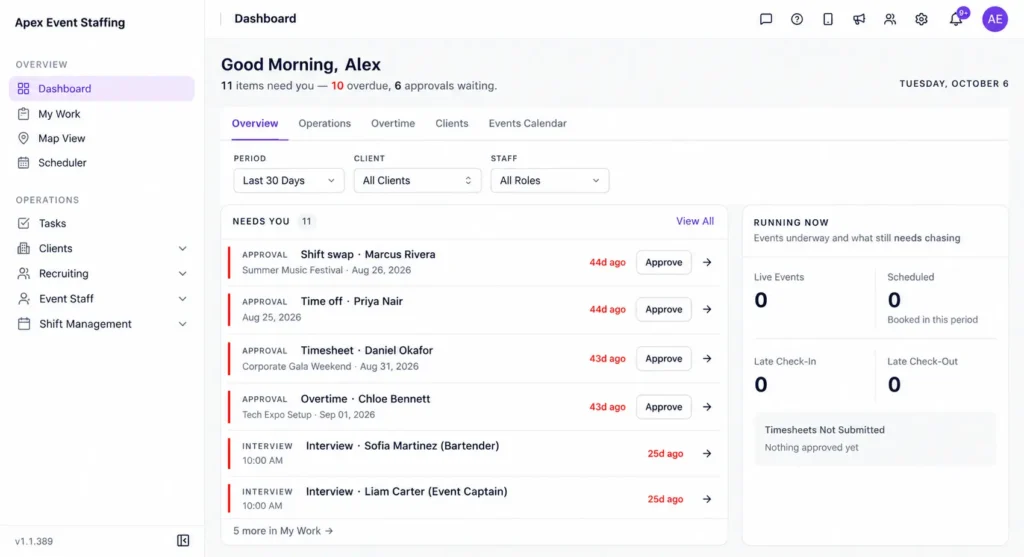
Take a three-day conference with crews across registration, doors and the exhibit floor. The coordinator builds the roster by zone and role and sees conflicts before publishing. Workers check in through the mobile app, which uses a GPS time clock and geofencing, and the coordinator sees arrivals against the roster, with alerts for missed check-ins and late arrivals. Recorded time flows into timesheets that feed payroll and billing, so the Monday after the event is not spent reconciling hours.
Core capabilities
- Scheduling by zone, role and shift block, with conflict checks before publishing
- Shift release and claim by qualified workers, with manager approval
- Mobile check-in with a GPS time clock and geofencing
- Timesheets that feed payroll and client billing from the same hours
- Worker onboarding for large temporary rosters
- AI Candidate Matching to shortlist available, qualified workers for open shifts
Pricing
Vars does not publish a price list. Ask for a demo to get current plans, and confirm which features your plan includes, because availability can vary by plan.
Watch-outs
Vars is built for agencies. If you schedule your own staff at one venue and never invoice a client, you may not need the pay and billing side, and a lighter scheduler could cost less.
Best fit: agencies that want one record from roster to invoice. To see how it handles an event end to end, read about event staffing software for agencies or book a demo.
2. Deputy: best for simple shift scheduling
Best for: small and mid-size teams that need straightforward shift scheduling and time tracking for their own employees.
Deputy is a general scheduling and time tracking tool for hourly work. It is priced per user, which keeps costs easy to predict for a small team.
What makes Deputy stand out
The plans are easy to compare. Lite is $5, Core is $6.50 and Pro is $9 per user per month. Auto-scheduling, biometric face unlock on kiosks and timesheet auto approval start at Core. Deputy also lists its AI features as included in every plan.
Core capabilities
- Shift scheduling and timesheets on every plan
- Auto-scheduling on Core and Pro
- Kiosk time clock, with face unlock from Core
- Timesheet auto approval from Core
- Payroll through a separately priced add-on
Pricing
Lite $5, Core $6.50 and Pro $9 per user per month, with Pro sold through a contact form. Free trials are offered on Lite and Core, and annual billing is listed at a 10% saving. Deputy lists a $30 minimum per invoice. The payroll add-on is listed at $8 per user per month plus a $49 base fee, and SMS messages are charged separately.
Watch-outs
The public pricing page does not describe client invoicing or bulk onboarding of temporary workers. If you bill clients by event, ask Deputy to show how approved hours become an invoice, and price the payroll add-on into your total.
Best fit: teams that mainly need a clear roster and clock-in for their own staff.
3. Humanity: best for rule-heavy labor control
Best for: teams where overtime and scheduling rules drive the risk.
Humanity is a scheduling tool built around rules. Its pricing page says you can set custom rules to guarantee compliance and avoid scheduling unnecessary overtime.
What makes Humanity stand out
The rule engine is the draw, along with a clear three-tier structure. Humanity lists 24/7 support as included in all plans, and it offers biometric time clock hardware with facial and fingerprint recognition as a separate product.
Core capabilities
- Starter: employee scheduling, unlimited locations and roles, SMS and email alerts, mobile apps, availability and time-off management
- Classic: time and attendance, employee skills, task management, payroll exports and integrations, standard reporting
- Professional: API access, forecasting, learning management, custom branding and a dedicated account manager
Pricing
Starter is listed at $2 per user and Classic at $3 per user, both with a $60 minimum. Professional is $6 per user, and Enterprise options are available on request. Humanity notes discounts for paying a year in advance and offers a free trial. Confirm the billing period and minimums on the current page.
Watch-outs
Confirm that the rules match the states and contract types you work with, and ask how approved hours turn into client invoices. A rules-focused scheduler does not replace billing for an agency.
Best fit: employers whose biggest worry is overtime and rule violations.
4. Planday: best for small fixed-location teams
Best for: small teams that work from fixed locations and want scheduling, payroll reporting and integrations.
Planday is a scheduling and workforce tool sold in three tiers, with pricing shown in pounds.
What makes Planday stand out
The entry price is low and the trial is generous: Planday lists plans from £2.99 per user and a 30-day free trial with no credit card required.
Core capabilities
- Starter: scheduling, simple time tracking, working time rules, basic payroll reporting and team communication
- Plus: advanced scheduling, leave and absence management, payroll reporting and integrations, revenue integration and reporting, API access, and employee information and document management
- Pro: custom planning metrics, auto-scheduling, configurable organizational structure, custom permissions and roles, phone support and custom account setup
Pricing
From £2.99 per user on Starter, billed monthly, with a minimum of 5 users. The Plus price is not shown on the page we checked, and Pro is custom. Prices are in GBP, so convert before you compare.
Watch-outs
Auto-scheduling is a Pro feature, which means custom pricing. Planday’s tiers are built around running locations, so ask how it handles many short assignments across clients.
Best fit: small teams with a stable roster and a few locations.
5. Shiftboard ScheduleFlex: best for complex multi-site scheduling
Best for: organizations scheduling changing shifts across several teams and sites.
UKG acquired Shiftboard in 2025, and UKG’s customer information page says both UKG Shiftboard and ScheduleFlex remain active products. Third-party directories describe ScheduleFlex as serving hourly and changing workforces, including staffing and events, with mobile apps, shift swapping and multi-location scheduling.
What makes ScheduleFlex stand out
The focus is scheduling at scale. UKG describes UKG Shiftboard as scheduling for industries where compliance, safety and 24/7 operations cannot be compromised, which suggests a heavier tool than a basic roster app.
Pricing
The vendor does not publish a price list on a page we could reach. Third-party directories show an entry price per feature per month, but we could not confirm it with the vendor, so request a quote and confirm any minimums.
Watch-outs
Because the product now sits under a larger parent, ask about the product roadmap and support, and how it handles pay and client invoicing for an agency.
Best fit: large operations with complex schedules where compliance and coverage matter more than price.
What do general scheduling tools usually miss for agencies?
General schedulers are built for a business that employs its own staff in one or a few locations. An event staffing agency has a different shape: many clients, short assignments and workers who may never have worked with you before. That exposes four gaps:
- Worker onboarding. Collecting documents from hundreds of temporary workers before an event is a workflow of its own.
- Client-level billing. Hours must roll up per client and per event, with approvals, not only per employee.
- Approved timesheets to pay and invoice. If pay and billing run from different numbers, margin leaks.
- Fast backfill. Filling a no-show needs a way to find available, qualified workers, not only a schedule view.
What usually breaks at scale: a general scheduler stretched to cover pay and billing through exports and spreadsheets. It works for one event and strains at five.
How do you choose the right event staffing software?
Many agencies choose from demos without first mapping their own workflow. Answer four questions before you book anything:
- Do you bill clients, or only schedule your own staff? Billing clients points to an agency platform.
- Where do hours get retyped today? The first retyping step is the one to remove.
- How many temporary workers do you onboard before a big event? Large rosters need onboarding built in.
- How many events do you run at once? More concurrent events raise the cost of manual close-outs.
Then match the answers to the tools:
- You mostly need a roster for your own team. Deputy or Planday may be enough, and the pricing is simple.
- Labor rules drive your risk. Look closely at Humanity and confirm the rules fit your states.
- You run schedules across many locations and teams. Ask for a ScheduleFlex quote and test how it handles changes.
- You bill multiple clients and need hours to flow into pay and invoices. Look at an agency platform such as Vars, and test the close-out as carefully as the schedule.
Common operational mistake: choosing on the schedule screen alone. Most demos stop at the roster. Ask to see an approved timesheet become pay and an invoice before you decide.
How do you compare event staffing software prices fairly?
Two habits make price comparisons fairer. First, ask whether the price covers every worker on your roster or only managers, because an agency may carry hundreds of temporary workers who rarely log in. Second, ask what is extra: onboarding, payroll connections, minimums, weekend support and setup help. A low per-user price with several add-ons can cost more than a higher all-in plan, so write each vendor’s total for the same crew size and compare the totals. For the budget side of event work, see our guide to event staffing cost management.
No tool fixes unclear client briefs, thin labor markets or weak supervisors. Software gives you visibility and a reliable record. The event still needs experienced people running it. For the detail behind each step, read our guides on event staff scheduling, check-in for event crews and event payroll and invoicing. If you are weighing gig platforms too, see event staffing software vs gig platforms.
FAQ
What is event staffing software?
Event staffing software helps agencies and organizers build rosters, confirm workers, check crews in, approve hours and, in agency platforms, turn those hours into pay and client invoices.
Is there free event staffing software?
Some vendors offer free trials, and a few offer free tiers for small teams. Check what the trial or free tier includes, because limits on users and features are common.
What is the difference between event staffing software and a scheduling app?
A scheduling app builds rosters. Event staffing software for agencies also covers worker onboarding, check-in, approved timesheets and client billing from the same record.
How much does event staffing software cost?
Per-user schedulers publish prices from a few dollars per user per month, as the table above shows. Agency platforms vary by features and size. Compare what each price includes, and write a total for your own crew size.
How long does implementation take?
It depends on your roster size, whether you migrate existing worker data and which payroll connections you need. Ask each vendor for a written timeline based on your numbers, not a general estimate.
Which features matter most for event crews?
Rostering by zone and role, shift confirmation and swaps, mobile check-in with location confirmation, approved timesheets, and onboarding for many temporary workers. For agencies, add pay and client billing from the same hours.
How can software help reduce event no-shows?
Shift confirmations and reminders help, and so do check-in alerts that show who has not arrived. A way to find available, qualified backups quickly turns a no-show into a short gap instead of a missed post.
How many options should we demo?
Two or three. Give each the same scenario, including an agenda change and a no-show, and compare how the close-out works.
Can a small agency start with a general scheduler?
Yes, if you run few events and bill few clients. Revisit when you manage several clients at once or spend a day each week reconciling hours.
The bottom line for event staffing agencies
The best event staffing software is the one that holds up on your own events and closes the loop from hours to pay and invoices. A scheduler is enough when you only need a roster. When you bill clients, judge the tools on the Monday after the event, not the weekend itself.
Your next step: write a one-page scenario from your last event, with an agenda change, a no-show and a disputed hour, and ask each vendor to run it. To see it handled in Vars, book a demo.
Related reading: Conference Staffing Schedule and Pay and Bill Software for Staffing Agencies.