A staffing forecasting tool helps an agency estimate how many workers it will need, in which roles and when, so recruiting, onboarding and scheduling start before orders arrive. Forecasting is not prediction magic. For most agencies, it means combining what clients tell you, what your own history shows and what the calendar suggests, then keeping a ready pool sized to match. This guide covers how to forecast for event, warehouse and on-demand work, and what to do when the forecast is wrong. The warehouse staffing software page shows how this applies to your segment.
Event agencies can see how crews, check-in and scheduling fit together in event staffing software.
Why does forecasting matter for staffing agencies?
An agency sells availability. A shortage means missed orders. A surplus means workers waiting without hours and lost goodwill. You can see how this works in practice on the labor management system page.
- Recruiting takes time. You cannot hire fifty people in a day.
- Onboarding takes time. Documents and checks need days.
- Clients plan late. Orders often arrive with short notice.
- Demand swings. Seasons, events and promotions create peaks.
- Cost of a miss is high. A missed order can cost the client relationship.
What usually breaks at scale: The agency forecasts by instinct. It works while one person knows every client, and fails when volume and staff grow.
What inputs should you use to forecast staffing demand?
See how Vars covers this for your agency
Scheduling, credentialing, and payroll in one platform.
Use several sources and compare them.
| Input | What it tells you |
|---|---|
| Client commitments | Known events, peaks and ongoing orders |
| Historical orders | Seasonal patterns by client, role and site |
| Calendar | Holidays, school terms, trade shows and festivals |
| Pipeline | Likely new clients and the volumes they bring |
| Fill and no-show rates | How many workers you need to schedule to cover one position |
| Lead times | How long recruiting and onboarding take for each role |
None of these is perfect. Together they give a range.
Common operational mistake: Forecasting only from last year’s totals. A client who doubled its volume or left entirely makes last year’s number misleading.
How do you build a simple eight-week forecast table?
Start with a table you can maintain in a spreadsheet, and keep it to the information that triggers action. The figures below are placeholders to show the structure:
| Week | Client or event | Role | Workers needed, with buffer | Cleared and available | Gap |
|---|---|---|---|---|---|
| 1 | Conference | Registration | 12 | 10 | 2 |
| 1 | Warehouse client | Pickers | 20 | 24 | none |
| 2 | Festival | Gate staff | 40 | 22 | 18 |
| 3 | On-demand pool | Mixed | 15 | 15 | none |
Color or flag any gap above zero, and attach an owner and a date to each one. The point of the table is the conversation it forces: who is recruiting for the festival gate staff, and by when do they need to be cleared?
Update it weekly. A table that is updated monthly is already out of date.
How do you forecast for event staffing?
Event demand is lumpy and calendar driven.
- Build a calendar of known events from client commitments and public schedules.
- Estimate crew size per event from similar past events and the client’s brief.
- Account for ramp-up: setup and teardown days often need different roles.
- Plan for overlap: several events in the same week compete for the same workers.
- Hold standby capacity for each role.
Review the calendar weekly, and update the forecast as events are confirmed, resized or cancelled.
How do you forecast for warehouse and light industrial work?
Warehouse demand follows production cycles, seasons and client promotions.
- Ask clients for their peak calendar, including promotional periods and inventory cycles.
- Look at weekly patterns, such as heavier shipping on certain days.
- Track lead time between order and start date.
- Plan onboarding capacity. A peak is limited by how many workers you can clear, not only how many you can find.
- Monitor attendance, since no-shows change how many you must schedule.
Pro tip for staffing agencies: Share your own forecast with each client and ask them to correct it. Clients often have information they never think to share until you ask.
How do you forecast for on-demand work?
On-demand work is the hardest to predict, because requests arrive close to the shift.
- Track patterns: days, times and roles that regularly see requests.
- Measure response time: how quickly you could fill similar requests in the past.
- Keep an engaged pool of workers who have agreed to be available at short notice.
- Watch signals, such as weather, local events and client announcements.
- Review weekly, and adjust your pool size based on fill and no-show data.
For on-demand work, the goal is not to predict each shift. It is to size the ready pool well enough that most requests can be filled. For more on this, see our guide to building a conference staffing schedule.
How do you turn a forecast into recruiting and onboarding plans?
A forecast is useful when it triggers action.
- Convert demand to worker counts per role and week, adding a buffer for no-shows.
- Compare with your ready pool, meaning cleared and available workers.
- Identify the gap by role and date.
- Set recruiting and onboarding targets that start early enough to close the gap.
- Review progress weekly, and adjust.
Key takeaway for operations leaders: A forecast that does not change what you recruit or onboard this week is a report, not a plan.
What should you do when the forecast is wrong?
It will be wrong sometimes. Be ready for both directions.
- Shortfall: use your standby list, re-engage past workers, ask the client about flexibility and notify clients early.
- Surplus: offer hours on other clients’ orders where qualified, and keep workers informed.
- Review afterwards: compare forecast to actual, find what changed and update your inputs.
Accuracy improves when you track the gap between forecast and actual for each client and role.
How do you forecast for a new client or a new site?
You have no history for a new client, so borrow it. Start with similar clients or sites you already serve, and ask the new client for the same inputs: volumes, peak dates, shift patterns and how much notice they usually give. Forecast conservatively at first, with a wider range, and tighten it as real orders arrive. Review the first four weeks closely. The gap between forecast and actual in that period teaches you the most about the client’s real pattern.
How do you measure whether your forecast is any good?
A forecast improves only if you check it. Each week, compare what you expected with what happened, by client and role, and record two things: how far off you were and in which direction. Consistently too high means you are carrying more pool than you need. Consistently too low means you are missing orders. Look for patterns, such as one client whose orders always land late in the week or a role that is always short in the same season. Fix the input that caused the miss, not just the number.
How does Vars support demand planning?
Vars is software that agencies use to run their operations, and it is not a staffing agency. For planning, Vars brings scheduling, onboarding status, job orders and worker availability into one place, so you can see how many cleared workers you have against upcoming demand. AI Candidate Matching and the AI Voice Recruiter can help you reach and shortlist more candidates when the gap needs closing. See the staffing and scheduling and event staffing software pages for related workflows. You can see how this works in practice on the AI Voice Recruiter page.
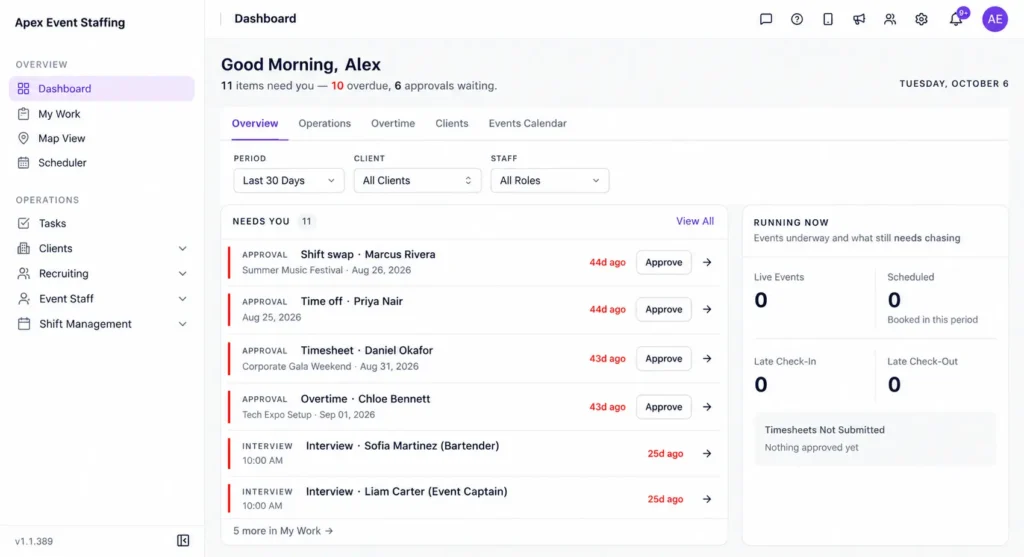
Confirm what forecasting or planning reports are in your plan before relying on them. Software can show you your pool and your orders. The judgment about what demand will do is still yours.
How do you plan for seasonality and one-off peaks?
Seasonal peaks, holidays and big events change demand sharply. Mark them on the same calendar as your forecast, with the client, the dates and the workers needed. Work backward from each peak to find when recruiting, onboarding and checks must start, and add those dates to the calendar too. For one-off peaks, ask whether the client can give you earlier notice in exchange for a guaranteed fill, which helps both sides. After each peak, note what the real demand was, so next year’s plan starts from facts.
Who should own the forecast, and how often should it be reviewed?
Give the forecast one owner, usually an operations or recruiting lead, and make updating it part of a weekly meeting. Keep that meeting short: review the gaps by role and date, confirm who is recruiting and onboarding to close each one, and note any client changes. Account managers should bring what clients have told them, because they often hear about peaks before orders arrive. A forecast with no owner turns into a document nobody reads. For event demand specifically, see our guide to conference staffing schedules and festival staffing.
What should you fix first, and what can wait?
- A record of orders and fills by client, role and week.
- A calendar of known peaks from clients.
- A ready-pool count by role.
- A weekly review of forecast against actual.
- Later: more detailed models and scenario planning.
What mistakes do agencies make when they forecast demand?
- Trusting last year’s numbers without adjusting for client changes.
- Ignoring lead times, so the forecast says you need workers you cannot onboard in time.
- Not tracking the gap between forecast and actual.
- Forecasting by total headcount instead of by role and week.
- Keeping the forecast with one person.
Share the forecast with recruiting, onboarding and scheduling, and review it weekly. A shared forecast prompts earlier action. You can see how this works in practice on the candidate onboarding page.
FAQ
How far ahead should a staffing agency forecast?
As far as your recruiting and onboarding lead times require, and further for known seasonal peaks.
Can small agencies forecast without special tools?
Yes. A simple calendar and a record of past orders go a long way.
How do we forecast for a new client?
Ask for expected volumes and timelines, then use a conservative estimate and adjust quickly as orders arrive.
What is the best way to avoid last-minute shortages?
Keep a ready pool and standby list sized to your recent no-show and fill patterns.
What is a ready pool in staffing?
It is the group of workers who are fully onboarded, cleared and available to take shifts at short notice. Forecasting compares expected demand with the size of this pool by role.
How often should we update a staffing forecast?
Weekly is a good rhythm for most agencies, with extra updates when a large order is confirmed or cancelled. A forecast updated monthly is usually too slow to guide recruiting.
How do we know our forecast is accurate?
Compare forecast with actual orders and fills each week, by client and role. Look at the size and direction of the gap, then fix the input that caused it.
Should we forecast by client or by role?
Both. Client-level forecasts catch changes in demand, and role-level forecasts tell you who to recruit and onboard. Keep the two tied together in one table.
Conclusion: your next step
A staffing forecasting tool helps most when it is tied to action: recruit, onboard and schedule ahead of demand. Combine client information, history and the calendar, and compare forecast against actual every week.
Your next step: build a simple table for the next eight weeks with expected orders, workers needed and cleared workers available, by role. The gaps show where to start recruiting. To see scheduling, onboarding and availability in one view, book a demo.