Daycare Management Software for Staffing, Hours and Payroll
Vars helps daycare directors schedule staff, keep certifications current, track hours from a phone and run payroll from the same record. Use it alongside any family-facing app for enrollment and parent messaging.
- Open shifts filled from one schedule
- Certifications and expiry dates tracked for every staff member
- Hours tracked on mobile feed straight into payroll





What Is Daycare Management Software?
Daycare management software helps a center run its day: enrolling families, tracking children, communicating with parents and managing staff. Many centers use one tool for the family side and another for staff scheduling, hours and payroll. Vars is built for the staff side of the center. You may also see it called daycare software or a daycare management system.
Prefer a full comparison? Use our daycare management software checklist or the complete buyer’s guide.
What to Look For in Daycare Management Software
Use these six questions on any vendor, including us.
Staff scheduling and coverage
Can you see who is working where, and fill a gap without a round of texts?
Certification tracking
Does it warn you before CPR, first aid or training dates expire?
Time tracking that matches payroll
Are hours captured once, or retyped between systems?
Payroll you can review
Is pay data clear enough to check and export without rework?
Mobile access for staff
Can staff view shifts and clock in from their own phones?
Clear pricing and support
Do you know what is included and how setup works? Ask for a quote on a demo call.
Where Daycare Staffing Gets Hard
These problems show up on the schedule long before they reach parents.
Call-outs leave rooms short
When someone calls out, the director starts texting. Coverage depends on who answers first.
Expired certifications
Renewal dates sit in folders and calendars, and get found at the worst moment.
Paper timesheets
Handwritten hours get re-typed, questioned and corrected every pay period.
Payroll corrections
Small errors in hours turn into fixes in the next check and unhappy staff.
Daycare Staff Scheduling Software and Time Tracking in One Record
Keep the schedule and the time record in the same system, so the hours you approve are the hours you pay.
Build schedules by location and role
Set up shifts once and adjust as plans change.
Fill open shifts from a phone
Staff see available shifts and respond without a phone tree.
Approve hours before payroll
Review recorded time, then send clean data to payroll.

Key Features of Daycare Management Software for Staff
Family apps cover enrollment and parent messaging. These are the staff-side features Vars covers.

Staffing and scheduling
Plan shifts, see coverage and fill gaps from one schedule.
Scheduling softwareOnboarding and credentials
Collect documents and keep certifications and expiry dates in one place.
Onboarding softwareMobile timekeeping
Staff record hours on their phones and supervisors review them.
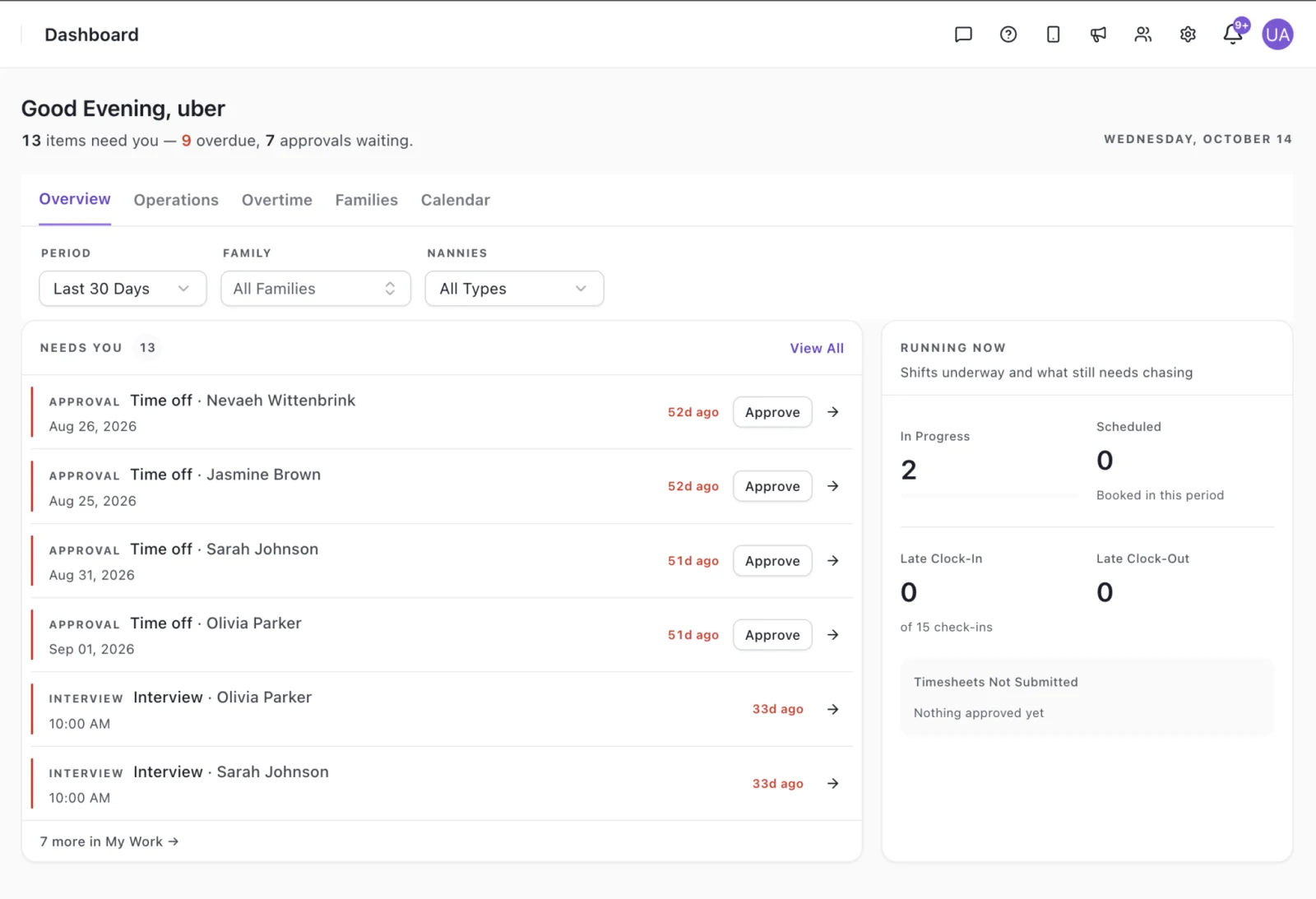
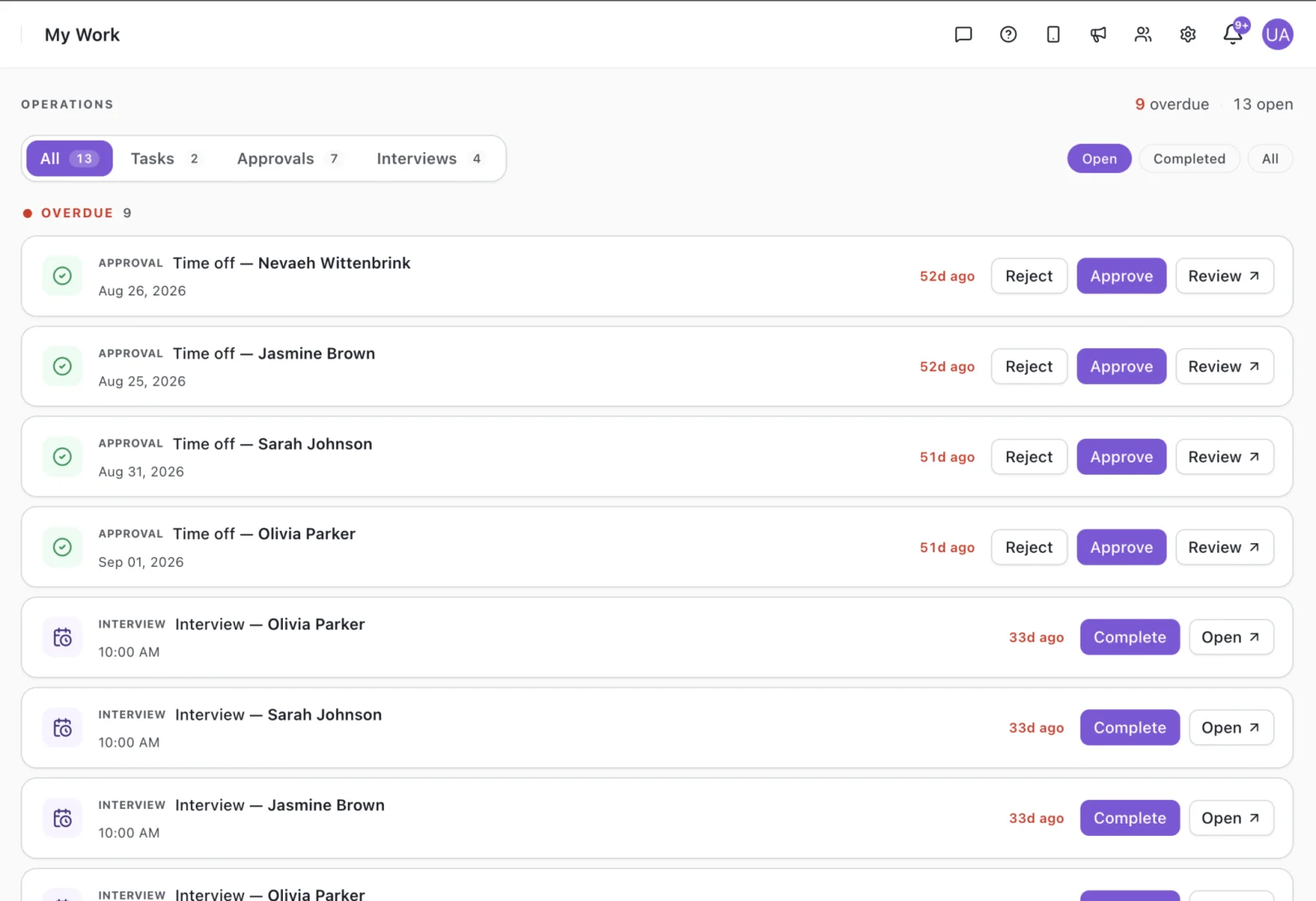
Timekeeping softwareSee the Staff Schedule and Approvals in the Product
Screens from the Vars platform, shown with demo data.
Benefits of Daycare Management Software for Directors
What the staff side looks like with the right tool.
Less time on call-out coverage
Open shifts go to staff on their phones, not through a phone tree.
Fewer lapsed certifications
Expiry dates sit with each staff record, so renewals are planned.
No paper timesheets
Staff record hours on mobile and supervisors review them.
Payroll from reviewed hours
Approved time becomes payroll-ready data without retyping.
Self-service for staff
Staff check their own shifts and hours instead of asking the office.
One view across locations
See coverage and hours for every site in the same place.
From Schedule to Payroll in Four Steps
Add staff
Bring in staff and their credentials.
Build the schedule
Create shifts and fill open ones.
Track hours
Staff record time on mobile.
Review and pay
Approve hours and run payroll.
Your Daycare Software Stack
Most centers need more than one tool. Here is who does what.
| Job | Family-facing daycare app | Vars | Spreadsheets |
|---|---|---|---|
| Enrollment and waitlists | Core strength | Not the focus | Manual |
| Child check-in and parent messaging | Core strength | Not the focus | Not available |
| Staff scheduling and coverage | Varies by product | Included | Manual |
| Certification tracking | Varies by product | Included | Manual |
| Hours to payroll | Varies by product | Included | Re-typed by hand |
Features vary between products. Check any vendor against your own requirements.
How Much Does Daycare Software Cost?
Daycare software pricing depends on the product type. Family-facing apps are often priced by enrolled children or by center, while workforce tools are priced by staff or by active users.
Add-ons such as payroll, extra locations or onboarding can change the total.
Before you compare quotes, ask what setup costs, which modules are included, how support works and how the price changes as you add staff or sites. Compare the total cost of the tools you need to cover both sides of the center, not only the sticker price of one.
Vars pricing depends on your team size and the modules you use. Book a demo for a quote.
Book a demoWhy Many Centers Use Two Tools
Family-facing apps are built around the child: who is in the room, what they ate, when they were picked up. Staff scheduling, certifications and payroll are built around the employee. They are different records, used by different people, on different days.
Runs the child and parent side
- Enrollment
- Child check-in
- Parent messaging
Runs the staff side
- Scheduling
- Certifications
- Hours
- Payroll
Most centers use both.
That is why many directors keep their family app and add workforce software for the staff side, instead of expecting one product to cover both. The staff schedule and pay record are useful on their own.
- 1Start with a staff list and each person’s certification dates.
- 2Build one week of the schedule and compare it with how you cover shifts today.
- 3Run one pay cycle in parallel before you switch over.
- 4Roll out to the rest of your locations once the first cycle matches.
How to Choose Daycare Management Software
Start by naming the problem. If rooms are short on call-outs and payroll needs fixing every cycle, begin with the staff side. If families are chasing you for updates, begin with the family side.
Then build a shortlist, ask each vendor to demo your own scenarios, and plan how training and data will move over. Our daycare management software checklist covers the questions to ask.
- 1
Assess your needs and agree a budget with the people who will use the tool.
- 2
Shortlist vendors that cover those needs, not every feature.
- 3
Request demos using your real schedules and pay rules.
- 4
Plan training, data transfer and who owns the rollout.
Keep Researching Before You Decide
Browse the buyer’s guide for daycare centers, the features checklist and an overview of daycare software systems. If you also run a childcare agency, see childcare management software for operators.
Hear From a Team Using Vars
In under two minutes, a Vars customer shares their experience running their staffing operations on the platform, in their own words.
Frequently Asked Questions
Daycare management software helps a center run its day: enrolling families, tracking children, communicating with parents and managing staff. Many centers use one tool for the family side and another for staff scheduling, hours and payroll. Vars is built for the staff side.
It depends on the job. Family-facing apps lead on enrollment, child check-in and parent messaging. Workforce software like Vars is built for staff scheduling, certifications, hours and payroll. Many centers use both, so decide which side of the center hurts most first.
Pricing differs by product and usually depends on the number of staff or children, the number of locations and the modules you add. Ask each vendor about setup, support and what changes as you grow. For Vars, book a demo.
For the staff side: scheduling and coverage, certification tracking, mobile time tracking and payroll-ready hours. For the family side: enrollment, child check-in and parent messaging. Match the list to the problems you have today.
Often, yes. Family-facing apps handle enrollment, child check-in and parent messaging. Workforce software like Vars handles staff scheduling, certifications, hours and payroll. Centers commonly use both.
Not if you rely on that app for child check-in, enrollment or parent messaging. Vars covers the staff side of the center, so many directors use it alongside their existing app.
Yes. You can keep staff credentials and their expiry dates in one place, so renewals do not catch you by surprise.
Yes. Staff can view shifts and record their hours in the Vars mobile app, and those hours feed payroll.
See How Vars Fits Your Center
Book a short demo and we will walk through scheduling, hours and payroll for a team like yours.
Book a DemoRead the Buyer’s Guide