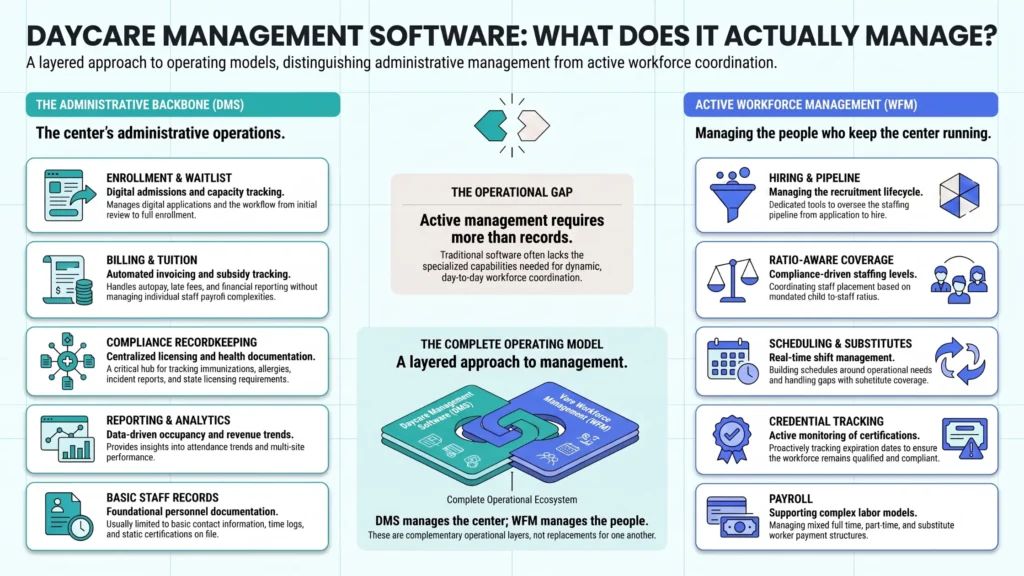
Daycare management software is the administrative backbone of a childcare center the system a director uses to manage enrollment, tuition, compliance documentation, and day-to-day reporting. It’s the operational layer, not just the parent-facing app; think of it as the director’s dashboard rather than the parent’s phone screen.
Below, we break down the core modules, who inside a center actually touches each one, how implementation typically unfolds, and where the category consistently falls short once an operation grows past a single small site.
What modules make up daycare management software?
| Module | What it does | Who uses it most |
|---|---|---|
| Enrollment & waitlist | Digital applications, capacity tracking, admissions workflow | Director / front office |
| Billing & tuition | Invoicing, autopay, late fees, subsidy tracking | Director / bookkeeper |
| Compliance recordkeeping | Immunizations, allergies, incident reports, ratios on file | Director for licensing visits |
| Reporting & analytics | Occupancy, revenue, attendance trends | Owner / multi-site operator |
| Basic staff records | Time logs, contact info, sometimes certifications on file (read-only) | Director, but rarely actively managed |
Notice what’s largely missing from that table: active staffing management. Most daycare management software treats staff as a line item in reporting, not as something the system actively manages no ratio-aware scheduling, no credential-expiration alerts, no payroll for a mixed staff of full-time, part-time, and substitute workers.
Common operational mistake: Assuming the “staff” tab inside daycare management software will scale past a single small center. It’s usually built for basic time logging, not for the scheduling and compliance complexity of a growing operation.
How does a typical implementation of daycare management software unfold?
See how Vars covers this for your agency
Scheduling, credentialing, and payroll in one platform.
Most directors underestimate the compliance-documentation migration step specifically. Moving from paper files or a legacy system to a new daycare management software platform means re-entering or importing immunization records, incident-report histories, and licensing documentation for every currently enrolled child a step that’s easy to underestimate in a rollout timeline and often takes longer than the billing-system migration itself.
A realistic sequence looks like: enrollment and billing data migrated first (since these affect cash flow immediately), compliance records migrated second (often in parallel with staff training), and reporting/analytics configured last, once historical data has populated the system enough to be useful.
Is daycare management software different from a childcare management app?
Mostly it’s a framing difference: “app” tends to describe the mobile, parent-facing experience of the same underlying system, while “management software” describes the admin dashboard. We cover this distinction in more detail in Childcare Management App: What It Is and Why Daycares Use One.
How do multi-site operators use daycare management software differently?
One operations lead at a multi-location childcare network told us the reporting and compliance modules were the reason they adopted daycare management software in the first place being able to pull licensing documentation across five sites in minutes instead of days, standardizing incident-report formats across locations that previously each had their own paper process. But the same operator described staffing as the part they’d since built entirely outside the software, using a separate scheduling and payroll system because the built-in staff module couldn’t handle ratio requirements across sites, let alone track which certifications were valid in which state.
What should you evaluate specifically for compliance and licensing needs?
- Whether compliance reports export in the exact format your state licensing agency requires, not a generic template
- Whether the system flags upcoming immunization or certification expirations proactively, rather than only reporting after the fact
- Whether incident reports can be filed and stored in an audit-ready format directly from a classroom tablet
- Whether historical compliance data remains accessible if you switch systems later
Where does workforce management fit alongside daycare management software?
This is a process change, not just a software problem; even the best daycare management software won’t fix a staffing process that’s still running on spreadsheets and text threads. A dedicated platform like Vars handles the workforce layer specifically: hiring, scheduling around ratio requirements, credential tracking, and payroll running alongside your daycare management software rather than replacing it.
How does daycare management software integrate with other tools a center already uses?
Most daycare management software platforms offer at least basic integrations with common accounting tools like QuickBooks, and some connect with payment processors directly for billing. Integration depth varies significantly, though some platforms offer a genuine two-way sync, while others require manual export/import between systems. Ask specifically about which integrations are native versus which require a third-party connector or manual workaround, since this affects your actual day-to-day workflow more than the marketing page suggests.
What ongoing costs beyond the subscription should directors budget for?
Beyond the base subscription, centers commonly encounter costs for premium compliance-reporting add-ons, SMS/text messaging credits for parent notifications, payment-processing fees on tuition transactions (often 2-3% per transaction, similar to standard card processing), and occasionally per-additional-user fees as staff counts grow. None of these are hidden exactly, but they’re also not always front-and-center in initial pricing conversations, so it’s worth asking a vendor for an itemized list rather than just the headline subscription number.
How does daycare management software handle subsidy and third-party payment programs?
Many centers serve families using state or federal subsidy programs, employer childcare benefits, or military/government assistance, each with different documentation and reimbursement requirements. Stronger daycare management software platforms handle these payment types natively, tracking partial payments and reimbursement status separately from standard parent-paid tuition. Weaker platforms treat subsidies as a manual workaround, which creates real reconciliation work for whoever handles billing each month worth testing directly during a demo if subsidy families make up a meaningful share of your enrollment.
What role does customer support play once a center is fully onboarded?
Support needs shift after the initial onboarding period early on, centers need hands-on implementation help, while ongoing needs are usually lighter but time-sensitive, like a billing error needing same-day resolution during an active pay period. Ask vendors specifically about post-onboarding support channels and typical response times, not just the white-glove treatment during the sales and implementation process, since that’s a poor predictor of year-two support quality.
What happens to daycare management software data during a licensing audit or inspection?
During a state licensing visit, inspectors typically want to review specific records on the spot current ratios, immunization compliance, incident history for a given period. A center’s ability to pull these records quickly and in the format an inspector expects can meaningfully affect how smoothly a visit goes. This is worth testing directly during a vendor demo: ask to see exactly how compliance records would be pulled up live in front of an inspector, not just described in the abstract, since the difference between a two-click report and a multi-step manual export matters considerably in that moment.
How do owner-operators without a background in software procurement typically approach this decision?
Many daycare owners come from an early-childhood-education or business background rather than a software or operations background, and that’s a completely normal starting point not a disadvantage. The most effective owners in this position tend to lean on structured evaluation frameworks (like the checklist in this cluster) rather than trying to become software experts themselves, and they lean on their own staff’s daily experience as the most reliable signal of what’s actually working, more than any vendor’s feature pitch.
Frequently Asked Questions
How should I test compliance reporting before choosing a platform?
Ask to see records pulled up live during a demo, the way you’d need to during an actual licensing inspection, rather than relying on a description alone.
Does daycare management software handle subsidy or third-party payments well?
It varies significantly by vendor stronger platforms track subsidy and reimbursement payments natively, while weaker ones require manual reconciliation. Test this specifically if subsidy families are a meaningful share of enrollment.
What kind of ongoing support should I expect after onboarding is complete?
Support needs shift from hands-on implementation help to faster response times for time-sensitive issues like billing errors ask about post-onboarding support specifically, not just the sales-process experience.
What’s the difference between daycare management software and a childcare app?
Largely framing “management software” usually refers to the admin/director dashboard, while “app” refers to the mobile, parent-facing experience. Most vendors bundle both under one product.
Does daycare management software handle payroll?
Rarely beyond basic time logging. Full payroll for a mixed staff of full-time, part-time, and substitute workers typically requires a separate system.
How do multi-site centers manage compliance across locations?
Most daycare management software centralizes compliance recordkeeping (immunizations, ratios, incident reports) across sites, which is one of its strongest use cases for multi-location operators.
Is daycare management software worth it for a single small center?
Often yes for compliance and billing alone, even before staffing complexity justifies a separate workforce tool.
How long does compliance-data migration typically take when switching daycare management software?
Often longer than billing migration plan for several weeks to properly re-import or verify immunization records, incident histories, and licensing documentation for every enrolled child.
Can daycare management software alert directors to expiring staff certifications?
Rarely in a meaningful way most platforms store the record but don’t proactively flag upcoming expirations the way a dedicated workforce platform does.
Conclusion
If you’re weighing whether your center needs a dedicated staffing layer alongside your daycare management software, the fastest gut-check is this: pull up how you currently track staff credentials and ratios. If the answer is a spreadsheet, see how Vars handles that specifically.