Most staffing agencies start on QuickBooks or Xero, and that’s usually fine for the first year or two, before staffing accounting software becomes worth the switch. It stops being fine somewhere around 15 to 20 active clients, once payroll and billing need to reconcile weekly, gross margin per client account becomes the number that actually matters, and a bill rate minus pay rate spread doesn’t map cleanly to a standard chart of accounts built for businesses with fixed headcount and stable revenue.
We looked at four options agencies actually consider once they hit that wall: Vars, QuickBooks/Xero, TempWorks, and Sage Intacct.
Why Does Generic Accounting Software Stop Working for Staffing Companies?
Staffing revenue doesn’t look like normal business revenue. It varies weekly with worker hours. Accounts receivable spans dozens of clients on different payment terms. Payroll has to reconcile with billing to the penny, every pay period, because both numbers come from the same worked hours. And the single most important financial metric in the business, gross margin per client account, isn’t something a standard chart of accounts was built to surface.
Common operational mistake: treating payroll and billing as two separate processes that happen to use similar numbers. When they’re entered separately, even from the same source timesheet, someone ends up reconciling the two by hand every week, and that reconciliation work is exactly where errors creep in.
What Should Actually Matter When Choosing Accounting Software for a Staffing Company?
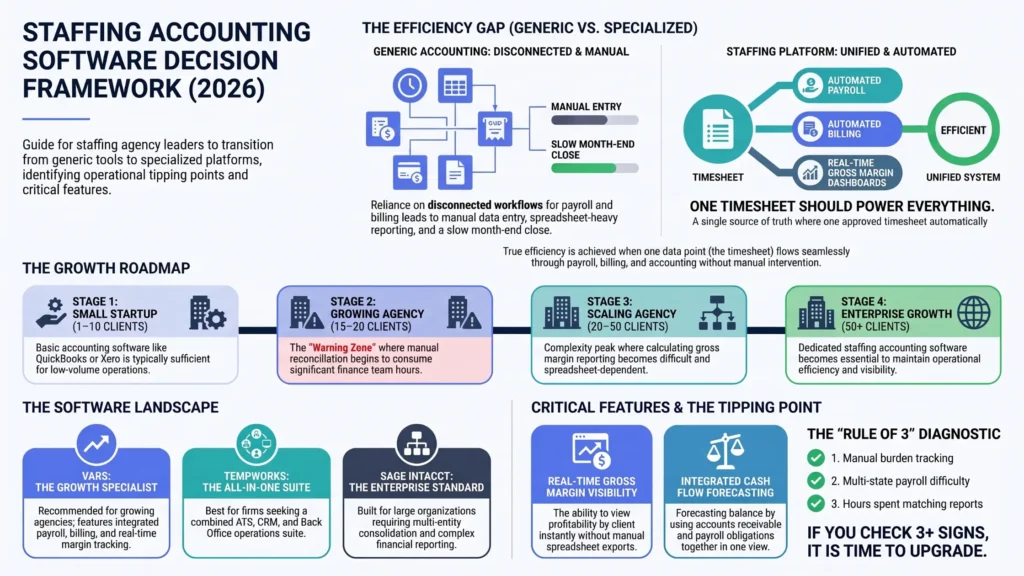
Three things ahead of everything else: whether payroll and billing both derive from the same approved timesheet record instead of two separate data entries, whether gross margin per client account shows up as a real-time number instead of a manually-built custom report, and whether the system can forecast cash flow using both upcoming payroll obligations and expected AR collections together, since staffing cash flow timing matters here as much as the payroll and billing side of the business.
Best Accounting Software Options for Staffing Companies in 2026
1. Vars
Vars connects timekeeping, payroll, and billing so that every financial record traces back to a single approved timesheet, with no parallel data entry and no weekly reconciliation step, the same shared record behind timekeeping and billing. Payroll runs automatically from approved hours, calculating gross pay, deductions, and employer burden, while client billing and AR draw from that same record, the same connected data behind staffing payroll services. Gross margin per client account updates in real time rather than requiring a custom report, and AR aging and collections are automated off the same billing data, so a finance team isn’t manually cross-checking three different sources to answer “what’s our margin on this account this month.”
2. QuickBooks / Xero
QuickBooks and Xero are where most staffing agencies start, and for a very small shop with a handful of clients, that’s a reasonable place to be. Both are affordable, well-supported, and familiar to almost any bookkeeper or accountant you’d hire. Where QuickBooks/Xero Fits: agencies under roughly 15 clients with simple, uniform billing terms. The tradeoff shows up exactly where staffing-specific platforms are built to solve it: multi-client AR becomes a spreadsheet-and-workaround exercise, payroll-billing reconciliation is a manual weekly task, and gross margin by account requires custom reporting pulled from multiple sources rather than a built-in view.
3. TempWorks
TempWorks is a staffing-specific front-and-back-office platform with payroll, invoicing, AR, and W-2 management built in alongside its ATS and CRM functions, and it’s been serving staffing agencies for over 25 years. Pricing starts around $125 per month. Where TempWorks Fits: agencies wanting one vendor that covers recruiting through payroll funding in a single system, particularly in light industrial, clerical, IT, and professional staffing. It’s a genuinely staffing-native option, though agencies should weigh it against a narrower, accounting-first platform if the back-office finance workflow is the main pain point rather than the full front-office suite.
4. Sage Intacct
Sage Intacct is a serious multi-entity accounting platform built for dimensional reporting, real-time consolidation across legal entities, and depth that most staffing agencies won’t need until they’re running multiple subsidiaries or crossing roughly $20 million in revenue. Implementation alone typically runs $40,000 to $120,000 in the first year. Where Sage Intacct Fits: larger staffing operations with multiple legal entities that need consolidated financial statements. It is not staffing-native, though, so bill rate and pay rate spread calculations, and timesheet-driven billing, still need to be built or integrated separately rather than coming out of the box.
How Do You Know When It’s Time to Move Off Generic Accounting Software?
The signal isn’t client count on its own, it’s what that client count is doing to your close process. Key takeaway for operations leaders: if closing the books every month means someone manually reconciling payroll against billing, building a gross margin report by hand from three exports, or guessing at next month’s cash position because payroll obligations and AR collections live in different views, that’s the actual cost of staying on generic software, not a vague sense that a new tool might be nicer.
What Does Switching Accounting Systems Actually Involve?
Pro tip for staffing agencies: run the new system in parallel for one full pay cycle before cutting over completely. Pick your most typical client accounts, not your simplest ones, and reconcile the new system’s output against your old process by hand for that one cycle. This surfaces mapping issues (a bill rate structure that didn’t translate cleanly, a burden calculation that’s off by a percentage point) while you still have the old system as a check.
A full transition, including historical data migration and a closed books comparison, usually takes four to eight weeks for a mid-size agency. The finance team’s time relearning the close process is the real cost here, more than the software itself, which is exactly why the parallel-run period matters more than picking the platform with the longest feature list.
Why Does Burden Rate Calculation Break in Generic Accounting Software?
Bill rate minus pay rate looks like gross margin, but it isn’t the real number, and this is one of the most common mistakes agencies make when they try to force staffing math into a standard chart of accounts.
The real spread has to account for burden: employer payroll taxes, workers’ compensation premiums, unemployment insurance, and any benefits contributions tied to that worker’s hours. Two client accounts with identical bill rates and pay rates can have meaningfully different actual margins if one involves a job classification with a much higher workers’ comp rate.
Generic accounting software has no native concept of burden calculated per worker, per job classification, per state. Agencies running QuickBooks or Xero typically build a spreadsheet-based burden multiplier and apply it manually, which works until rates change (which they do, often annually) or until someone forgets to update the multiplier for a specific classification and a client account’s reported margin quietly becomes wrong for months before anyone notices.
Pro tip for staffing agencies: if you’re still calculating burden in a separate spreadsheet from your core accounting system, that’s usually the single clearest sign you’ve outgrown generic software, even before AR or reconciliation pain shows up.
How Do Multi-State Placements Complicate Staffing Accounting?
A staffing agency placing workers across state lines runs into a compliance layer most generic accounting tools were never built to handle: state income tax withholding, unemployment insurance rates, and workers’ comp classifications all vary by state, and a worker who takes a short assignment in a different state from where the agency is registered can trigger a new state tax registration requirement.
This shows up as a real accounting problem, not just an HR one, because it changes which tax rates and burden calculations apply to which hours on which invoice. A finance team manually tracking which worker was in which state for which pay period, on top of everything else, is exactly the kind of manual cross-referencing that a connected, timesheet-driven system is built to eliminate, since the location data already exists at the point the hours were logged.
Common operational mistake: assuming a worker’s home state and their assignment state are the same for tax purposes. Agencies operating across state lines need software that tracks assignment location per timesheet, not just a static address on file.
Frequently Asked Questions
What features actually matter most in staffing accounting software?
Payroll and billing deriving from the same approved timesheet record, real-time gross margin by client account, and cash flow forecasting that combines payroll obligations with AR collections rather than showing either one in isolation.
Can small staffing agencies benefit from dedicated staffing accounting software?
It depends more on client count and billing complexity than headcount. A five-person agency with 20 clients on different payment terms often has a harder reconciliation problem than a fifteen-person agency with five large, uniform accounts.
How long does it take to switch accounting systems at a staffing agency?
A parallel-run pilot with your most typical accounts takes about one pay cycle. Full migration, including historical data and a full closed-books comparison, usually takes four to eight weeks depending on data volume and how many client billing structures need to be mapped.
Is QuickBooks or Xero good enough for a staffing agency, or is it always worth switching?
For a very small agency with simple, uniform billing terms, QuickBooks or Xero can work fine for a while. The switch becomes worth it once multi-client AR, payroll-billing reconciliation, or gross margin visibility start eating meaningful staff time every week.
Does staffing accounting software replace the need for a payroll and billing platform, or work alongside it?
In a system like Vars, accounting, payroll, and billing are the same connected platform rather than three separate tools. In other setups, accounting software still needs to integrate with a separate payroll and billing system, which is exactly the kind of integration gap that creates reconciliation work.
The real cost of staying on the wrong accounting setup isn’t the software price, it’s the hours a finance team spends every week reconciling numbers that should already match. Start by timing how long it actually takes to close payroll against billing for a typical pay period right now. If that number is more than an hour, the case for switching is already there, regardless of which platform you eventually choose, and the same audit is worth running before evaluating staffing agency software more broadly.