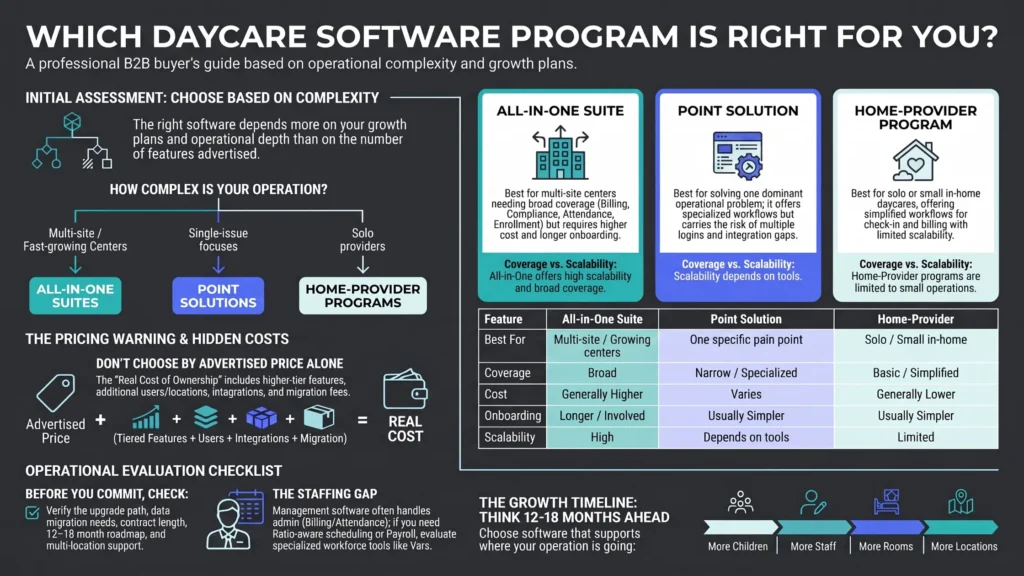
Daycare software programs generally fall into three types: all-in-one suites, point solutions, and home-provider tools built for solo operators. Which type fits depends far more on your center’s size and complexity than on any single feature comparison.
What are the three main types of daycare software programs?
| Type | Best for | Trade-off |
|---|---|---|
| All-in-one suite | Multi-site or fast-growing centers | Higher cost, longer onboarding |
| Point solution (billing-only, attendance-only) | Centers with one specific pain point | May need multiple tools stitched together |
| Home-provider program | Solo or small in-home daycares | Limited scalability past a handful of children |
When does an all-in-one suite make more sense than a point solution?
See how Vars covers this for your agency
Scheduling, credentialing, and payroll in one platform.
All-in-one suites earn their higher cost and longer onboarding when a center has multiple simultaneous pain points — billing, compliance, and parent communication all need improvement at once. Point solutions make more sense when one specific problem dominates and the rest of your current process, however manual, is working well enough not to disrupt. Stitching together two or three point solutions can work, but it introduces integration risk: data doesn’t always sync cleanly between separate vendors, and staff end up managing multiple logins.
How should pricing shape which program you pick?
Common operational mistake: picking the program with the lowest advertised price without checking whether staffing, multi-room reporting, or licensing exports are locked behind a higher tier. Ask for the full pricing sheet, not just the homepage number, before comparing programs seriously. Many vendors advertise an entry-level price that excludes features most centers end up needing within the first year, effectively making the real cost of ownership higher than the initial quote suggested.
Are free daycare software programs worth considering?
Free tiers exist and can work for very small operations, but they typically cap the number of children, staff, or locations, and often drop compliance-reporting features that larger centers rely on. Free programs also sometimes monetize through data or advertising rather than subscription fees, which is worth understanding before enrolling children’s information into the system. We cover this trade-off in more depth in our guide to free daycare software options.
How do home-provider daycare software programs differ from center-focused ones?
Home-provider programs are typically simplified versions of the same core features — check-in, billing, basic reporting — scaled for a single caregiver managing a handful of children rather than a multi-room facility. They generally lack multi-staff scheduling, room-based ratio tracking, and the deeper compliance reporting that licensed centers need for state audits, since solo home providers usually face lighter licensing requirements.
What should you check before committing to a specific program tier?
- Whether upgrading tiers later requires a full data migration or is a simple account change
- Whether the contract locks you into an annual term or allows monthly cancellation
- Whether customer support quality differs meaningfully between free/entry and paid tiers
- Whether the vendor’s roadmap includes features you’ll need in 12-18 months, not just today
Do daycare software programs include staff management as a category?
Occasionally as a shallow add-on, rarely as a core strength. Key takeaway for operations leaders: if staff scheduling, credentialing, or payroll show up as a checkbox rather than a full module in a program’s marketing, assume it’s basic — and plan to pair the program with a dedicated workforce platform like Vars for ratio-compliant scheduling and payroll.
How do seasonal or part-year programs (like summer camps) fit into this landscape?
Centers that run seasonal programs alongside year-round daycare — summer camps, school-break care — sometimes need a program flexible enough to handle fluctuating enrollment and short-term registrations differently from standard tuition billing. Not every daycare software program handles this well; some are built assuming consistent monthly enrollment and require workarounds for short-term or seasonal billing. If this applies to your center, test this scenario specifically during any demo rather than assuming it’s covered.
What should you know about contract length and vendor lock-in?
Program pricing often comes with meaningfully different contract terms — some vendors offer month-to-month flexibility at a premium, while others require an annual commitment for their best rate. Weigh this against how confident you are in the fit after your evaluation process; a lower annual-contract price is only a good deal if you’re genuinely confident the platform will still fit your needs a year from now, particularly for a growing or changing operation.
How should a first-time daycare owner, without prior software experience, approach this decision?
First-time owners without a benchmark for what “normal” looks like in daycare software often over-index on flashy features during demos rather than fundamentals like billing reliability and compliance-report accuracy. A useful approach: talk to a few other local center owners, even competitors, about which platforms they use and why — this informal research frequently surfaces practical insights that vendor marketing materials won’t, including which platforms have strong regional support presence or particularly good familiarity with your state’s specific licensing requirements.
How do daycare software programs differ in their approach to customer onboarding?
Onboarding style varies considerably across vendors and program tiers — some provide a dedicated implementation specialist who works through data migration and staff training directly with your team, while others rely primarily on self-service documentation and video tutorials with lighter live support. Neither approach is inherently better, but it’s worth matching to your team’s own comfort level with new software: a center with limited administrative bandwidth generally benefits more from a higher-touch onboarding program, even at a somewhat higher price point, than from a lower-cost self-service option that assumes more technical confidence than the team actually has.
How should you evaluate a newer, less-established daycare software program versus a longtime market leader?
Newer entrants sometimes offer more modern interfaces, more responsive support (since they’re actively fighting for market share), and more flexible pricing to win customers from established competitors. The trade-off is a shorter track record and less certainty about long-term stability. Weigh this against your center’s risk tolerance: a center with simpler needs and a smaller budget may benefit meaningfully from a newer program’s more competitive pricing and support responsiveness, while a larger, more complex operation may reasonably prioritize the proven stability of an established market leader instead.
What questions should you ask specifically about a program’s roadmap and update frequency?
Ask how often the vendor ships meaningful product updates, and specifically what’s currently on their near-term roadmap that might address gaps you’ve identified during evaluation — particularly on the staffing side, where you may reasonably expect a “maybe soon” answer rather than a current feature. A vendor’s transparency about their own product limitations and roadmap, rather than overselling current capability, is itself a reasonably good signal of how straightforward they’ll be to work with after you’ve signed.
Frequently Asked Questions
Is a newer daycare software vendor riskier than an established market leader?
It carries a shorter track record, but often more competitive pricing and support responsiveness — weigh this against your center’s risk tolerance and complexity.
Does onboarding style differ between daycare software vendors?
Yes — some offer hands-on implementation specialists, others rely on self-service documentation. Match this to your team’s own comfort level with new software.
How should a first-time daycare owner evaluate software without prior experience?
Talk to other local center owners about what they use and why — informal peer research often surfaces practical insights, like regional support quality, that vendor marketing won’t.
What’s the difference between a daycare software program and daycare software in general?
“Program” typically refers to a specific packaged product or tier, while “software” is the broader category term — the distinction is more about vendor framing than function.
Are home daycare software programs cheaper than center-focused ones?
Generally yes, since they’re built for lower child/staff counts, but feature sets are also more limited.
Can I upgrade from a free daycare software program later?
Most vendors offer paid tiers you can upgrade into, though data migration between programs from different vendors can require manual work.
Do daycare software programs handle multi-location reporting?
Usually only the all-in-one suite tier — point solutions and home-provider programs rarely support multi-site reporting.
Is it risky to stitch together multiple point-solution programs instead of one suite?
It can introduce integration issues, since data doesn’t always sync cleanly between separate vendors — weigh this against the cost savings before deciding.
What should I check before signing an annual contract for a daycare software program?
Confirm cancellation terms, tier-upgrade requirements, and whether the vendor’s roadmap covers features you’ll likely need within the next year.
Conclusion
Once you’ve picked a program type, run the staffing side of your evaluation separately — see how Vars handles scheduling and payroll for centers where that’s the bigger gap.