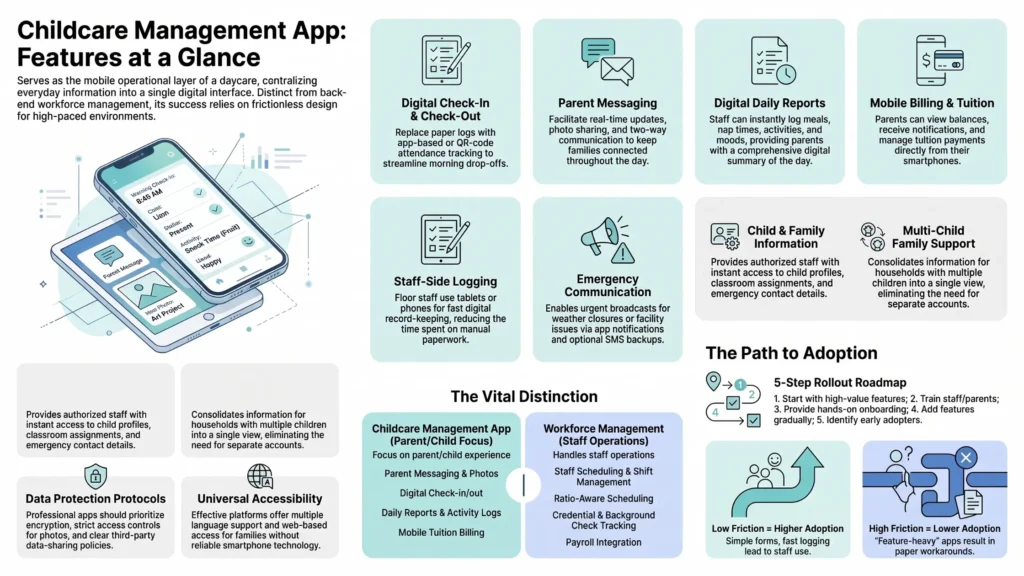
A childcare management app is the mobile version of a daycare’s operational software the piece parents and floor staff actually interact with on their phones, as opposed to the admin dashboard a director uses on a desktop. Check-in, daily reports, messaging, and billing notifications typically live here.
What features and examples define a childcare management app?
- Parent messaging: real-time updates, photos, and two-way communication with staff, generally the single most-used feature by parents
- Digital check-in/check-out: QR code or app-based sign-in replacing paper logs, often required at a physical kiosk near the entrance
- Daily reports: meals, naps, activities, sent automatically to parents throughout the day rather than relayed verbally at pickup
- Mobile billing: parents pay tuition and see balances from their phone, reducing late payments compared to paper invoicing
- Staff-side logging: floor staff record activities directly from a tablet or phone, usually the primary data-entry point for the entire system
Brightwheel, Procare, and Lillio are the most commonly cited examples in this category, each with slightly different strengths in parent communication versus admin reporting depth.
Why does adoption matter more than feature depth for a childcare management app?
See how Vars covers this for your agency
Scheduling, credentialing, and payroll in one platform.
Key takeaway for operations leaders: the apps that get adopted well by floor staff are the ones that require the fewest taps during a busy transition period of drop-off and pickup. Apps that require staff to fill out lengthy forms mid-shift tend to get abandoned within weeks, regardless of feature depth. The best-designed app on paper is worthless if teachers quietly revert to a paper clipboard because logging into the app takes too long during a chaotic morning drop-off window.
This is also true on the parent side. A center can select a feature-rich app and still see low adoption if the onboarding process asks too much of parents up front, creating an account, downloading a separate app, and entering payment details all in the first week. Centers that roll out gradually, starting with just check-in notifications before adding billing and messaging, tend to see meaningfully higher parent adoption rates within the first month.
What privacy and security questions should directors ask about a childcare management app?
Because these apps store sensitive information about minors photos, health notes, emergency contacts directors should ask vendors directly about data encryption, who has access to child photos and records internally, whether data is sold or shared with third parties, and what happens to stored data if a family leaves the center. These questions matter increasingly to parents too, and centers that can answer them confidently during enrollment tend to build more trust.
Does a childcare management app include staff scheduling?
Some include a basic shift view so staff can check their schedule from their phone, but that’s usually read-only; it shows the schedule, it doesn’t build it. Ratio-aware scheduling, credential tracking, and shift-swap approval workflows are generally outside what these apps handle, which is a common source of frustration for directors who assumed “app” meant “does everything.”
How does this connect to staffing the center itself?
A childcare management app makes the parent and child experience smoother, but it doesn’t solve who’s actually working the floor on a given day. That’s the layer Vars operates in: ratio-compliant scheduling, credential and background-check tracking, and payroll for a mixed staff. If your center already has a solid childcare management app and the real gap is on the workforce side, that’s worth solving separately rather than waiting for the app vendor to build it.
How should a center handle the rollout to avoid low adoption?
A staged rollout consistently outperforms an all-at-once launch. Start with the single highest-value feature for parents, usually check-in notifications or daily reports, and let that build trust and habit before layering on billing and deeper messaging features. Pair the rollout with a short, in-person or video walkthrough during drop-off for the first week or two rather than relying solely on an email announcement, since parents juggling a busy morning are unlikely to read a lengthy onboarding email closely.
It also helps to identify a handful of enthusiastic early-adopter parents and staff who can informally help others get comfortable with the app during the first weeks peer encouragement tends to move adoption faster than repeated reminders from the front office alone.
What ongoing maintenance does a childcare management app require from staff?
Beyond daily logging, someone on staff typically needs to own periodic tasks: updating enrolled-child rosters as families join or leave, keeping emergency contact information current, and reviewing app-generated compliance exports before licensing visits. Centers that don’t assign clear ownership of these maintenance tasks often find the app’s data quality degrades over time even after initial adoption goes well.
How do multi-child families experience a childcare management app differently?
Families with more than one child enrolled, whether at the same center or across siblings in different rooms, need an app that consolidates information cleanly rather than requiring separate logins or views per child. This is a smaller but real feature difference between platforms: some handle multi-child households elegantly with a single unified feed, while others make parents toggle between children constantly, a friction point that shows up disproportionately in negative reviews from larger families.
What accessibility considerations matter for a childcare management app?
Not every parent is equally comfortable with a mobile-first app experience; language barriers, limited smartphone access, or general technology comfort all affect adoption unevenly across a center’s family population. Centers serving a linguistically or economically diverse family base should specifically ask vendors about multi-language support and whether core information (billing balance, daily reports) is accessible via a simple web view for families without reliable smartphone access, not just through the primary app.
How do childcare management apps typically handle emergency communication?
Beyond routine daily updates, most childcare management apps include some form of emergency broadcast capability for weather closures, lockdown notifications, or urgent facility issues sent to all enrolled families simultaneously. The reliability of this feature matters more than almost any other, since it’s used precisely when communication speed is most critical. Ask vendors specifically about message delivery reliability and whether emergency broadcasts work through SMS as a backup channel if push notifications fail or a parent hasn’t opened the app recently.
Frequently Asked Questions
How reliable are emergency notifications sent through a childcare management app?
This varies by vendor; ask specifically about SMS backup delivery in case a parent hasn’t opened the app or push notifications fail to reach them.
Do childcare management apps handle families with multiple enrolled children well?
It varies by platform; some consolidate multi-child households into one clean view, while others require toggling between children, which is a common source of frustration in reviews.
Are childcare management apps accessible to families with limited smartphone access or language barriers?
This varies significantly by vendor ask specifically about multi-language support and web-based access options if your family base is linguistically or economically diverse.
What’s the best childcare management app for busy staff?
The best fit depends on center size and whether parent communication or admin reporting matters more. See our comparison of Brightwheel, Procare, and Lillio for a detailed breakdown.
Do childcare management apps work for small home-based daycares?
Yes, most offer scaled-down or free tiers suited to solo or small providers, though features are typically more limited.
Can parents see billing information in a childcare management app?
Yes, most apps in this category include mobile billing, autopay setup, and balance visibility for parents.
Does a childcare management app replace the need for staff scheduling software?
No, most apps offer only a basic read-only shift view. Ratio-aware scheduling and credential tracking typically require a separate workforce tool.
How long does it take for parents to fully adopt a new childcare management app?
Often 4-6 weeks to reach strong adoption, faster when centers roll out features gradually rather than all at once during enrollment.
What data privacy questions should I ask before choosing a childcare management app?
Ask about data encryption, internal access controls to child photos and records, third-party data sharing, and data retention policy after a family leaves.
Conclusion
For a side-by-side look at the leading options, see our comparison guide. If staffing, not the parent app, is your actual bottleneck, book a demo to see how a dedicated workforce platform fits alongside whatever app you’re already using.