Event staff no-shows are reduced most by closing four gaps: unclear assignments, unconfirmed shifts, no early warning on the day, and no ready backfill. Agencies that treat a no-show as a scheduling and communication problem, not only a reliability problem, usually fill more of their rosters. If you want to see how scheduling, check-in and communication connect in one place, read about event staffing software for agencies.
This guide covers why no-shows happen, nine tactics that reduce them, how to spot a gap before the doors open, and what to fix first.
Why do event staff no-shows happen in the first place?
Most no-shows are not a worker deciding to ignore the job. They trace back to something the agency could have caught earlier:
In real implementations, the biggest bottleneck is usually the briefing: workers who miss a call time often never received it in a form they could find on the day.
- Unclear details. The worker was assigned weeks ago and never got a clear call time, entrance or supervisor name.
- No confirmation. Nobody asked the worker to confirm, so nobody knew the shift was at risk.
- Double commitments. The worker accepted two jobs and picked one at the last minute.
- Access and travel problems. Parking, venue entrances and load-in times were not explained.
- Side-channel swaps. Two workers agreed a swap by text and the coordinator never heard about it.
Common operational mistake: treating every no-show as the worker’s failure. If three workers on one event miss the same call time, look at the briefing before you look at the workers.
What does one event staff no-show actually cost?
See how Vars covers this for your agency
Scheduling, credentialing, and payroll in one platform.
A no-show looks like a single missing person, but the cost spreads across several lines. When you count them, the case for prevention is easy to make:
- Premium backfill: the extra pay or incentive you offer to get a replacement at short notice
- Coordinator time: the calls, messages and roster edits during the hour before doors open
- Coverage risk: the effect on the client if a zone runs thin, including any credit or lost repeat work
- Overtime: hours shifted onto workers who are already on shift
- Reputation: the client remembers a thin registration desk longer than they remember a smooth close-out
You do not need exact figures to act. Take your last event and list each no-show with the role, the backfill method and the time it took. Add the premium paid and the minutes your coordinators spent. After three events, you have your own cost per no-show, which is the number to compare with the cost of a standby pool or a better confirmation process.
What are the 9 tactics that reduce event staff no-shows?
- Send full details when you assign the shift. Include call time, release time, exact entrance, supervisor name and phone number, dress code and what to bring.
- Require a confirmation for each shift or day. For multi-day events, confirm every day separately. See how to build a conference staffing schedule for how to structure it.
- Remind workers the evening before and the morning of. Keep the message short and put the call time first.
- Chase unconfirmed workers early. Set a cut-off, for example the evening before. Anyone who has not confirmed moves to your at-risk list.
- Keep a pre-confirmed standby pool per role. A small group ready to step in is safer than blanket overbooking, which raises labor cost and needs client agreement.
- Set an early check point. Look at arrivals against the roster shortly before call time, not after the doors open. Our guide to check-in for event crews explains what to track.
- Match workers to roles and distance. A worker who is available, qualified and within reach is more likely to arrive than one assigned because they were next on a list.
- Make swaps official. Let a worker release a shift and a qualified colleague claim it, with approval, instead of arranging it by text.
- Review attendance after every event. Track patterns by worker, role, venue and shift time, and act on what repeats.
| Phase | What to do | Who owns it |
|---|---|---|
| When you assign | Send full details and request confirmation | Coordinator |
| Days before | Chase unconfirmed workers and brief the standby pool | Coordinator |
| Evening before and morning of | Send reminders with the call time first | Coordinator |
| Before call time | Compare arrivals to the roster and act on gaps | Floor lead |
| After the event | Log no-shows and look for patterns | Operations |
What should a confirmation message actually say?
A confirmation only works if the worker can act on it in ten seconds. Put the call time first, then the place, then the person to call if something goes wrong.
- Call time and release time for that specific day
- Exact entrance and level, with parking or transit notes
- Supervisor name and phone number
- Dress code and what to bring, such as ID or specific footwear
- One clear way to confirm, such as a tap on a link or a reply of YES
Keep reminders short. A worker who has to scroll to find the call time is less likely to read the message. Send the full detail once at assignment, then keep later reminders to two lines. For multi-day events, ask for a fresh confirmation each day, because day two rarely matches day one.
How big should a standby pool be?
There is no universal ratio. Start from your own history: count how many gaps you had per event over your last few events, by role, and size the pool to cover the typical gap plus a small margin. Add extra cover for the roles that hurt most when empty, such as registration, entry doors and any role tied to safety.
Keep standby workers engaged. Tell them which event they are covering, brief them like the main crew and release them by a set time with a short thank-you, so they stay willing next time. How you pay standby time depends on your worker terms and local rules, so confirm it with your payroll provider or counsel.
How do you know someone will be a no-show before the doors open?
Two signals matter: who has not confirmed, and who has not arrived near call time. Both are visible early if the data lives in one place.
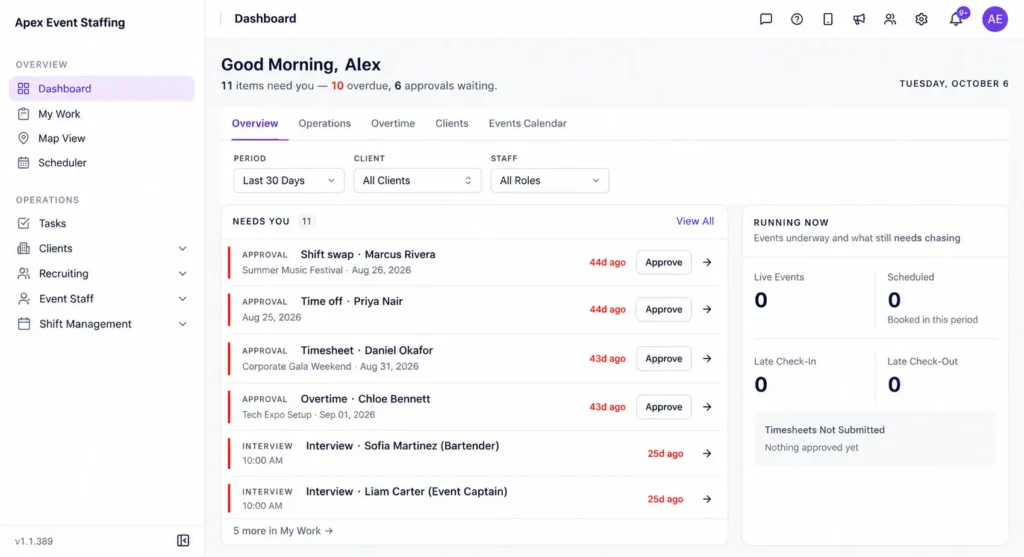
In Vars, a coordinator can see shift confirmations and check-ins against the roster, and receive alerts for missed check-ins and late arrivals. That turns “we think someone is missing” into a named gap with time left to act. Confirm which alerts your plan includes before you promise them to clients.
What usually breaks at scale: a group chat and a spreadsheet. The roster is right at 5 pm, three swaps happen by text overnight, and by call time nobody is sure who is where.
How do no-shows change on multi-day events?
Day two and day three behave differently from day one. Workers are tired, plans change and a good first day can make people less careful about the second. A few adjustments help:
- Ask for a fresh confirmation for every day, with the day’s call time and entrance.
- Check on the previous evening’s departures: anyone who left early or was frustrated is a risk for tomorrow.
- Brief leads to speak with their crews at the end of each day and flag anyone who may not return.
- Keep standbys for every day, not only the first.
- Revisit the roster each night against what you learned, instead of repeating day one.
For how to plan coverage across several days, see our guide to a conference staffing schedule.
What does an event-day no-show routine look like?
A clear routine stops people improvising under pressure. Give each person a role and write it on one page:
- Floor lead: reports arrivals by zone and calls anyone who is not checked in at the agreed point.
- Coordinator: watches confirmations and arrivals, decides when to release standby workers and updates the roster.
- Standby workers: know their trigger point, how to reach the venue and whom to report to.
- Account manager: speaks to the client only when coverage is affected, with the fix already under way.
The aim is that by the time the client notices a gap, someone is already on their way to fill it. For attendance records that support this routine, see our guide to check-in for event crews.
Where does software help, and where does process matter more?
What is the fastest way to backfill an event staff no-show?
Speed depends on what you prepared before the event. A workable sequence:
- Identify the gap by role and zone, not just a headcount.
- Message the pre-confirmed standby pool for that role first.
- If the pool is empty, shortlist workers who are available and qualified for the role.
- Send the replacement the full details: location, entrance, supervisor and call time.
- Update the roster so the change is visible to the floor lead and recorded for billing.
Vars offers AI Candidate Matching, which agencies use to shortlist available, qualified workers for open roles. It shortens step 3. It does not replace a standby pool, because a good pool is faster than any search.
Where does software help, and where does process matter more?
Software helps with the parts that break under volume: sending details and confirmations, showing who has confirmed, flagging late or missing check-ins and keeping one roster everyone sees. It does not fix pay that is below market, a poor briefing or a worker who is unreliable. Those need process and management decisions.
Pro tip for staffing agencies: track unconfirmed shifts 24 hours before an event for your next three events and compare them with actual no-shows. If the two numbers move together, confirmation is your cheapest fix.
How should you talk to a worker after a no-show?
How you respond decides whether a good worker with a bad day stays with you. Keep the conversation factual and consistent:
- Ask what happened before you draw conclusions. Illness, transport failures and unclear details are common causes.
- Check your own part: was the shift confirmed, and were the details clear?
- Record the incident with the date, role and reason, so you can see patterns.
- Apply your written attendance policy the same way to everyone.
- Agree what changes, such as clearer details or a different shift time, and note it.
Policies on discipline and removal differ by location and worker classification, so have your counsel or HR adviser review yours.
How can you reward reliable workers?
Punishing no-shows addresses only half the problem. Reliable workers deserve a reason to keep choosing you. Practical options include first choice of new shifts, earlier access to the best events, recognition from the floor lead and prompt, accurate pay. These cost little and spread quickly by word of mouth. Track who shows up and arrives on time across events, and use that record when you build the next roster.
How should agencies track event staff no-show patterns?
Log each no-show with the worker, role, venue, shift time and whether the worker had confirmed. After a few events, patterns appear: early morning call times, remote venues, a particular shift type. Fix the cause first. Escalate to the worker only if the pattern follows one person.
Key takeaway for operations leaders: confirmations and an early check point cost almost nothing and catch most gaps. Build those before you build anything more complex.
FAQ
How far ahead should we confirm shifts for an event?
Ask for confirmation when you assign the shift, then again the evening before. For multi-day events, confirm each day separately.
Is overbooking event staff a good idea?
Only with care. A pre-confirmed standby pool covers gaps without paying everyone to attend. Check your client contract before scheduling extra paid staff.
What counts as a no-show and what counts as a late arrival?
Set a clear rule in advance, for example a time after call time with no contact. Write it into your worker terms so everyone knows the line.
Can a small agency reduce no-shows without software?
Yes. A clear message, a confirmation and a standby list work in a spreadsheet. Software becomes useful when you run several events at once or changes arrive often.
How should we handle a worker who no-shows repeatedly?
Review the pattern first, then speak to the worker. Apply your written policy consistently, and confirm any penalty rules with your payroll provider or counsel.
What is a good no-show rate for event staffing?
There is no universal benchmark because it varies by event type, role, season and market. Track your own rate by role and event over time and focus on the trend.
Should we pay a premium to fill a last-minute gap?
It can be worth it for critical roles, but a ready standby pool is usually cheaper. Compare your premium costs with the cost of keeping standbys, using your own numbers.
How do we reduce no-shows for early morning call times?
Send the details the evening before, ask for an explicit confirmation, check arrivals shortly before call time and keep a standby pool. Also check whether travel to the venue is realistic at that hour.
Conclusion: your next step
Event staff no-shows are rarely random. They follow unclear details, missing confirmations and late discovery, and each of those can be fixed before the event starts.
Your next step: pull your last three events and count how many shifts were unconfirmed 24 hours before and how many ended as no-shows. If you want to see confirmations, check-in and roster visibility in one platform, book a demo.
Related reading: Event Staff Scheduling Software: A Complete Guide and Event Staffing Software.