A conference staffing schedule is a role-by-day, shift-by-shift roster that matches your crew to the event’s run of show: registration, ushering, session doors, booths, AV runners, cloakroom, and everything that happens between. Build it from the agenda and the floor plan, not from a headcount the client gave you on a call. Then publish it to every worker with a call time, a location and a named supervisor. To see how multi-day rosters, check-in and payroll fit together, read about event staffing software for agencies.
That is the short version. The rest of this guide covers how agencies actually do it across two, three or five days without losing track of who is where.
How do you build a conference staffing schedule from the run of show?
Start with the client’s run of show, not your roster. List every zone where a staff member needs to be (registration desk, main hall doors, breakout rooms, exhibit floor, VIP lounge, loading dock) and write down the hours each zone is live.
Then work in three passes:
- Zone demand. For each zone, note peak hours and quiet hours. Registration is heaviest in the hour before the opening session. Session doors are heaviest ten minutes either side of a start time.
- Roles inside the zone. A registration desk needs greeters, badge printers and a lead. Splitting by role early prevents the “we have ten people but nobody can troubleshoot a badge” problem on day one.
- Shift blocks. Cut the day into blocks that follow demand, not a fixed eight hours. A split of early, mid and late crew usually covers more with fewer idle hours.
Pro tip for staffing agencies: Ask the client for the session grid and exhibitor move-in schedule on the same day you receive the purchase order. Move-in and move-out days are where schedules get built wrong, because the demand pattern looks nothing like show days.
How do you decide how many staff each zone needs?
See how Vars covers this for your agency
Scheduling, credentialing, and payroll in one platform.
The client’s headcount number is a starting point, not an answer. Work it out zone by zone, using what you can get from the client and from your own past events:
- Expected attendance and its shape. Ask for the registration curve and the session grid. A zone’s demand follows arrivals, session changes and breaks, not the daily total.
- Flow points. Doors, queues, stairs and lifts need more people at changeover times.
- Your own history. Look at past events of a similar size and type. If a zone ran short or over, adjust.
- The brief. Check what the client expects from each role, such as badge printing, directions only or active crowd control.
- Safety and venue rules. Some venues set minimums for certain areas, so confirm them.
Write down the assumption behind each number, such as “two at the main doors for ten minutes either side of each session change”. When the agenda changes, you can update the assumption instead of guessing again.
What does a multi-day schedule look like in practice?
Below is an illustrative day-one layout. The numbers are placeholders to show structure, not benchmarks. Your staffing ratios come from the client brief and the venue.
| Zone | Role | Call time | Release | Crew | Notes |
|---|---|---|---|---|---|
| Registration | Greeter | 6:30 am | 2:00 pm | per client brief | Briefing at 6:15 |
| Registration | Badge lead | 6:30 am | 4:00 pm | 1 | Holds reprint authority |
| Main hall | Door usher | 7:30 am | 5:30 pm | per room capacity | Staggered breaks |
| Exhibit floor | Booth support | 8:00 am | 6:00 pm | per exhibitor requests | Check in with floor lead |
| Back of house | AV runner | 7:00 am | 6:00 pm | 1 per two rooms | Radio required |
Copy the structure for each day, then adjust. Day two rarely matches day one: registration shrinks, breakout rooms grow, and evening receptions add a late crew that did not exist on day one.
How do you staff move-in and move-out days?
Trade show move-in and move-out do not look like show days. Demand is physical and front-loaded: exhibitors arrive in waves, freight and loading areas are busy and the crowd is mostly exhibitors, not attendees. Plan these days separately:
- Staff the loading dock, marshalling and exhibitor help desks first, and keep registration light until attendees arrive.
- Confirm each exhibitor’s time slot and allow extra people in the hour when slots overlap.
- Check safety and access requirements with the venue, since some areas need briefings or credentials.
- Plan for long, irregular hours, and confirm break and overtime rules with your payroll provider.
- Keep a flexible crew who can move between dock, floor and help desk as the day unfolds.
Move-out is usually shorter and more intense than move-in. Brief your leads on the exit order and who authorizes each release, so crews are not held, or released, by accident.
Which roles do conference schedules often forget?
The obvious roles get scheduled. These are the ones that cause trouble when they are missing:
- Runners who carry materials, water and messages between rooms
- Room resets between sessions, where one person can hold up the next session
- Cloakroom and bag check at the start and end of each day
- Signage and wayfinding staff at points where attendees get lost
- Accessibility assistance at entrances, lifts and session rooms
- Badge reprint and help desk for the people who arrive without a working badge
- Lost and found, which is small but affects how attendees remember the event
Ask the client at the briefing which of these they expect from you, and add them to the zone list before you cost the job.
How do you cover breaks and overlapping shifts without leaving a zone empty?
Plan breaks as part of the schedule, not as something the floor lead sorts out. For any zone that must stay staffed, assign a relief person by name and write the relief window next to the primary shift.
Agencies that run longer shifts also have to track the labor rules in the state where the event is held, including meal and rest breaks and overtime thresholds. Rules differ by state and by classification, so confirm with your payroll provider or counsel instead of assuming. For more on this, see our guide to event payroll, timesheets and invoicing.
Common operational mistake: Giving every worker the same break time. At a conference, that empties the registration desk exactly when the lunch session lets out.
What should the schedule include so workers actually show up on day two?
Most day-two gaps trace back to a worker who was never clearly told where to be. Every assignment should carry:
- Call time and release time for that specific day
- Exact location, including the entrance and level, since convention centers are large
- Supervisor name and phone number
- Dress code and what to bring
- Check-in method, whether that is a QR code, an app tap or a sign-in sheet
Send a reminder the evening before each day, and require a confirmation. Anyone who has not confirmed by a set time goes on your standby list so you can backfill before the doors open. For more on this, see our guide to GPS check-in for event crews.
What usually breaks at scale: Spreadsheets with one tab per day and a separate group chat. The roster is right at 5 pm, the client changes the agenda at 7 pm, and by morning half the crew is working from a stale version.
How do you keep the roster accurate when the client changes the agenda?
Agenda changes are routine at conferences. A keynote moves, a breakout room is added, a sponsor books a late reception. The schedule has to absorb that without a rebuild.
Practical habits that help:
- Keep a standby pool of pre-confirmed workers per role, sized to what past events taught you.
- Hold one source of truth for the roster, so a change made by one coordinator is visible to everyone.
- Re-publish only the affected shifts, and notify only the workers they touch.
- Log each change with who requested it. It protects you when the client disputes hours at invoicing.
How should you brief the crew on the day?
A ten-minute briefing at the start of each shift saves hours later. Gather each zone’s crew with their lead and cover five points: what changed since yesterday, where each person stands and when they take breaks, who to call for a problem, what the client cares about most today and what happened yesterday that should not happen again. End by asking each person to say what they are responsible for. It takes two minutes and exposes misunderstandings while they are cheap to fix. If crews start at different times, the lead repeats the brief at each start.
What should the end-of-day review cover?
A short review each evening turns day one into a better day two. Ask the leads three questions: What went well? What nearly went wrong? What do we change tomorrow? Then check the numbers: who checked in late, where coverage was thin and which changes the client requested. Fix the roster for the next day before you send reminders. Keep notes for the invoice too, such as extended hours and who approved them. Our guide to event payroll, timesheets and invoicing explains how those notes support the final invoice.
Where does scheduling software help, and where does it not?
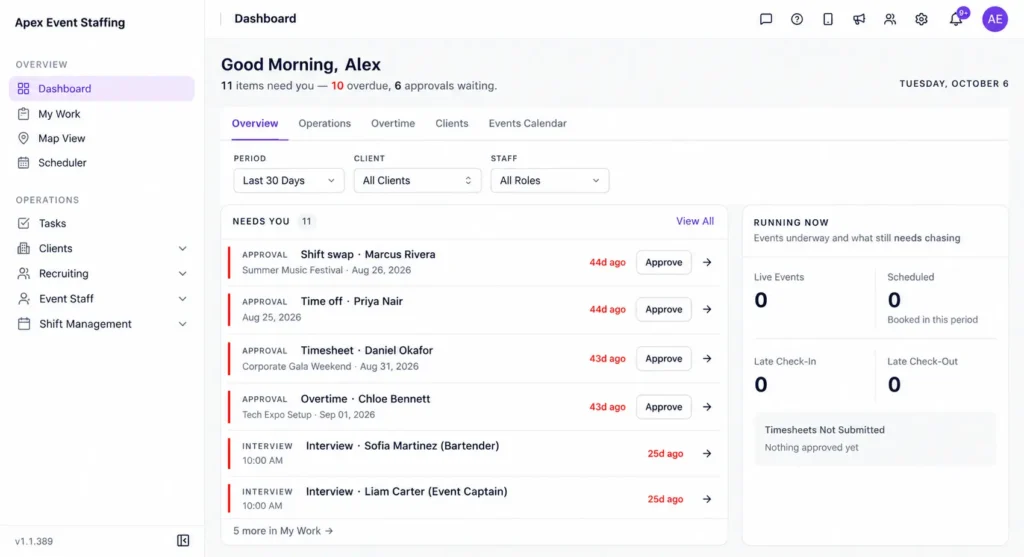
Software helps with the parts of conference staffing that break under volume: building multi-role, multi-day rosters, checking conflicts when one worker is assigned to overlapping shifts, and sending shift details and confirmations to the crew. In Vars, an agency can build those rosters in one place and see conflicts before they reach the floor. For filling the roster, Vars also offers AI Candidate Matching, which agencies use to shortlist available, qualified workers for open roles. You can see how this works in practice on the scheduling software page.
Software does not fix an unclear brief. If the client has not told you what each zone needs, a faster roster just produces the wrong schedule more quickly. It also does not replace a floor lead who can make judgment calls. The tool gives you the plan and the visibility. The event still needs experienced people running it. For more on this, see our guide to festival and seasonal event staffing.
If your team currently builds each day by hand, compare how long a full roster takes with how long a single mid-event change takes. The second number is the one that tells you whether your process holds up. For more on this, see our guide to event staffing software options.
FAQ
How far in advance should we build the conference staffing schedule?
Draft it as soon as the run of show is confirmed, and publish worker-facing details at least a few days out. Keep a standby list for last-minute changes.
How do we schedule staff for a trade show with move-in and move-out days?
Treat them as separate events with their own zones and demand patterns. Move-in needs fewer, more physical roles, and move-out often runs late.
What is the best way to avoid double-booking workers across days?
Assign from one shared roster that flags overlapping shifts, and require the worker’s confirmation for each day.
Can a small event staffing agency run multi-day coverage without software?
Yes, for a few events a year. The strain shows up when you run several events at once or when changes arrive often.
How many standby workers should a conference have?
Use your own history. Look at no-shows and late changes at past events of the same type, and size the standby list to cover the typical gap by role. Confirm standbys the night before.
Who should approve hours at a conference?
Agree it with the client in advance. Many agencies use the zone lead for daily confirmation and the client coordinator for the final approval, with both attached to the timesheet.
How do we schedule for several sessions running at once?
Build each room as its own zone with its own session times, then check changeover periods across rooms. Use shift blocks that overlap at session changes so doors are never empty.
What if the client cuts staff during the event?
Ask for the change to be sent in writing to your coordinator, record who requested it and confirm the paid time for released workers under your agreement. It protects you at invoicing.
Conclusion: where to start
A good conference staffing schedule starts with the run of show, splits coverage by zone and role, plans breaks on paper and gives every worker the details they need for each day. Multi-day coverage gets easier once the roster lives in one place.
Your next step: take your most recent conference and map one full day into zones, roles and shift blocks. Note every point where you had to message someone by hand. Those are the steps worth fixing first. If you want to see how multi-role, multi-day rosters work in Vars, book a demo.
Related reading: Event Staff Scheduling Software: A Complete Guide and Event Staffing Software.